

 GideonZ
DIG DUG original disk fails to load
Original game disk of DIG DUG (c) 1983 Namco, with V-MAX! fails to load. Virtual drives A and B were disabled, game loading attempt from real 1541-II resulted in a crash.
On a real C64C with the same 1541-II drive the game loaded successfully on the first try.
U64 with latest firmware.

Well, I tried exactly that disk on my Ultimate 64 with my external 1541 II. It does work!
The interesting part might be what wo check., No real idea, since even the IEC device makes no difference on my U64.

I've tested that disk on my C128 with a 1541 II. It shows that it hangs early in loading if some fast loader kernal is active. Original CBM kernal has to be used.
The disk has "C64/128" so it is expected to run on 1571, so I tried it on 1571. A real C64C + 1571 loaded it fine.
U64 + 1571 again failed. A stock CBM Kernal has been used. Tried also restoring default settings, made no difference.
The loading screen has "ThunderMountain" logo on it (and that printed on the disk as well). U64 gets this far but then crashes and displays a garbled screen for a second, then displays the C64 startup screen.

Well, there is always the possibility that there are different versions of that game. Your descriptions sounds different. Without a way to reproduce the issue, it cannot be analyzed.
Edit: Indeed, there are at least two versions of the original disk...
Yes, C128 was released in 1985 so the disk I have can hardly be earlier than that - yet the C64 version of DIG DUG was released a few years prior. So this disk is of a later batch with presumably an improved loader/protection.
BTW, there is an improved version of the game which fixes a bug in the original game when it gets stuck after too many monsters are killed by a single rock.
https://csdb.dk/release/?id=225869&show=notes
That's interesting - Now using the right disk in my 1541 II, I have to confirm it.
Edit: Also happens using an image of the original disk in the 1541 emulation. On C128 works fine, on Ultimate 64 fails.
Revolution V V1.5 reports V-MAX version 1. https://csdb.dk/release/?id=134573. Could not copy since version 1 is not supported.
This is what c64preservation.com has to say about version 1: "This is used in some Activision games and is mostly easily copied and works in VICE. A couple titles have an extra byte counting protection check that still fails. It uses normal CBM DOS sectors. "
https://c64preservation.com/dp.php?pg=vmax
Edit: Nice if the disk image could be shared, I would like to try it on other emulators and also on a Pi1541 device on a C64.
Original game disk of DIG DUG (c) 1983 Namco, with V-MAX! fails to load. Virtual drives A and B were disabled, game loading attempt from real 1541-II resulted in a crash.
On a real C64C with the same 1541-II drive the game loaded successfully on the first try.
U64 with latest firmware.
Can you post a link to the original disk?
Nevermind.. I found it: dig_dugthunder_mtn_198x(!).g64

Revolution V V1.5 reports V-MAX version 1. https://csdb.dk/release/?id=134573. Could not copy since version 1 is not supported.
This is what c64preservation.com has to say about version 1: "This is used in some Activision games and is mostly easily copied and works in VICE. A couple titles have an extra byte counting protection check that still fails. It uses normal CBM DOS sectors. "
https://c64preservation.com/dp.php?pg=vmax
Edit: Nice if the disk image could be shared, I would like to try it on other emulators and also on a Pi1541 device on a C64.
Thank you for the link!
I confirm that on U64 the .g64 crashes in the same way as the real physical copy. On VICE x64sc it seems to crash in the same way as on U64 (reported as VICE bug 1869 - it might offer a clue to resolution; a bit surprisingly on x128 it does not crash). Z64K runs it.
I looked a bit why emulators (Vice and Z64K) failed with REU (since I cannot debug U64). The JSR $1044 instruction at $1016 seems to be the key. They get this far but they don't seem to get past this.
I'll try to post a direct link to the VMAX version that fails on U64: https://archive.org/download/C64_Preservation_Project_10th_Anniversary_Collection/C64_Preservation_Project_10th_Anniversary_Collection_G64.zip/c64pp-g64-zip%2Fd%2Fdig_dug%5Bthunder_mtn_198x%5D%28vmax2%29%28%21%29.zip
The other 2 G64 versions both load fine. The linked version does load fine on VICE 3.1 even with Jiffy Dos kernal and drive ROM enabled.

I looked at the code a bit more closely. After waiting for the raster it then accesses the presumably empty I/O range $DE00-$DFFF. Incompatibility with the REU also gets an explanation since it messes up with the REU I/O range. My guess is that U64 does not emulate correctly something related to that I/O range. Drive emulation does not seem to be the cause since loading failed with real physical drive and floppy. I think a real C64/128 with UII will run it correctly.
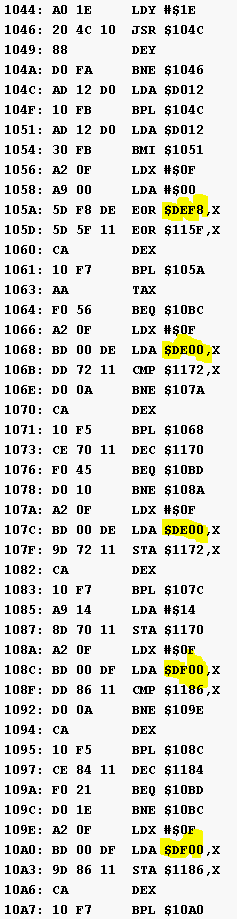
I further tried modifying the code:
108c LDA $DE00,X

10a0 LDA $DE00,X
With these modifications the presence of REU no longer prevents the program from running. The accurate emulation of this I/O range is required to run the loader successfully.
That code might be freezer cartridge detention code that I thought Gideon may have fixed for an issue a few years back. Something like if no IO1 or IO2 range device is plugged in the code expects to see the VIC data still on the bus from the last VIC read.
This is broken since the introduction of the turbo mode. There is another ticket that describes this problem with another title, together with the proposed solution.

Here is the link to the other issue: https://github.com/GideonZ/1541ultimate/issues/205
The patch seems to be
105a eor $115f,x
...
1068 lda $1172,x
...
107c lda $1172,x
...
108c lda $1186,x
...
10a0 lda $1186,x
If U64 had memory poke functionality, this could be done easily (during loading). But since it does not seem to have such, it cannot be done.
It actually does have this functionality. In 3.11 you can also do it through the API and set a breakpoint.
Message ID: @.***>
If this is indeed a duplicate issue, then please close this issue and add your solution resolving the problem in the original issue. There is no need to keep duplicate issues open.

The solution is already there, Rolf.. It just needs to be implemented and verified.
Message ID: @.***>
For now you can use the soon-to-be-deprecated socket connection: TCP port
64, and send the sequence 06 FF
From 3.11, you can do a HTTP request:
[PUT] http://
There is also a poke command when the firmware is compiled with the DEVELOPER flag; accessible from the F5 menu. But that's single byte per menu access.
Message ID: @.***>
Actually it suffices to modify only two bytes, or one line of code
105a 5d 5f 11 eor $115f,x
Those two EOR instructions could be replaced with NOPs, but that takes six bytes. Either way, at the end of the loop the accumulator will have zero, and the following BEQ instuction will jump to a RTS instruction, and so the subroutine always passes.
$105b,$5f (decimal 4187,95)
$105c,$11 (decimal 4188,17)
My humble opinion is that memory poking should be enabled by default.
Edit: one byte alteration should work also,
$105a,$60 RTS (decimal 4186,96)
(This way the state of x-register is different after execution of RTS but it does not make a difference here).
(The modification is to be made a few seconds into the V-MAX! loading phase, before the screen turning yellow - easy to do.)