

 Genymobile
External monitor mode for otg mode (Universal control mode).
- [x] I have checked that a similar feature request does not already exist.
Is your feature request related to a problem? Please describe. When the otg mode is enabled on windows, You can enter the phone through the otg window. But there is no gui method to exit the phone screen(you have to alt- tab out of the window). It would be nice if there was a gui way to exit the phone screen without using the keyboard
Describe the solution you'd like Maybe there could be an external monitor mode in which the mouse behaves in a similar way to how it would behave if an external monitor was connected.
If the mouse exits from a designated edge of the screen, it enters the phone. And if exits from the corresponding edge of the phone screen, it re-enters the desktop screen.
Similar to how universal control on mac and ipad works.

You can capture/uncapture the mouse by pressing Alt. So uncapture the mouse and close the window.

Aah ok I see. Thanks.
Still it would be nice to have such a mode (Like universal control). So you can navigate purely with the mouse.
In universal control the position of the second screen is automatically detected. It wouldn't be feasible to do something like that in this case. But maybe you can define a screen edge manually to designate which side of the screen the phone screen is on.
Hope something like this will be possible. Thanks
But maybe you can define a screen edge manually to designate which side of the screen the phone screen is on.
The client (on the computer) does not know where the mouse pointer is on the phone: it just sends relative movements.
Maybe the window can be drawn in the way illustrated below:
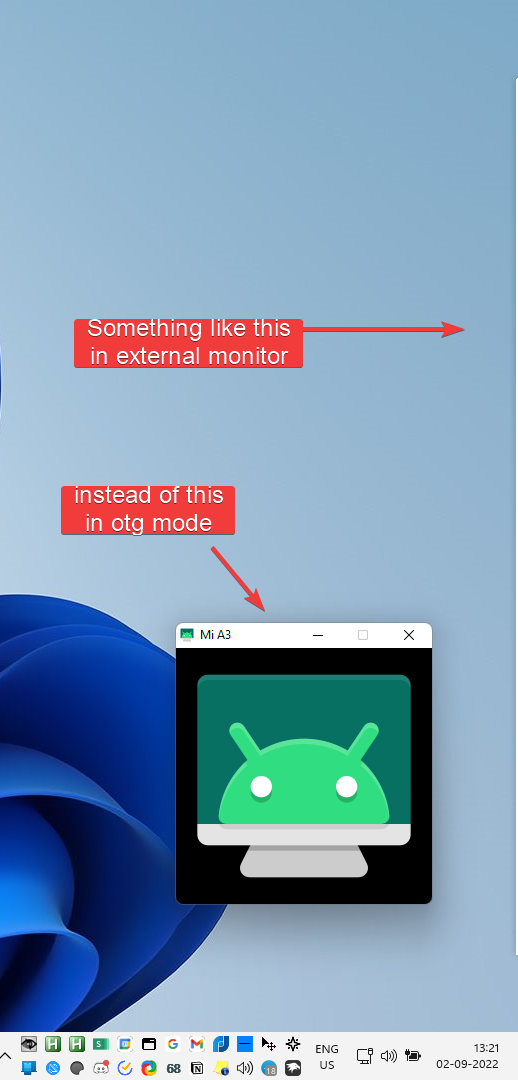
And in this mode, if the mouse hovers over the thin window, it can be captured into the phone window. And In this case, (Assuming the phone is on the right hand side of the monitor) if the mouse goes to the left edge of the phone, it exits the otg mode.
Hope I'm making sense.

if the mouse goes to the left edge of the phone, it exits the otg mode.
The computer can't know, HID just transmits eventd, there is no feedback about what the device does and where the mouse pointer is.
what would it take to make a small android app that detects HID mouse position and send it to scrcpy? would it require root permissions? is there any app available that scrcpy can interface with?

I found a program called desk dock and it does exactly this. I bought the pro version but the user experience is not that seamless..... And it hasn't received updates in a long time. It works by installing an android app and a server on the windows side.
best I can do is something like this
scrcpy --otg -s 6C4B4A96 --always-on-top --window-borderless --window-x -249 --window-y 600 &
This puts it on the left edge. Click to enter, alt-tab to exit.
but yes, this would be an amazing feature to have it slightly more seamless
