Galooshi
No JS module to import for (module)
Have been unable to get any of the commands working. Tried to debug and found that the sqlite exports table is empty. Not sure where to look next.

https://github.com/Galooshi/import-js/blob/master/lib/ExportsStorage.js#L270
The Temp/importjs.db file is 12KB

@reohjs Is there anything useful in your importjs log file? You can get the path to the log file by running importjs logpath. It might also be helpful to set the logLevel config to 'debug' first.

 -even with logLevel set to debug
Should note also, the sql table is being populated now (with duplicates?) with the latest version but still won't import:
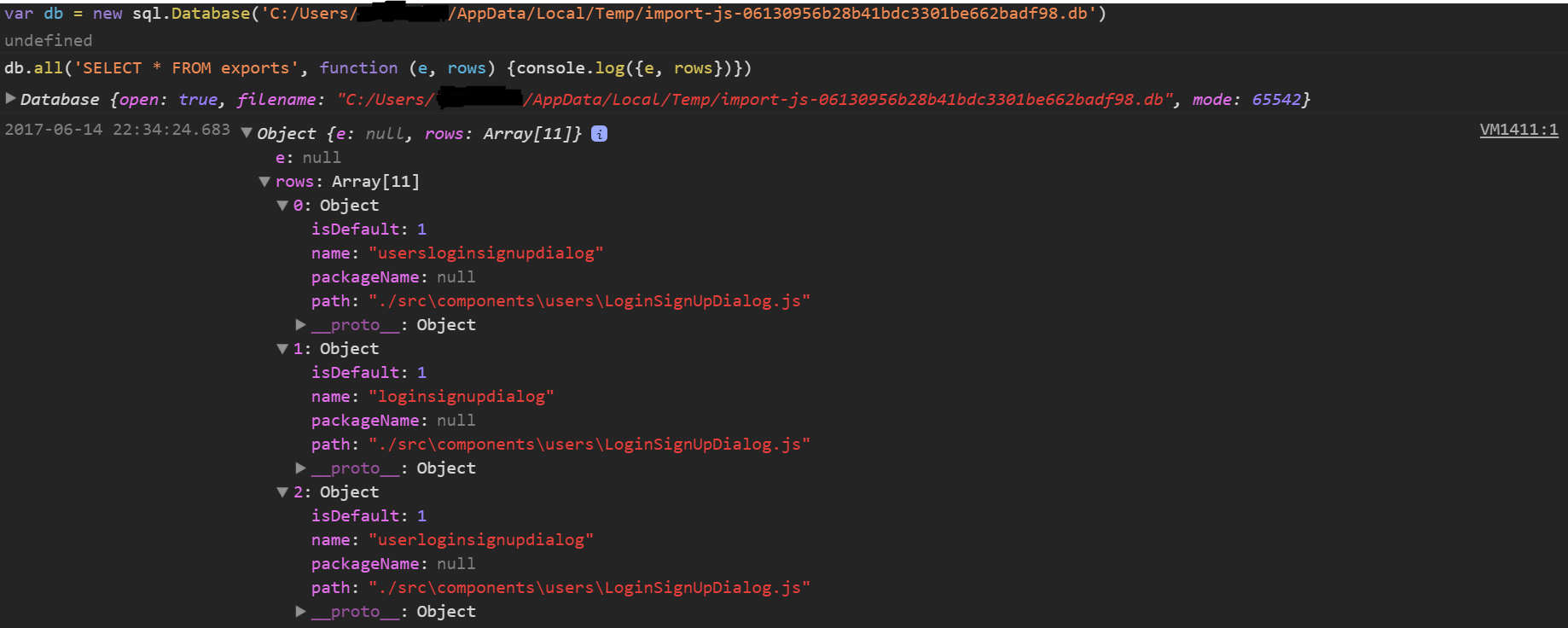
The "duplicates" are intentional (they are slightly different, using plural/singular). It looks like we're screwing up the paths however. This is on windows, right?
Regarding the logfile, what does importjs logpath give you? When run from the project root.

I was about to create a new issue, but I think this one is related to my case. Sometimes I am unable to import modules (No JS module to import for (module)) or go to them (<Leader> g). There is some edited output from logs:
importjs.log:
{"message":"ERROR response: {\"error\":\"SQLITE_ERROR: no such table: exports\\nError: SQLITE_ERROR: no such table: exports\"}","level":"error"}

vimChannel.log:
 18.698218 : looking for messages on channels
 18.698555 SEND on 0(in): '{"pathToFile":"somepath","fileContent":"somecontent","commandArg":"Login","command":"goto"}
'
 18.698576 on 0: Blocking NL read, timeout: 2000 msec
 18.698584 on 0: Waiting for up to 2000 msec
 19.972875 RECV on 0(out): 'ImportJS (v4.0.2) DAEMON active. Logs will go to: /tmp/importjs.log
'
 19.972893 on 0: Returning 67 bytes
 19.973058 : ERROR: Error detected while processing function importjs#Goto[5]..importjs#ExecCommand[26]..importjs#ParseResult:
 19.975226 : ERROR: line    1:
 19.975343 : ERROR: E474: Invalid argument
 19.975407 : ERROR: line    3:
 19.975425 : ERROR: E715: Dictionary required
 19.975469 : ERROR: line    8:
 19.975488 : ERROR: E715: Dictionary required
 19.975524 : ERROR: line   13:
 19.975541 : ERROR: E715: Dictionary required
 19.975908 : ERROR: line   24:
 19.975930 : ERROR: E715: Dictionary required
 19.975968 : ERROR: line   27:
 19.975987 : ERROR: E715: Dictionary required
 19.982705 : looking for messages on channels
 20.277082 RECV on 0(out): '{"error":"SQLITE_ERROR: no such table: exports\nError: SQLITE_ERROR: no such table: exports"}
'
 20.277102 on 0: Dropping message '{"error":"SQLITE_ERROR: no such table: exports\nError: SQLITE_ERROR: no such table: exports"}
'
I have some non empty import-js-somehashnum.db file hovever resided next to the importjs.log.