

 Gadgetoid
Simultaneous mouse support
As requested by @Hermann-SW on the original gist comments - https://gist.github.com/Gadgetoid/5a8ceb714de8e630059d30612503653f
- [x] capture HID descriptor for a mouse (official Pi mouse to get started?)
- [x] find a way to merge that descriptor (multi-endpoint?) with the keyboard descriptor
- [x] get pi400kb showing mouse/keyboard devices when connected to USB
- [x] expand
find_hidraw_deviceto scan for and connect to any supplied VID/PID - [x]
GRABthe mouse fd to prevent local input - [x] Add forwarding of mouse HID events to the relevant output
- [x] Cross fingers!
- [x] Make VID/PID for mouse/keyboard configurable
- [ ] systemd unit plus documentation?

sudo usbhid-dump --model=093a:2510
007:012:000:DESCRIPTOR         1634121261.154741
 05 01 09 02 A1 01 09 01 A1 00 05 09 19 01 29 03
 15 00 25 01 75 01 95 03 81 02 75 05 95 01 81 01
 05 01 09 30 09 31 09 38 15 81 25 7F 75 08 95 03
 81 06 C0 C0
Annotated (thanks to https://eleccelerator.com/usbdescreqparser/)
0x05, 0x01,        // Usage Page (Generic Desktop Ctrls)
0x09, 0x02,        // Usage (Mouse)
0xA1, 0x01,        // Collection (Application)
0x09, 0x01,        //   Usage (Pointer)
0xA1, 0x00,        //   Collection (Physical)
0x05, 0x09,        //     Usage Page (Button)
0x19, 0x01,        //     Usage Minimum (0x01)
0x29, 0x03,        //     Usage Maximum (0x03)
0x15, 0x00,        //     Logical Minimum (0)
0x25, 0x01,        //     Logical Maximum (1)
0x75, 0x01,        //     Report Size (1)
0x95, 0x03,        //     Report Count (3)
0x81, 0x02,        //     Input (Data,Var,Abs,No Wrap,Linear,Preferred State,No Null Position)
0x75, 0x05,        //     Report Size (5)
0x95, 0x01,        //     Report Count (1)
0x81, 0x01,        //     Input (Const,Array,Abs,No Wrap,Linear,Preferred State,No Null Position)
0x05, 0x01,        //     Usage Page (Generic Desktop Ctrls)
0x09, 0x30,        //     Usage (X)
0x09, 0x31,        //     Usage (Y)
0x09, 0x38,        //     Usage (Wheel)
0x15, 0x81,        //     Logical Minimum (-127)
0x25, 0x7F,        //     Logical Maximum (127)
0x75, 0x08,        //     Report Size (8)
0x95, 0x03,        //     Report Count (3)
0x81, 0x06,        //     Input (Data,Var,Rel,No Wrap,Linear,Preferred State,No Null Position)
0xC0,              //   End Collection
0xC0,              // End Collection
Thanks for working on this! I do have Raspberry mouse to test with, will do when there is something to test.
I do have Logitech MX Ergo trackball as well. Just connected that to the Pi400, usbhid-dump outputs three sections for it:
pi@raspberrypi400:~/pi400kb/build $ lsusb | grep Logitech
Bus 001 Device 005: ID 046d:c52b Logitech, Inc. Unifying Receiver
pi@raspberrypi400:~/pi400kb/build $ sudo usbhid-dump --model=046d:c52b
001:005:002:DESCRIPTOR         1634132743.533097
 06 00 FF 09 01 A1 01 85 10 75 08 95 06 15 00 26
 FF 00 09 01 81 00 09 01 91 00 C0 06 00 FF 09 02
 A1 01 85 11 75 08 95 13 15 00 26 FF 00 09 02 81
 00 09 02 91 00 C0 06 00 FF 09 04 A1 01 85 20 75
 08 95 0E 15 00 26 FF 00 09 41 81 00 09 41 91 00
 85 21 95 1F 15 00 26 FF 00 09 42 81 00 09 42 91
 00 C0

001:005:001:DESCRIPTOR         1634132743.537803
 05 01 09 02 A1 01 85 02 09 01 A1 00 05 09 19 01
 29 10 15 00 25 01 95 10 75 01 81 02 05 01 16 01
 F8 26 FF 07 75 0C 95 02 09 30 09 31 81 06 15 81
 25 7F 75 08 95 01 09 38 81 06 05 0C 0A 38 02 95
 01 81 06 C0 C0 05 0C 09 01 A1 01 85 03 75 10 95
 02 15 01 26 FF 02 19 01 2A FF 02 81 00 C0 05 01
 09 80 A1 01 85 04 75 02 95 01 15 01 25 03 09 82
 09 81 09 83 81 60 75 06 81 03 C0 06 BC FF 09 88
 A1 01 85 08 19 01 29 FF 15 01 26 FF 00 75 08 95
 01 81 00 C0

001:005:000:DESCRIPTOR         1634132743.541980
 05 01 09 06 A1 01 05 07 19 E0 29 E7 15 00 25 01
 75 01 95 08 81 02 81 03 95 05 05 08 19 01 29 05
 91 02 95 01 75 03 91 01 95 06 75 08 15 00 26 A4
 00 05 07 19 00 2A A4 00 81 00 C0

pi@raspberrypi400:~/pi400kb/build $

The second descriptor is your (very complicated and fancy :laughing:) mouse:
0x05, 0x01,        // Usage Page (Generic Desktop Ctrls)
0x09, 0x02,        // Usage (Mouse)
0xA1, 0x01,        // Collection (Application)
0x85, 0x02,        //   Report ID (2)
0x09, 0x01,        //   Usage (Pointer)
0xA1, 0x00,        //   Collection (Physical)
0x05, 0x09,        //     Usage Page (Button)
0x19, 0x01,        //     Usage Minimum (0x01)
0x29, 0x10,        //     Usage Maximum (0x10)
0x15, 0x00,        //     Logical Minimum (0)
0x25, 0x01,        //     Logical Maximum (1)
0x95, 0x10,        //     Report Count (16)
0x75, 0x01,        //     Report Size (1)
0x81, 0x02,        //     Input (Data,Var,Abs,No Wrap,Linear,Preferred State,No Null Position)
0x05, 0x01,        //     Usage Page (Generic Desktop Ctrls)
0x16, 0x01, 0xF8,  //     Logical Minimum (-2047)
0x26, 0xFF, 0x07,  //     Logical Maximum (2047)
0x75, 0x0C,        //     Report Size (12)
0x95, 0x02,        //     Report Count (2)
0x09, 0x30,        //     Usage (X)
0x09, 0x31,        //     Usage (Y)
0x81, 0x06,        //     Input (Data,Var,Rel,No Wrap,Linear,Preferred State,No Null Position)
0x15, 0x81,        //     Logical Minimum (-127)
0x25, 0x7F,        //     Logical Maximum (127)
0x75, 0x08,        //     Report Size (8)
0x95, 0x01,        //     Report Count (1)
0x09, 0x38,        //     Usage (Wheel)
0x81, 0x06,        //     Input (Data,Var,Rel,No Wrap,Linear,Preferred State,No Null Position)
0x05, 0x0C,        //     Usage Page (Consumer)
0x0A, 0x38, 0x02,  //     Usage (AC Pan)
0x95, 0x01,        //     Report Count (1)
0x81, 0x06,        //     Input (Data,Var,Rel,No Wrap,Linear,Preferred State,No Null Position)
0xC0,              //   End Collection
0xC0,              // End Collection
Looks like this is report ID 2 of a multi-faceted HID device with a keyboard and other consumer control features.
Basically every instance of "Report Size" is a number in bits and every instance of "Report Count" is how many instances of that size report there are. Running through:
0x95, 0x10,        //     Report Count (16)
0x75, 0x01,        //     Report Size (1)
0x75, 0x0C,        //     Report Size (12)
0x95, 0x02,        //     Report Count (2)
0x75, 0x08,        //     Report Size (8)
0x95, 0x01,        //     Report Count (1)
0x95, 0x01,        //     Report Count (1)
So presumably we're looking at 16 + 12 + 12 + 8 + 8 bits of data which is a nice even 7 bytes.
I'm not actually sure what data you'd get from raw grabbing your mouse device- perhaps it would just be the mouse report in which case you could copy your descriptor into gadget-hid.c replacing the mouse portion, and adjust the MOUSE_HID_REPORT_SIZE in gadget-hid.h to 7.
That, along with specifying the correct VID/PID and device (fish around in "/dev/input/by-id/") should get you somewhere.
Then you'd need to look at mouse events in the debug output and hope they correspond with your movements.
All bets are off as to whether this will work, but it should be possible.
In future it would be really nice just to supply a VID/PID and have the device, and the HID descriptor and stuff automatically taken care of.
IE you would supply a VID/PID and it would:
- Get the relevant devices
- Dump the full HID descriptor of your keyboard/mouse
- Set up a new HID device pretending to be your keyboard/mouse
- Forward all HID reports - so it's basically 1:1 identical with plugging your mouse straight into your computer
I should probably raise an issue for this.
This is the Logitech MX trackball I am using. Has quite some (programmable) keys in addition to trackball and mouse buttons. Has profiles for two devices, perhaps only 70/2=35 bits are relevant ... https://www.amazon.com/Logitech-Ergo-Wireless-Trackball-Mouse/dp/B0753P1GTS/ref=sr_1_3
I don't use any of the keys, but love to work with the trackball the last 4 months.
I am happy to start testing with the Raspberry mouse I have, later I will test with trackball as well.
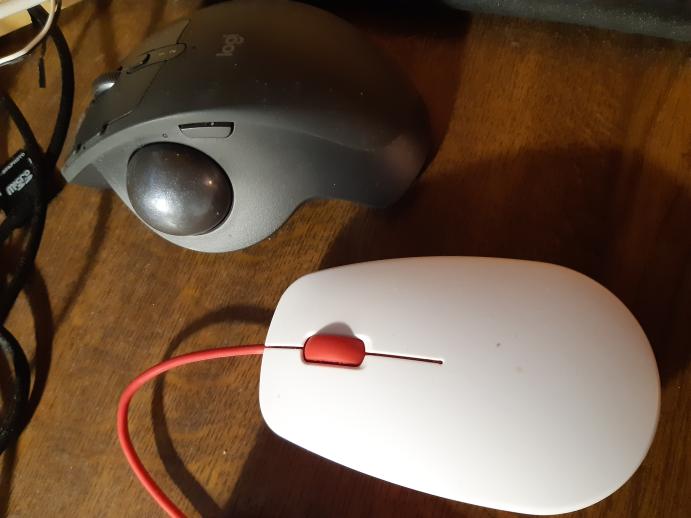
For comparison, here's my Alienware AW610M mouse (wireless dongle):
sudo usbhid-dump -d 0461:4ec0
001:023:002:DESCRIPTOR         1634155310.886475
 06 00 FF 09 01 A1 01 09 02 15 00 26 FF 00 75 08
 95 40 81 02 09 03 15 00 26 FF 00 75 08 95 40 91
 02 0A 00 FF 75 08 95 40 B1 02 C0

001:023:001:DESCRIPTOR         1634155310.886822
 05 01 09 06 A1 01 85 01 05 07 19 E0 29 E7 15 00
 25 01 75 01 95 08 81 02 95 01 75 08 81 01 05 07
 15 00 26 E7 00 19 00 2A E7 00 75 08 95 06 81 00
 C0 05 0C 09 01 A1 01 85 02 15 00 26 3C 02 19 00
 2A 3C 02 75 10 95 01 81 00 C0

001:023:000:DESCRIPTOR         1634155310.887158
 05 01 09 02 A1 01 09 01 A1 00 05 09 19 01 29 05
 15 00 25 01 95 05 75 01 81 02 95 03 81 01 05 01
 16 01 80 26 FF 7F 09 30 09 31 75 10 95 02 81 06
 15 81 25 7F 09 38 75 08 95 01 81 06 06 00 FF 09
 F1 75 08 95 05 15 00 26 FF 00 81 00 C0 C0
In my case the third endpoint is the mouse, and looks like:
0x05, 0x01,        // Usage Page (Generic Desktop Ctrls)
0x09, 0x02,        // Usage (Mouse)
0xA1, 0x01,        // Collection (Application)
0x09, 0x01,        //   Usage (Pointer)
0xA1, 0x00,        //   Collection (Physical)
0x05, 0x09,        //     Usage Page (Button)
0x19, 0x01,        //     Usage Minimum (0x01)
0x29, 0x05,        //     Usage Maximum (0x05)
0x15, 0x00,        //     Logical Minimum (0)
0x25, 0x01,        //     Logical Maximum (1)
0x95, 0x05,        //     Report Count (5)
0x75, 0x01,        //     Report Size (1)
0x81, 0x02,        //     Input (Data,Var,Abs,No Wrap,Linear,Preferred State,No Null Position)
0x95, 0x03,        //     Report Count (3)
0x81, 0x01,        //     Input (Const,Array,Abs,No Wrap,Linear,Preferred State,No Null Position)
0x05, 0x01,        //     Usage Page (Generic Desktop Ctrls)
0x16, 0x01, 0x80,  //     Logical Minimum (-32767)
0x26, 0xFF, 0x7F,  //     Logical Maximum (32767)
0x09, 0x30,        //     Usage (X)
0x09, 0x31,        //     Usage (Y)
0x75, 0x10,        //     Report Size (16)
0x95, 0x02,        //     Report Count (2)
0x81, 0x06,        //     Input (Data,Var,Rel,No Wrap,Linear,Preferred State,No Null Position)
0x15, 0x81,        //     Logical Minimum (-127)
0x25, 0x7F,        //     Logical Maximum (127)
0x09, 0x38,        //     Usage (Wheel)
0x75, 0x08,        //     Report Size (8)
0x95, 0x01,        //     Report Count (1)
0x81, 0x06,        //     Input (Data,Var,Rel,No Wrap,Linear,Preferred State,No Null Position)
0x06, 0x00, 0xFF,  //     Usage Page (Vendor Defined 0xFF00)
0x09, 0xF1,        //     Usage (0xF1)
0x75, 0x08,        //     Report Size (8)
0x95, 0x05,        //     Report Count (5)
0x15, 0x00,        //     Logical Minimum (0)
0x26, 0xFF, 0x00,  //     Logical Maximum (255)
0x81, 0x00,        //     Input (Data,Array,Abs,No Wrap,Linear,Preferred State,No Null Position)
0xC0,              //   End Collection
0xC0,              // End Collection
``

Definitely some commonalities there. I wonder if I can rely on the user providing a HID dump for their mouse, and then figure out what size the packets should be from that.

I need to raw capture my mouse and see what the data looks like, I reckon it'll be similar to yours.

Tried to hook up my Pi 400 to my laptop and it crashed my whole USB bus :grimacing:
A bit of sleuthing reveals the raw report size from my mouse is 12 bytes, and looks something like:
# LMB Pressed
149.1145

  72 49 67 61 00 00
  00 00 8d 96 01 00

  00 00 00 00 04 00
  04 00 01 00 09 00

  72 49 67 61 00 00
  00 00 8d 96 01 00

  00 00 00 00 01 00
  10 01 01 00 00 00

  72 49 67 61 00 00
  00 00 8d 96 01 00

  00 00 00 00 00 00
  00 00 00 00 00 00

# LMB Released
149.5545

  72 49 67 61 00 00
  00 00 50 4d 08 00

  00 00 00 00 04 00
  04 00 01 00 09 00

  72 49 67 61 00 00
  00 00 50 4d 08 00

  00 00 00 00 01 00
  10 01 00 00 00 00

  72 49 67 61 00 00
  00 00 50 4d 08 00

  00 00 00 00 00 00
  00 00 00 00 00 00
I capped this with a hastily written Python tool:
import time
import os

t_start = time.time()

device = "/dev/input/by-id/usb-DELL_Alienware_610M-event-mouse"
packet_size = 12
chunk_size = 6

cap_start = False

with open(device, "rb") as f:
    os.set_blocking(f.fileno(), False)
    while True:
        data = f.read(packet_size)
        if data and len(data) == packet_size:
            if not cap_start:
                print(f"{time.time() - t_start:.4f}\n")
            cap_start = True
            for offset in range(0, packet_size, chunk_size):
                chunk = data[offset:offset + chunk_size]
                fmt = "{:02x} " * len(chunk)
                print("  " + fmt.format(*chunk))
            print("")
        else:
            if cap_start:
                print("\n")
                cap_start = False
This script tries to batch events together by relying on the read() returning nothing right after capturing a full stream of events.
It took a bit of trial and error to dial in the right report size, and it takes some times for the data stream to visually make any sense whatsoever.
Eventually I spotted the mouse button ID and pressed/released states very clearly changing in line with my button presses in the stream, though.
When I get back into the office tomorrow I can try inserting my HID descriptor and setting the buffer size appropriately.
Okay I've fleshed out that tool into something that'll try and annotate some of the stuff it detects: https://github.com/Gadgetoid/pi400kb/blob/feature/tools/tools/rawcap.py
eg:
7.2861

  8b 50 67 61 00 00
  00 00 d1 aa 0d 00

  00 00 00 00 04 00
  04 00 01 00 09 00
  - Mouse Button 1

  8b 50 67 61 00 00
  00 00 d1 aa 0d 00

  00 00 00 00 01 00
  10 01 00 00 00 00
  - 0 (Released)

  8b 50 67 61 00 00
  00 00 d1 aa 0d 00

  00 00 00 00 00 00
  00 00 00 00 00 00


7.5401

  8c 50 67 61 00 00
  00 00 c3 48 02 00

  00 00 00 00 02 00
  01 00 01 00 00 00
  - Mouse Axis 1 (1)

  8c 50 67 61 00 00
  00 00 c3 48 02 00

  00 00 00 00 00 00
  00 00 00 00 00 00
There are probably much better ways to go about this, but it's interesting just poking about.
I just synced "feature/mouse-support" branch and did build it (according instructions, with finally just "make"). When I start pi400kb, mouse as well as keyboard events get printed on Pi400 display. When I switch display to laptop, keypresses have no effect there, although terminal is active there. And mouse move events show as keypresses in laptop terminal. Keypresses do not move move on laptop. So does not work with Pi400 and original mouse yet ...
I deleted build directory, created it again and did this cmake for Raspberry mouse with explicit code
cmake .. -DMOUSE_DEV="/dev/input/by-id/usb-PixArt_USB_Optical_Mouse-mouse" -DMOUSE_VID=0x093a -DMOUSE_PID=0x2510
just to be sure. Still compiled pi400kb shows same behavior as reported in previous comment.
pi@raspberrypi400:~/test/pi400kb/build $ ls -l /dev/input/by-id/
total 0
lrwxrwxrwx 1 root root 9 Oct 16 03:17 usb-PixArt_USB_Optical_Mouse-event-mouse -> ../event0
lrwxrwxrwx 1 root root 9 Oct 16 03:17 usb-PixArt_USB_Optical_Mouse-mouse -> ../mouse0
lrwxrwxrwx 1 root root 9 Oct 16 03:17 usb-_Raspberry_Pi_Internal_Keyboard-event-if01 -> ../event2
lrwxrwxrwx 1 root root 9 Oct 16 03:17 usb-_Raspberry_Pi_Internal_Keyboard-event-kbd -> ../event1
pi@raspberrypi400:~/test/pi400kb/build $
Tried this as well, same result:
cmake .. -DMOUSE_DEV="/dev/input/by-id/usb-PixArt_USB_Optical_Mouse-event-mouse" -DMOUSE_VID=0x093a -DMOUSE_PID=0x2510
And mouse move events show as keypresses in laptop terminal.
Thought I’d fixed this- IE the events were just mislabelled. There might still be a bug.
The keyboard is set up to toggle with local control enabled by default IIRC- you need to hit “Ctrl + Raspberry” to enable capture and forwarding to the connected computer.
I just tried that, and see corresponding messages on Pi400:
K:9 0 0 0 0 0 0 0
Releasing Keyboard and/or Mouse
K:1 0 0 0 0 0 0 0
K:0 0 0 0 0 0 0 0
M:0 0 1 0
M:0 fe 2 0
M:0 0 2 0
M:0 ff 2 0
M:0 0 3 0
M:0 ff 2 0
M:0 ff 1 0
M:0 0 2 0
K:1 0 0 0 0 0 0 0
K:9 0 0 0 0 0 0 0
Grabbing Keyboard and/or Mouse
Grabbing: /dev/input/by-id/usb-_Raspberry_Pi_Internal_Keyboard-event-kbd
Grabbing: /dev/input/by-id/usb-PixArt_USB_Optical_Mouse-event-mouse
K:1 0 0 0 0 0 0 0
K:0 0 0 0 0 0 0 0
M:0 0 3 0
M:0 2 3 0
Unfortunately the behavior keeps the same, mouse appears as keyboard presses in laptop, keyboard events don't show there ...
This is no-doubt some USB descriptor and report ID weirdness then. What's OS are you running on your laptop?
Red Hat Enterprise Linux 8.4 -- the normal only keyboard pi400kb works like a charme, just the feature/mouse-support branch does not
Sorry, my fault, I did start your old pi400kb in lxde autostart: https://forums.raspberrypi.com/viewtopic.php?f=140&t=295074&start=25#p1922811
After I removed that from autostart, Pi400 keyboard and Raspberry mouse immediately worked on laptop with feature/mouse-support branch pi400kb !
That'll do it! Whoops!
Actually writing a systemd unit was on my TODO list for this now it works better as a daemon with a toggle on/off.
I feel it needs to emit or receive some kind of on-toggle signal, though, so you can trigger other things locally but that might need config file support before I can really implement it properly.
IE: the settings file could have "oncapture" and "onrelease" settings which accept an executable/shell script to run when the mouse/keyboard are captured/released. This would also let you hook out to set some kind of toggle indicator LED (I wonder if one of the LEDs on the Pi400 keyboard could be toggled).
Thanks -- the "oncapture" and "onrelease" events would be cool. Currently I have keyboard shortcut in place to start pi400kb, in addition to autostart startup. Since few minutes I run completely functiional Pi400 KVM!
GraphvizFiddle link
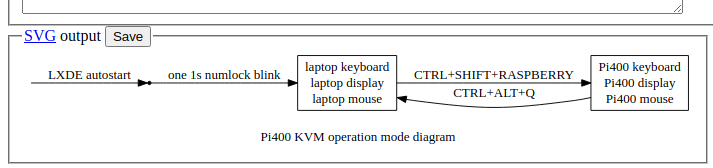
The events would eliminate the need for CTRL_ALT_Q.c gist, see latest diff on how I integrate display switch via IR led: https://gist.github.com/Hermann-SW/033a7224378d577fb89e37bc408e18ad/revisions
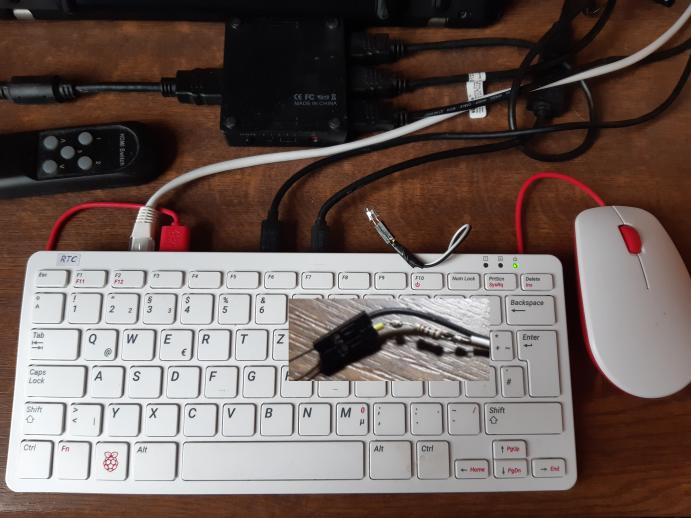
I use irplay gist to send the signal to HDMI switch to toggle display together with keyboard and mouse:
https://gist.github.com/Hermann-SW/7e951c6d123cd97cbf9f835f12312730
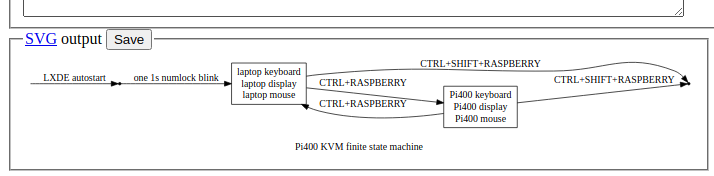
Please add "oncapture" and "onrelease" event processing, that would allow below Pi400 KVM switch finite state diagram. I would just need to configure "irplay 3" and "irplay 1" for those two events, and start pi400kb in LXDE autostart instead:
GraphvizFiddle link
I described the details on how to build in new "Pi400 KVM switch" forum thread: https://forums.raspberrypi.com/viewtopic.php?f=140&t=321840
I tried to compile pi400kb for Logitech MX Ergo trackball:
pi@raspberrypi400:~/test/pi400kb/build $ lsusb | grep Logi
Bus 001 Device 007: ID 046d:c52b Logitech, Inc. Unifying Receiver
pi@raspberrypi400:~/test/pi400kb/build $
$ cmake .. -DMOUSE_DEV="/dev/input/by-id/usb-Logitech_USB_Receiver-if02-event-mouse" -DMOUSE_VID=0x046d -DMOUSE_PID=0xc52b
Keyboard works fine on laptop, but mouse not. Whatever I do with trackball ball, always the same event gets created
M:20 1 2 0
Pressing and releasing left, right and wheel button results in these events:
K:0 0 28 0 0 0 0 0
K:0 0 0 0 0 0 0 0
M:20 1 2 1
M:20 1 2 0
M:20 1 2 2
M:20 1 2 0
M:20 1 2 4
M:20 1 2 0
While these events are distinct, they don't work on laptop (opening a menu does not work).
Yeah if you don't completely replace the USB descriptors with the ones from your mouse then there will be a disconnect between the events fetched from the mouse and how they are interpreted by the host computer.
Seeing if I can bring up an alternate mouse and post some instructions for accomplishing this is on my TODO list.
And - ultimately - maybe some way for pi400kb just to auto-clone the mouse and make the whole thing transparent and effortless- though that's a little beyond my understanding at the moment.
Thank you Philip, your hook.sh is marvelous! I just added irplay calls for automatic display switching, keeping led0 toogle from the script, although that is not really needed since you see on HDMI display where keyboard+mouse are active with irplay:
pi@raspberrypi400:~/pi400kb $ git diff
diff --git a/hook.sh b/hook.sh
index a3d7eab..edb76c4 100755
--- a/hook.sh
+++ b/hook.sh
@@ -5,8 +5,10 @@ echo none > /sys/class/leds/led0/trigger
 case $1 in
     0) # Ungrabbed
         echo 0 > /sys/class/leds/led0/brightness
+       irplay 1
         ;;
     1) # Grabbed
         echo 1 > /sys/class/leds/led0/brightness
+       irplay 3
         ;;
 esac
pi@raspberrypi400:~/pi400kb $
I finally did let led0 as is:
pi@raspberrypi400:~ $ cat /usr/local/bin/hook.sh
#!/bin/bash
# irplay example pi400kb hook
# This script is given the argument 1 for grabbed, 0 for ungrabbed.
case $1 in
    0) # Ungrabbed
	irplay 1
        ;;
    1) # Grabbed
	irplay 3
        ;;
esac
pi@raspberrypi400:~ $
Did build pi400kb by "cmake -DHOOK_PATH=/usr/local/bin/hook.sh ..", and copied pi400kb to /usr/local/bin as well. Used this helper script:
pi@raspberrypi400:~ $ cat /usr/local/bin/pi400kb_
#!/bin/bash
sudo pi400kb
pi@raspberrypi400:~ $
Execute helper script during autostart:
pi@raspberrypi400:~ $ tail -2 /etc/xdg/lxsession/LXDE-pi/autostart
@xscreensaver -no-splash
@pi400kb_
pi@raspberrypi400:~ $
I deleted CTRL_ALT_Q, not needed anymore now that pi400kb can toggle.
This is my current Pi400 KVM switch:
GraphvizFiddle link
Thanks again for mouse-support, and now toggle-hook features!