

 GSConnect
Open URL on device
It would be useful to have a menu item in GSConnect to be able to send a URL (i.e. paste into an input box on GSConnect) to a device.
I am aware of the Chrome extension but that only works in Chrome. There are lots of other places where URLs show up, such as in Evolution meeting requests. The only thing I can do with that URL is to highlight and copy it to the clipboard.
I would like to be able to then paste that to the device.

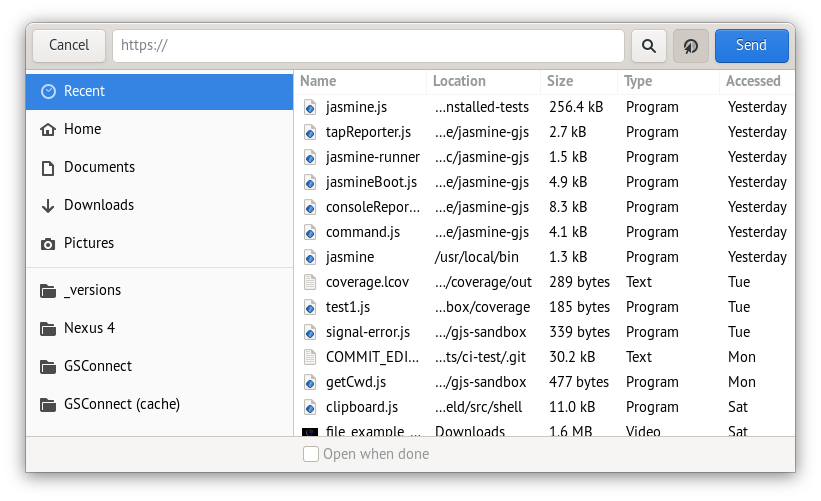

~~My share dialog doesn't have the URL input bar at the top.~~ NVM. I just noticed the Share URL icon next to the Send button.
It isn't a very good UX experience for that, but I guess I don't use that feature much outside the browser. Maybe it's worth making a custom dialog for this.
Well, when I was initially looking for that functionality, I did go to the Share item in the menu. But as explained above, I didn't see the button I had to click to open the URL pasting input box.
Maybe get rid of the button and just have the dialog open with input box immediately activated. If one pastes a URL, then one cannot select a file. If one selects a file, one cannot paste a URL. Perhaps both can be achieved by [de-]activation (greying out). I.e. initially both are active and un-greyed out, but as soon as one is used to make a selection (text in the input box, or clicking in a file name) the other is grey-ed out.
The only catch there is that one can easily go back to the dual-active state by erasing the input box such that it's empty again, but how does one unselect a file once selected. Clicking on a selected file perhaps?
Let's reopen this to evolve UX of the dialog.
If the URL entry has the input focus there is no indication that's what it's for and it also removes the window title. I guess the best option is really to use a text button and a modal dialog for link sharing.