
AMF
 AMF copied to clipboard
 GPUOpen-LibrariesAndSDKs
[Bug]: H264 B-frames are causing stuttering when set to 2 or 3 B-frames, when using the new OBS Studio w/AMF encoder
Describe the bug I am using OBS Studio, built off of the "obs-amf" branch that now has a texture-based encoder and the ability to directly send encoder options to AMF itself.
Link to the branch: https://github.com/obsproject/obs-studio/tree/obs-amf Link to the ongoing conversation: https://github.com/obsproject/obs-studio/pull/6508
I feel that the bug is that H264 B-frames cause dropped frames and stuttering in the video output.
- When: MaxConsecutiveBPictures and BPicturesPattern to 2 or 3, regardless of whether BReferenceEnable is set to true or false.
- The stuttering also strangely causes the video preview window to drop frames, which is not normal.
- This behavior has happened across several iterations of this OBS Studio branch, including the latest build, found here: https://github.com/obsproject/obs-studio/actions/runs/2484946117
The latest build linked above was produced after I brought up discussion regarding the considerations one should take when using B-frames, but the stuttering persists. The mentions of B-frames are on Page 72 and 73 of https://github.com/GPUOpen-LibrariesAndSDKs/AMF/blob/master/amf/doc/AMF_API_Reference.pdf The changes that were made in the latest commit actually did fix issues I was having with stuttering when using PreAnalysis and/or PreEncode, but B-frames remain an issue.
I've done everything I can to eliminate variables from my testing, and while the PA/PE issues above are solved now, no combination of settings nor anything else I have done have made the encoder use B-frames without creating a stuttery media preview window and video output.
To Reproduce
- Download the Windows x64 build of OBS Studio from the link above
- Run the program, close the configuration wizard pop-up, and go into settings
- On the Video tab: Change Output Resolution to 1920x1080, set framerate to 60fps, hit apply
- On the output tab, change Output Mode to "Advanced"
- On the recording tab, in the Encoder drop-down, select "AMD HW H.264"
- Add the following configuration in to the AMF/FFmpeg Options field:
RateControlMethod=1 Profile=100 ProfileLevel=42 QualityPreset=2 IDRPeriod=120 TargetBitrate=6800000 PeakBitrate=7000000 VBVBufferSize=14000000 InitialVBVBufferFullness=64 MaxNumRefFrames=4 HalfPixel=true QuarterPixel=true MaxOfLTRFrames=0 FillerDataEnable=true EnforceHRD=true DeBlockingFilter=false HighMotionQualityBoostEnable=false EnableVBAQ=false RateControlPreanalysisEnable=false MaxConsecutiveBPictures=3 BPicturesPattern=3 BReferenceEnable=true EnablePreAnalysis=false
- Click apply, then OK
- Add some 1080p60 media or run a 3d application and capture it with OBS Studio
- Hit record
- Stop recording and check output media
One thing I do notice is, when I set MaxConsecutiveBPictures=3 and BPicturesPattern=3 (with AdaptiveMiniGOP=false), during the stuttering at the start, the output will sometimes only put one or two B-frames in a row during the first GOP. After that, it always obeys the pattern that is set. It is using B-frames, but the output is not smooth, and encoder occasionally shows an overload.
Setup (please complete the following information):
- OS version: Windows 11 21H2 22000.708
- Adrenalin driver version: WHQL 22.5.2
- GPU: AMD Reference RX 6900 XT LC
- Which component has the issue: H264 Encoder
Debug Log (please upload or paste): Interestingly, no errors are thrown during this process. The encoder outputs frames as expected, and the encoder doesn't crash, nor GPU drivers crash.
Expected behavior I expect the H264 encoder to encode using B-frames, with and without other options such as PreEncode, PreAnalysis, VBAQ, etc, with a proper 60fps output with no dropped frames due to encoder overload.
Additional context I can be contacted on the Radeon Vanguard discord server if conversation outside of github is warranted.


I'm making this post on both Issue 325 and 326.
It has come to light that many people are having issues with encoding, starting with driver 21.50.xx, and AMF 1.4.24. Poor H264 performance, H265 performance, and driver crashes with H265, are occurring across various driver versions since release driver 22.3.1.
I rolled back to release driver 22.2.3, and have no experienced any of the issues thus far; encoding performance is fine, no encoding overloads, no crashes.
I believe all of these issues to be related to AMF 1.4.24, and possibly to all driver versions since 21.50.xx, too. Jim/jp9000 over at OBS Studio has been notified of my findings.
Hello again. After the past few weeks of trying numerous settings in as many combinations as I can fathom, I wanted to provide more data, and a few updates as to where things stand regarding using H264 B-frames with OBS Studio. All tests were done with OBS Studio set to 1080p, 60fps.
I waited to make this post until now, because until now, I have not had another program with which to test OBS Studio against, but with the latest updates to VCEEnc https://github.com/rigaya/VCEEnc, I do, and it appears that the problems I've been experiencing in this ticket, and others, are probably an issue with OBS Studio and/or it's AMF implementation, and not an issue with AMF itself.
- When one sets MaxConsecutiveBPictures and BPicturesPattern to 2, the encoder reports an "overload" when it first starts, reports 8-10 frames as "Skipped frames due to encoder lag". The The encoder occasionally drops frames and reports "Skipped frames due to encoder lag" along the way, usually B-frames. In Windows 11's Task Manager, the encoder duty cycle never reaches 100%. Example settings that produce this result:
RateControlMethod=1 Profile=100 ProfileLevel=42 QualityPreset=2 IDRPeriod=120 TargetBitrate=7000000 VBVBufferSize=14000000 MaxNumRefFrames=4 MaxOfLTRFrames=0 HalfPixel=true QuarterPixel=true FillerDataEnable=true EnforceHRD=true DeBlockingFilter=true HighMotionQualityBoostEnable=false EnableVBAQ=false MaxConsecutiveBPictures=2 BPicturesPattern=2 BReferenceEnable=false
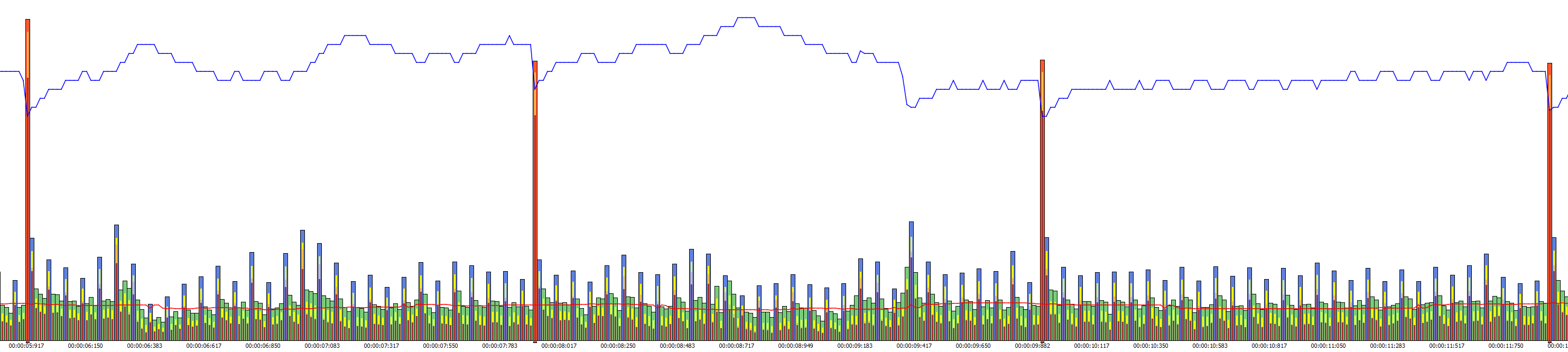
The output stutters during playback (in several GPU and CPU-driven players) at each of the yellow arrows:

- When one sets MaxConsecutiveBPictures and BPicturesPattern to 3, the encoder reports an "overload" when it first starts, reports 8-10 frames as "Skipped frames due to encoder lag". The The encoder continuously drops frames and reports "Skipped frames due to encoder lag" along the way, almost exclusively B-frames. In Windows 11's Task Manager, the encoder duty cycle never reaches 100%. Example settings that produce this result:
RateControlMethod=1 Profile=100 ProfileLevel=42 QualityPreset=2 IDRPeriod=120 TargetBitrate=7000000 VBVBufferSize=14000000 MaxNumRefFrames=4 MaxOfLTRFrames=0 HalfPixel=true QuarterPixel=true FillerDataEnable=true EnforceHRD=true DeBlockingFilter=true HighMotionQualityBoostEnable=false EnableVBAQ=false MaxConsecutiveBPictures=3 BPicturesPattern=3 BReferenceEnable=false
Each third B-frame is strangely missing data, and manifests as a consistent, visually "missing" frame during the stuttery playback:

Where identical settings from VCEEnc, using a clip from the same source that the above encodes were using, plays back just fine:
VCEEncC64.exe -i 1InputForAMF_VCEEnc.mkv -c h264 -u slow --cbr 7000 -b 3 --ref 4 --ltr 0 --max-bitrate 7000 --vbv-bufsize 14000 --motion-est Q-pel --gop-len 120 --level 4.2 --profile high --enforce-hrd --filler -o test01.mkv

- When one sets MaxConsecutiveBPictures and BPicturesPattern to 2 or 3, and enables the PreAnalysis Component, the encoder reports an "overload" when it first starts, reports 50-150 frames as "Skipped frames due to encoder lag" (Happens with PA on H264 and HEVC, regardless of settings; unrelated to the current issue). The The encoder will sometimes drop frames and reports "Skipped frames due to encoder lag" along the way,but not always. In Windows 11's Task Manager, the encoder duty cycle never reaches 100%.
What is different here is that, while there is no "Skipped frames due to encoder lag", but!... the output is choppy as if the third B-frame still isn't being filled with proper data. Example settings that produce this result:
RateControlMethod=1 Profile=100 ProfileLevel=42 QualityPreset=2 IDRPeriod=120 TargetBitrate=7000000 VBVBufferSize=14000000 MaxNumRefFrames=4 MaxOfLTRFrames=0 HalfPixel=true QuarterPixel=true FillerDataEnable=true EnforceHRD=true DeBlockingFilter=true HighMotionQualityBoostEnable=false EnableVBAQ=false MaxConsecutiveBPictures=3 BPicturesPattern=3 BReferenceEnable=false EnablePreAnalysis=true RateControlSkipFrameEnable=true AdaptiveMiniGOP=false PASceneChangeDetectionEnable=false
OBS Studio's AMF implementation can be found here: https://github.com/obsproject/obs-studio/blob/master/plugins/obs-ffmpeg/texture-amf.cpp
TL;DR:
- Setting 2 or 3 B-frames causes small to substantial stuttering in the output
- PreAnalysis alleviates the stuttering somewhat, but it appears that the data is still missing from the frames
- VCEEnc's latest release does not produce any of the above symptoms, and output appears as expected: smooth and free from any artifacts
- GPU load does make a different as to the severity of each issue, and the frequency of the encoder reporting "Skipped frames due to encoder lag"
- PreAnalysis smooths things out, but does not remedy the root problem.
Jim/jp0000, the developer over at OBS Studio that is working on the AMF texture-based encoder, does not know where to start looking for issues that would lead to the above symptoms. While I myself have looked at the code, I am not a programmer, and know only enough C++ to get me into trouble, so I can't speak for anything I've seen in the code itself, neither on OBS Studio's side, nor the AMF package's side.
I would like to ask a huge favor of @MikhailAMD and others, that if any of you have any thoughts on what might be causing the symptoms mentioned above, I would greatly appreciate it! I wish I could be of more help, but alas, the most I can do is provide data from the end-user's side.
Thank you all again for your time.
Let's start with simple. Recently Jim/jp0000 added few things to mitigate loss of frames. Also obs-amf has been integrated into master. Did you try the latest code and the latest driver?
Thank you for replying, it means a lot that you are willing to help out with this issue.
Let's start with simple. Recently Jim/jp0000 added few things to mitigate loss of frames. Also obs-amf has been integrated into master. Did you try the latest code and the latest driver?
Yes, the above output is using a recent version of Master that was built after obs-amf was rolled into Master. I'll update this post with the exact version when I arrive home from work in a few hours. The above tests were done using drivers available to me, though behaviour on 22.7.1 and older was similar.
I can test again with the latest Master build, or start using the 28.0.0-beta1 and later versions of OBS Studio if you would like. Likewise, I can start using 22.7.1 too if you would like. I wish to make diagnosing this issue the most simple for all involved.
Thank you again for your help!
***Edit: The version of OBS Studio I've been using is "OBS-Studio-27.2.0-f6f6690cc-Win-x64"
On the most recent build of OBS Studio 28.0.0-beta1-4a64b2aae, using:
RateControlMethod=1 Profile=100 ProfileLevel=42 QualityPreset=2 IDRPeriod=120 TargetBitrate=7000000 VBVBufferSize=14000000 MaxNumRefFrames=4 MaxOfLTRFrames=0 HalfPixel=true QuarterPixel=true FillerDataEnable=true EnforceHRD=true DeBlockingFilter=true HighMotionQualityBoostEnable=false EnableVBAQ=false MaxConsecutiveBPictures=3 BPicturesPattern=3 BReferenceEnable=false
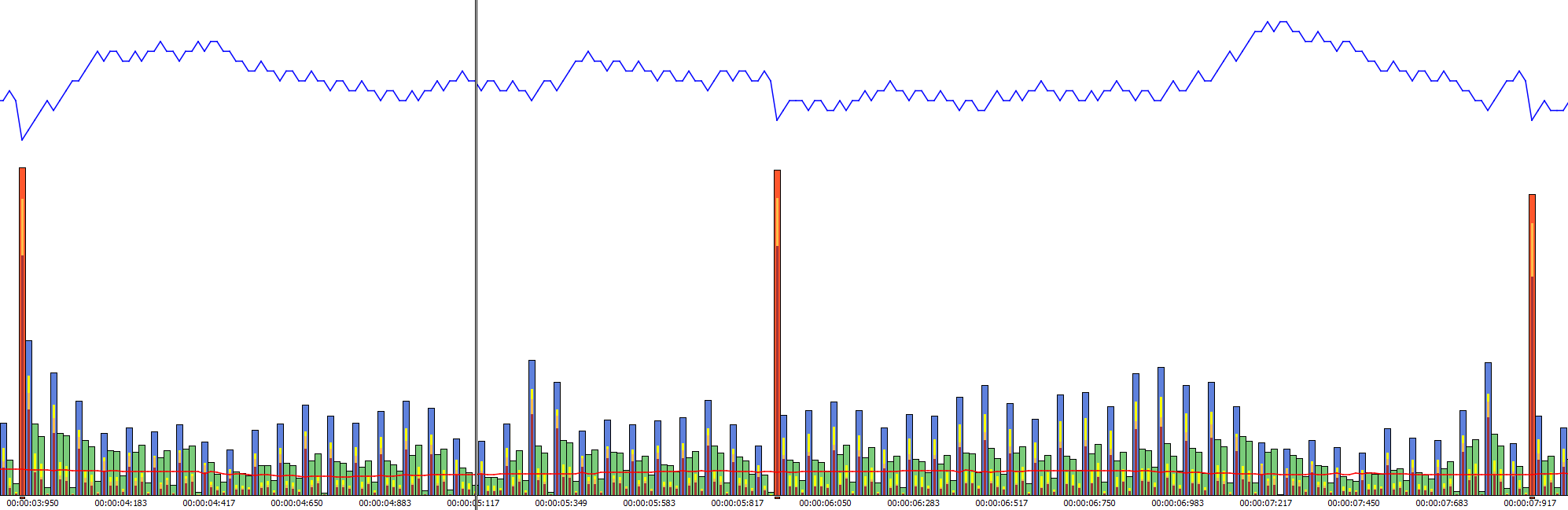
I have observed the same behaviour now, as I did before, with 3 B-frames enabled:
A few thoughts on this issue to hopefully narrow down what may be causing the B-frame issues:
- Now that VCEEnc has been updated, its output using 3 B-frames is nominal, so I don't think this is an issue with AMF, but instead something going on with OBS Studio itself
- OBS Studio v28 beta 1 and beta 2 both exhibit the same behaviour when using 2 and 3 B-frames
- The intensity and number of "fames dropped due to encoder lag" can be manipulated by adjusting options such as "QualityPreset" and setting RateControlPreanalysisEnable to true/false
- OBS Studio is properly setting PTS and DTS (at least, when comparing output files from OBS Studio and VCEEnc)
- OBS Studio says "encoder is overloaded" occasionally/constantly depending on settings, yet encoder duty cycle is never more than 80% in Windows' Task Manager
When using 3 B-frames, the third B-frame shows a very small frame size, as one can see in the graph in my post above. Curiously, when one inspects the file in Elecard Streameye, that third B-frame's macroblocks are almost entirely set to "skip"; very few MB's actually contain any data, and in the video file itself: Very little changes on those 'empty' B-frames visually.
I can't begin to fathom why the encoder would exhibit this behaviour, but it is consistent in producing output with this behaviour, for what that's worth.
Thank you again for any insight you/you all may have on this issue!
Thanks for your efforts. Just want to confirm that we are investigating.
Issue was resolved by the awesome Jim in the following commit.
https://github.com/obsproject/obs-studio/commit/07df6548fdb88e093eb0901106a882ad73ad9848