

 GDevelopApp
Added "PlatformCharacterAnimator"
Change the animations and horizontal flipping of a platformer character based on their movement and interaction with platform objects.
How to use:
- At beginning of scene, use "Enable changing animations" or "Enable horizontal flipping" actions
- If you don't use the default animation names, change the animation names in the behavior properties
Playable game
https://liluo.io/victrisgames/extension-animation-changer
Project files
Video
https://user-images.githubusercontent.com/8879811/188296127-c17e90c8-ad4c-442f-b91d-67533647f537.mp4

Interesting
In the example, can you should show how the user can override the animation to do an attack for instance?
Should this extension be called "Platformer character animator" or something like this?

Things I noticed :3
1- The old man icon doesn't really fit with what the extension does.
2- what if I want to enter my animation ID, not name.
3- the animation names in the parameter is saying ("Fall" animation name), the first thing came to my mind is to write my animation name between "" so maybe change it to (Fall animation name) to not make it confusing, or add a long description explaining.
4- why in the example, at the beginning of the scene, you start 2 actions, while this 2 actions are the same checked in the extension behavior ?
5- I would re-order the extension as (Enable changing... > Enable automatic... >Idle > Run > Jump > Fall > Climb)
6- I would change the events at (Change animations) group to:
Object is on floor (Sub event) Is moving + Trigger once > Action: set animation... (Sub event) Is Not moving + trigger once > Action set animation...
7- I was going to suggest to hide the platformer character behavior from the extension, but when I tried that, the game got stuck in the loading screen... no idea if this is a bug, or it supposes to happen.
8- if I disabled the group event (Enable automatic animations) none of the animations will work (even though I checked both from the behavior), it's better to make this actions start from the extension (Behavior) side, not the user side.

Interesting
In the example, can you should show how the user can override the animation to do an attack for instance?
I have updated the example to include 3 methods to do this:
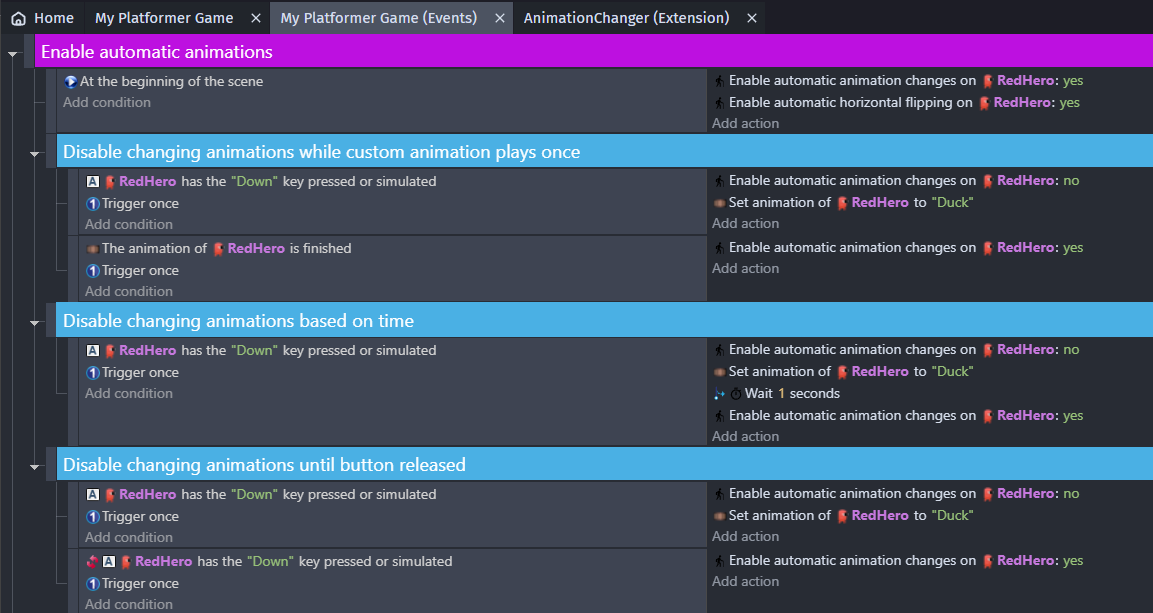
Example game (updated):
PlatformerCharacterAnimator.zip
Should this extension be called "Platformer character animator" or something like this?
Yes, I think so. Changed.
1- The old man icon doesn't really fit with what the extension does.
I picked a different one.
2- what if I want to enter my animation ID, not name.
I think I could find a way to do this... How about:
- Add a string (from a list) property: "Animation selection method:" "Animation Name" or "Animation Number"
- Change actions to use the right "change animation" action
The downside of this method is that users will need to enter a string, even to select an animation number.
@D8H do you have any ideas on how to handle this?
Here is an example of what I described above:
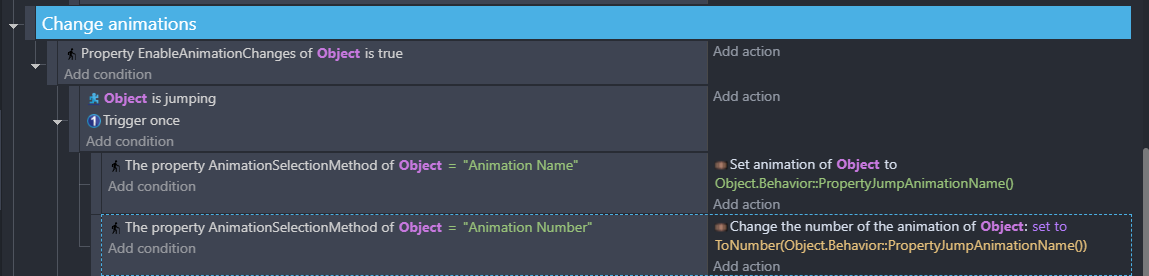
3- the animation names in the parameter is saying ("Fall" animation name), the first thing came to my mind is to write my animation name between "" so maybe change it to (Fall animation name) to not make it confusing, or add a long description explaining.
Great observation! I don't know a great fix for this, but I will add "Do not use quotation marks"
4- why in the example, at the beginning of the scene, you start 2 actions, while this 2 actions are the same checked in the extension behavior ?
GDevelop requires an extension function (action/condition/expression) to be used somewhere in the event sheet before the extension will be included and run.
5- I would re-order the extension as (Enable changing... > Enable automatic... >Idle > Run > Jump > Fall > Climb)
Re-ordering is only seen in the editor. The user sees the functions sorted alphabetically inside each group.
6- I would change the events at (Change animations) group to:
Object is on floor (Sub event) Is moving + Trigger once > Action: set animation... (Sub event) Is Not moving + trigger once > Action set animation...
What does this fix?
7- I was going to suggest to hide the platformer character behavior from the extension, but when I tried that, the game got stuck in the loading screen... no idea if this is a bug, or it supposes to happen.
Yeah, we can't hide the required behaviors or it breaks (but I wish we could).
8- if I disabled the group event (Enable automatic animations) none of the animations will work (even though I checked both from the behavior), it's better to make this actions start from the extension (Behavior) side, not the user side.
Same as 4 above.
GDevelop requires an extension function (action/condition/expression) to be used somewhere in the event sheet before the extension will be included and run.
Even the behavior one ? that's weird, I have never seen extension with behavior that require a call from the events sheet.
Re-ordering is only seen in the editor. The user sees the functions sorted alphabetically inside each group.
No, what I meant is reordering the behavior properties, which is a user side.
What does this fix?
Nothing, it's just a cleaner way, and use less events.
GDevelop requires an extension function (action/condition/expression) to be used somewhere in the event sheet before the extension will be included and run.
Even the behavior one ? that's weird, I have never seen extension with behavior that require a call from the events sheet.
You are right! I deleted all the events and the animations changed correctly. Thanks for the reminder.
Re-ordering is only seen in the editor. The user sees the functions sorted alphabetically inside each group.
No, what I meant is reordering the behavior properties, which is a user side.
I just tested this, and the behavior properties are sorted alphabetically. Groups are the best we have.
I just tested this, and the behavior properties are sorted alphabetically. Groups are the best we have.
You can rename your behaviors parameters and give them a letter before its name For example:
APlatformerBehavior BIdleAnimationName CMoveAnimationName DJumpAnimationName EFallAnimationName FClimbAnimationName GEnableAnimationChanges HEnableHorizontalFlipping
Before:

After:
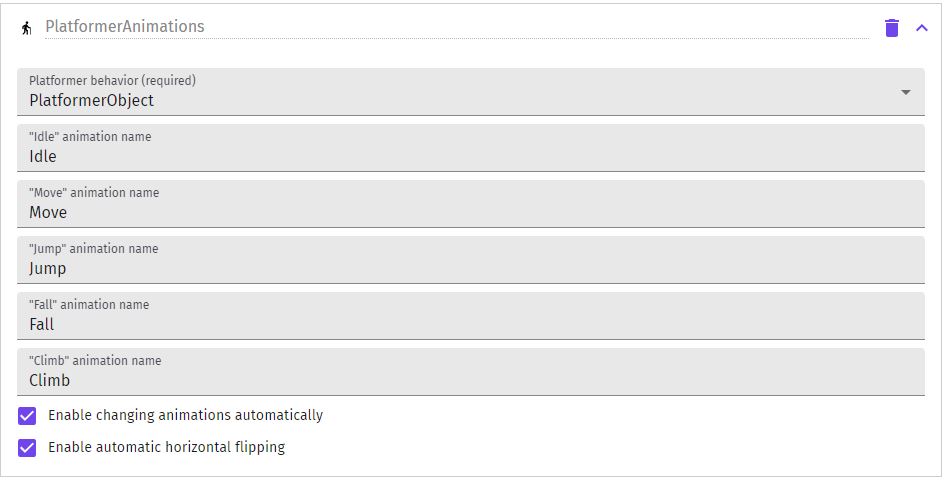
@VegeTato thanks for that idea and for your time. We want to avoid using that method to enforce sorting because the sorting problem might be solved eventually, and then any future name changes would be considered breaking.
I would just like to mention two things very quickly:
- Pressing down disables the animation changes in your game example, which means no climbing animation is played when climbing a ladder down (unless you of course disable the ducking animation code entirely).
- Regarding to my extension "AnimationHelper": These two extensions are very very different. Your extension (as far as I could tell) focuses entirely on making the platformer character animations easy to set up. My extension just tries to make animation difficulties for any object (with any animations) less annoying. I just used the platformer character for the example game since it made the most sense. I wouldn't mind merging the two extensions since they have a very similar topic, but I definitely wouldn't call these two extensions the same.

- Pressing down disables the animation changes in your game example, which means no climbing animation is played when climbing a ladder down (unless you of course disable the ducking animation code entirely).
I should have picked a button that is not part of the default controls. I'll change my example to use a different key.
- Regarding to my extension "AnimationHelper": These two extensions are very very different.
Based on your feedback, I will open your PR back up so that it can be discussed there.
- The example can't be used with the last commit.
- What do you want to do with the AnimationSelectionMethod property? Should it be removed?
Some suggessions
- Animations must be started each time a new one is set because animations may not loop and the ladder state can also stop it (if the character jump from the ladder).
- In the extension description
- "How to use" is useless
- "Tips" can go in the "enable animation" action description.
- This extension is simple enough to have the confidence to start with a "1.0.0".
- The category could be movement even if it's only indirectly related.
- The behavior name should be "Platformer character animator" and the description the shorter one.
Errors were detected in this submission:
❌ 2 Errors found in extension 'PlatformerCharacterAnimator':

  ⟶ ❌ (🔧) [Dots in sentences]: Field 'shortDescription' of the extension description misses a dot at the end of the sentence!
  ⟶ ❌ (🔧) [Dots in sentences]: Field 'description' of the behavior 'PlatformerCharacterAnimator' misses a dot at the end of the sentence!


❌ 2 Errors found in extensions - please fix them before generating the registry.
![github-actions[bot] avatar](https://avatars.githubusercontent.com/in/15368?v=4 "Published by a pub.dev verified publisher")
@D8H thanks for your review.
- The example can't be used with the last commit.
I have updated the extension (via commit) and example in the original post.
- What do you want to do with the AnimationSelectionMethod property? Should it be removed?
Yes. For this PR let's just use string animation names.
- Animations must be started each time a new one is set because animations may not loop and the ladder state can also stop it (if the character jump from the ladder).
I'm not sure what you mean by this. I did make a minor change that allows the ladder animation pause correctly.
- In the extension description
- "How to use" is useless
I have shortened this a lot.
- "Tips" can go in the "enable animation" action description.
I cleaned these up as well.
- This extension is simple enough to have the confidence to start with a "1.0.0".
Done.
- The category could be movement even if it's only indirectly related.
Agreed, done.
- The behavior name should be "Platformer character animator" and the description the shorter one.
Done.
- Animations must be started each time a new one is set because animations may not loop and the ladder state can also stop it (if the character jump from the ladder).
I'm not sure what you mean by this. I did make a minor change that allows the ladder animation pause correctly.
Edit : never mind what I said I was confused.
I did some changes:
- Simplify events
- Move the custom animation explanation in the "disable animation" action description.
- Remove the description on animation name property.
- The default values already tells users not to put quotes.
- Leaving blank animation name will have unexpected behaviors, it's not something to advertise.
- Use "Run" instead of "Move" as it's more common in the asset-store.
It can be checked here:
- https://github.com/GDevelopApp/GDevelop-examples/pull/415
I let you review my changes and if you are ok with them I guess it can be merged.
I let you review my changes and if you are ok with them I guess it can be merged.
Thanks for the review, @D8H! This will be a great extension for our users. :)