

 GDQuest
Hidden Inventory Items in Lesson 24 with text at minimum size
I'm submitting a...
- [x] Bug report.
- [ ] Feature request.
Bug report
What is the current behavior? Some images showing the inventory example in lesson 24 are hidden behind the code block example.
What is the expected behavior? Those items should be visible.
Tell us the steps to reproduce the bug, and if possible share a minimal demo of the problem. Open the Learn GDScript app on macOS and select lesson 24. Scroll down to where the inventory visual examples are. View issue.
Feature request
Describe the problem you're trying to solve.
Tell us which solutions you've explored, the solution you would pick, and why you think it would be the best for everyone.
Other
Other information
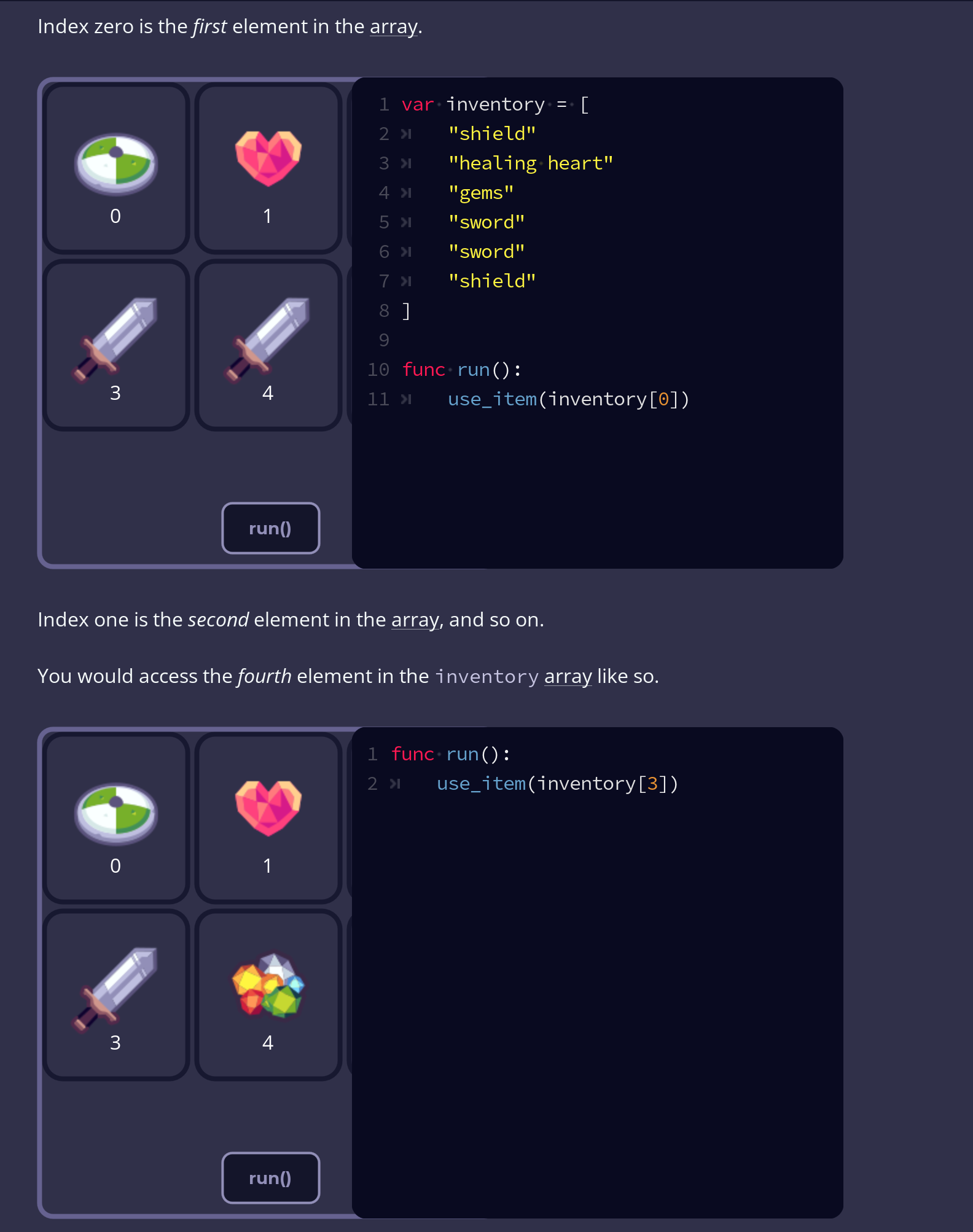

Neglected to mention that my text size slider in the app is all the way to the left on the smallest size.
Just tested and shifting that slider all the way to the right, clicking apply reveals those items. The "fix" persists when shifting back to the left and clicking apply Extremely minor inconvenience with a very simple work around
This is also happening for Lesson 23:
- Running the app in Chrome Version 123.0.6312.59
- My display resolution is 3840x2160
With text size set to smallest:
With text size set to default:
