
fusionauth-issues

fusionauth-issues copied to clipboard
 FusionAuth
Adding a consent to a user waiting to be part of a family causes an exception in the UI
Adding a consent to a user waiting to be part of a family causes an exception in the UI
Description
If a child is waiting to be confirmed as part of a family, and you add a consent to them, you end up with an exception in the admin console.
Steps to reproduce
- Create a consent, make sure it has email plus enabled. I just used the default email templates.
- Create an application
- Create a parent account:
API_KEY=...

curl -H 'Content-type: application/json' -H "Authorization: $API_KEY" 'http://localhost:9011/api/user/registration/' -d '{"registration": {"applicationId": "85a03867-dccf-4882-adde-1a79aeec50df" }, "user" : { "birthDate": "1980-01-01", "email" : "[email protected]", "password": "pass" }}'
- Create a child account associated with a parent account.
API_KEY=...

curl -H 'Content-type: application/json' -H "Authorization: $API_KEY" 'http://localhost:9011/api/user/registration/' -d '{"registration": {"applicationId": "85a03867-dccf-4882-adde-1a79aeec50df"}, "user" : { "parentEmail" : "[email protected]", "birthDate": "2019-01-01", "email" : "[email protected]", "password": "pass" }}'
- If you view the kid account now in the admin screen, things are fine.
- Add the consent to the kids account (with the parent as the giver):
CONSENT_ID=20b8814a-fdd8-4724-aa30-908c7bde3212

curl -XPOST -H 'Content-type: application/json' -H "Authorization: $API_KEY" 'http://localhost:9011/api/user/consent' -d '{"userConsent": {"giverUserId" : "9258faf9-3bd1-428a-9007-b0798bef0512", "userId": "9def3223-9f0a-49cc-865e-d7ae840a1070", "consentId": "'$CONSENT_ID'" }}'
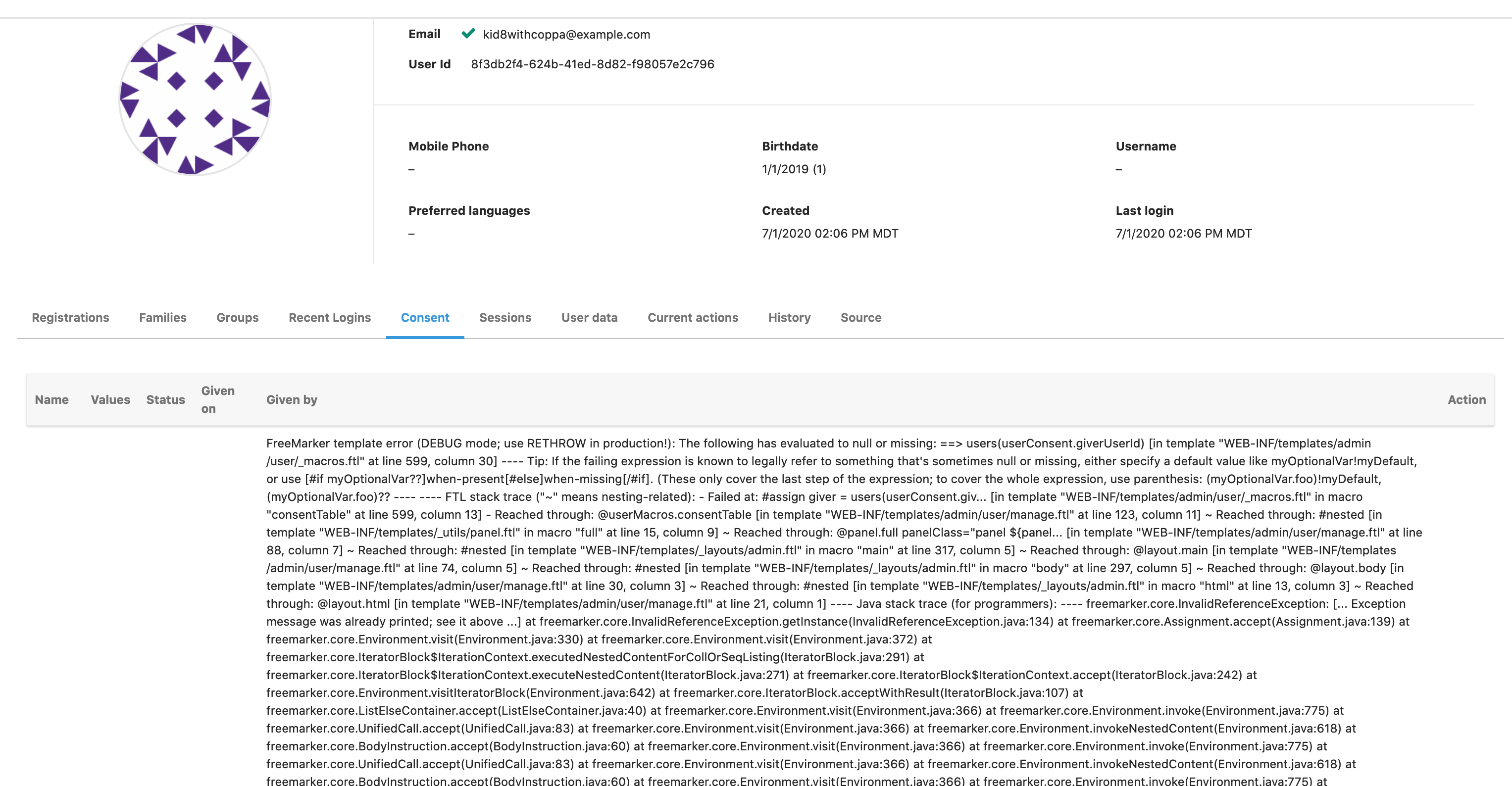
- Now if you view the kid's user details page, you see an error message on the
consenttab and all the tabs after it don't render.
Here's the error message (full stack trace attached):
FreeMarker template error (DEBUG mode; use RETHROW in production!): The following has evaluated to null or missing: ==> users(userConsent.giverUserId) [in template "WEB-INF/templates/admin/user/_macros.ftl" at line 599, column 30] ---- Tip: If the failing expression is known to legally refer to something that's sometimes null or missing, either specify a default value like myOptionalVar!myDefault, or use [#if myOptionalVar??]when-present[#else]when-missing[/#if]. (These only cover the last step of the expression; to cover the whole expression, use parenthesis: (myOptionalVar.foo)!myDefault, (myOptionalVar.foo)?? ---- ---- FTL stack trace ("~" means nesting-related): - Failed at: #assign giver = users(userConsent.giv... [in template "WEB-INF/templates/admin/user/_macros.ftl" in macro "consentTable" at line 599, column 13] - Reached through: @userMacros.consentTable [in template "WEB-INF/templates/admin/user/manage.ftl" at line 123, column 11] ~ Reached through: #nested [in template "WEB-INF/templates/_utils/panel.ftl" in macro "full" at line 15, column 9] ~ Reached through: @panel.full panelClass="panel ${panel... [in template "WEB-INF/templates/admin/user/manage.ftl" at line 88, column 7] ~ Reached through: #nested [in template "WEB-INF/templates/_layouts/admin.ftl" in macro "main" at line 317, column 5] ~ Reached through: @layout.main [in template "WEB-INF/templates/admin/user/manage.ftl" at line 74, column 5] ~ Reached through: #nested [in template "WEB-INF/templates/_layouts/admin.ftl" in macro "body" at line 297, column 5] ~ Reached through: @layout.body [in template "WEB-INF/templates/admin/user/manage.ftl" at line 30, column 3] ~ Reached through: #nested [in template "WEB-INF/templates/_layouts/admin.ftl" in macro "html" at line 13, column 3] ~ Reached through: @layout.html [in template "WEB-INF/templates/admin/user/manage.ftl" at line 21, column 1] ---- Java stack trace (for programmers): ---- freemarker.core.InvalidReferenceException: [... Exception message was already printed; see it above ...] at freemarker.core.InvalidReferenceException.getInstance(InvalidReferenceException.java:134) at
...
Expected behavior
No stack trace displayed, can see consents.
Screenshots
Platform
FusionAuth 1.17.4 and 1.17.0 Firefox
Additional context
I see the following error in the console: Error: A div is required with the following ID [sessions] when I load the kid details page.
If a child is part of a family, you see this bug instead: https://github.com/FusionAuth/fusionauth-issues/issues/718

