
openwebui-chat-client
 openwebui-chat-client copied to clipboard
 Fu-Jie
openwebui-chat-client is a comprehensive, stateful Python client library for the OpenWebUI API.
OpenWebUI Python Client




openwebui-chat-client is a comprehensive, stateful Python client library for the Open WebUI API. It enables intelligent interaction with Open WebUI, supporting single/multi-model chats, tool usage, file uploads, Retrieval-Augmented Generation (RAG), knowledge base management, and advanced chat organization features.
[!IMPORTANT] This project is under active development. APIs may change in future versions. Please refer to the latest documentation and the CHANGELOG.md for the most up-to-date information.
🚀 Installation
Install the client directly from PyPI:
pip install openwebui-chat-client
⚡ Quick Start
from openwebui_chat_client import OpenWebUIClient
import logging

logging.basicConfig(level=logging.INFO)

client = OpenWebUIClient(
    base_url="http://localhost:3000",
    token="your-bearer-token",
    default_model_id="gpt-4.1"
)

# The chat method returns a dictionary with the response, chat_id, and message_id
result = client.chat(
    question="Hello, how are you?",
    chat_title="My First Chat"
)

if result:
    print(f"Response: {result['response']}")
    print(f"Chat ID: {result['chat_id']}")
✨ Features
- Autonomous Task Processing: Multi-step iterative problem-solving with
process_taskandstream_process_taskmethods, supporting tool and knowledge base integration. - Automatic Metadata Generation: Automatically generate tags and titles for your conversations.
- Manual Metadata Updates: Regenerate tags and titles for existing chats on demand.
- Real-time Streaming Chat Updates: Experience typewriter-effect real-time content updates during streaming chats.
- Chat Follow-up Generation Options: Support for generating follow-up questions or options in chat methods.
- Multi-Modal Conversations: Text, images, and file uploads.
- Single & Parallel Model Chats: Query one or multiple models simultaneously.
- Tool Integration: Use server-side tools (functions) in your chat requests.
- RAG Integration: Use files or knowledge bases for retrieval-augmented responses.
- Knowledge Base Management: Create, update, and use knowledge bases.
- Notes Management: Create, retrieve, update, and delete notes with structured data and metadata.
- Prompts Management: Create, manage, and use custom prompts with variable substitution and interactive forms.
- Model Management: List, create, update, and delete custom model entries, with enhanced auto-creation/retry for
get_model. - Chat Organization: Rename chats, use folders, tags, and search functionality.
- Concurrent Processing: Parallel model querying for fast multi-model responses.
🧑💻 Basic Examples
Single Model Chat
from openwebui_chat_client import OpenWebUIClient

client = OpenWebUIClient(
    base_url="http://localhost:3000",
    token="your-bearer-token",
    default_model_id="gpt-4.1"
)

result = client.chat(
    question="What are the key features of OpenAI's GPT-4.1?",
    chat_title="Model Features - GPT-4.1"
)

if result:
    print("GPT-4.1 Response:", result['response'])
Parallel Model Chat
from openwebui_chat_client import OpenWebUIClient

client = OpenWebUIClient(
    base_url="http://localhost:3000",
    token="your-bearer-token",
    default_model_id="gpt-4.1"
)

result = client.parallel_chat(
    question="Compare the strengths of GPT-4.1 and Gemini 2.5 Flash for document summarization.",
    chat_title="Model Comparison: Summarization",
    model_ids=["gpt-4.1", "gemini-2.5-flash"],
    folder_name="Technical Comparisons" # You can optionally organize chats into folders
)

if result and result.get("responses"):
    for model, resp in result["responses"].items():
        print(f"{model} Response:\n{resp}\n")
    print(f"Chat saved with ID: {result.get('chat_id')}")
🖥️ Example: Page Rendering (Web UI Integration)
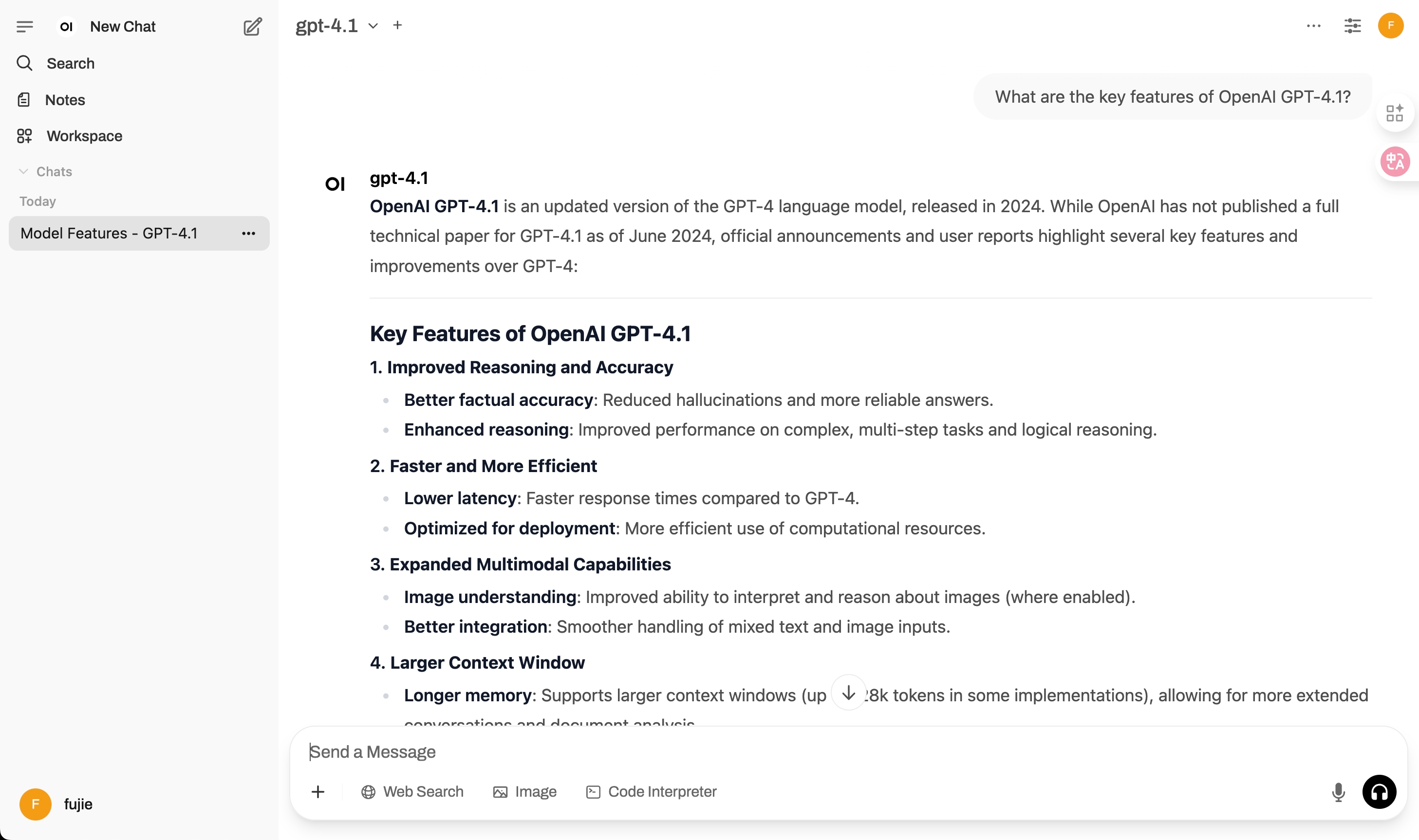
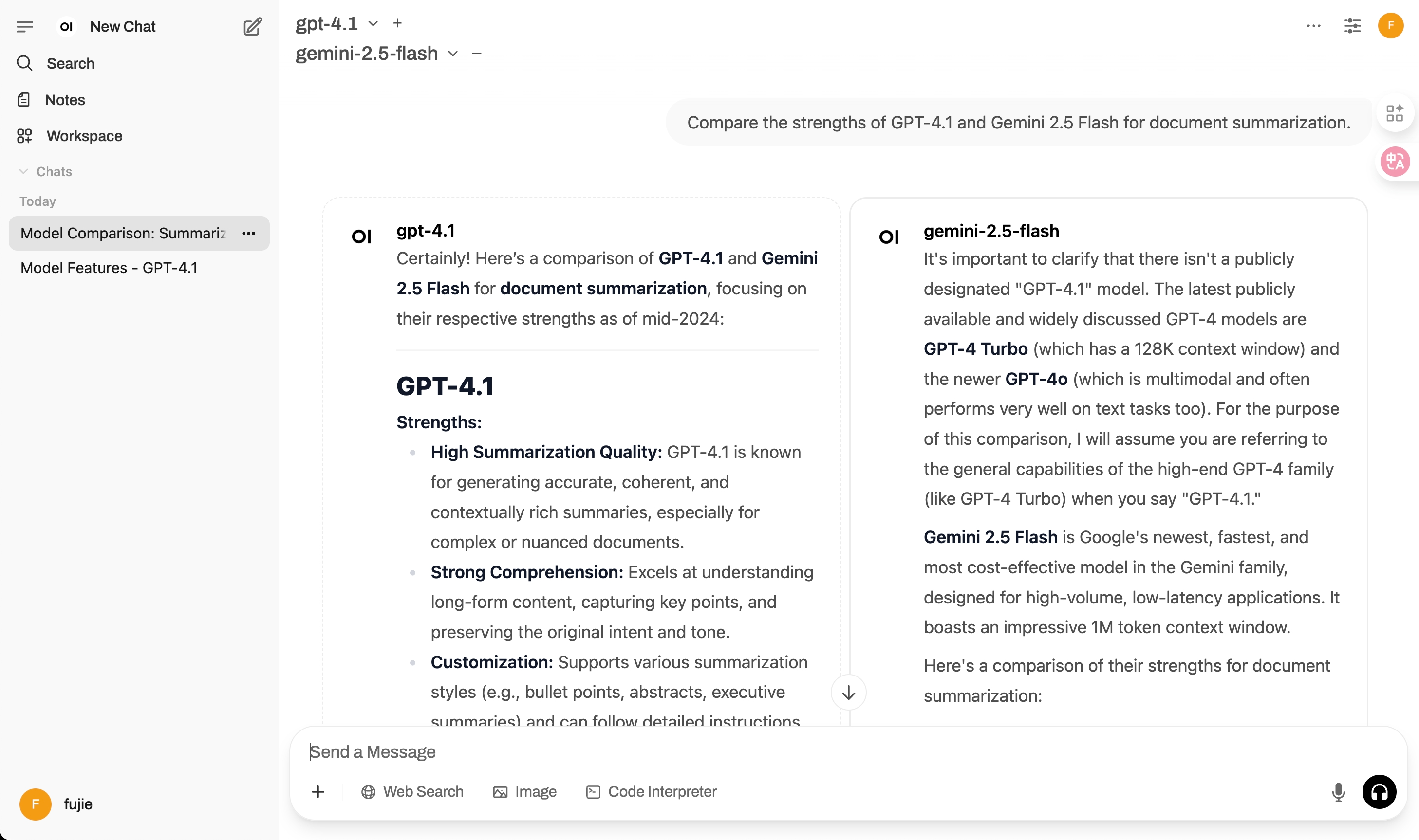
After running the above Python code, you can view the conversation and model comparison results in the Open WebUI web interface:
-
Single Model (
gpt-4.1):
The chat history will display your input question and the GPT-4.1 model's response in the conversational timeline.
-
Parallel Models (
gpt-4.1&gemini-2.5-flash):
The chat will show a side-by-side (or grouped) comparison of the responses from both models to the same input, often tagged or color-coded by model.
Tip:
The web UI visually distinguishes responses using the model name. You can expand, collapse, or copy each answer, and also tag, organize, and search your chats directly in the interface.
🧠 Advanced Chat Examples
1. Using Tools (Functions)
If you have tools configured in your Open WebUI instance (like a weather tool or a web search tool), you can specify which ones to use in a request.
# Assumes you have a tool with the ID 'search-the-web-tool' configured on your server.
# This tool would need to be created in the Open WebUI "Tools" section.

result = client.chat(
    question="What are the latest developments in AI regulation in the EU?",
    chat_title="AI Regulation News",
    model_id="gpt-4.1",
    tool_ids=["search-the-web-tool"] # Pass the ID of the tool to use
)

if result:
    print(result['response'])
2. Multimodal Chat (with Images)
Send images along with your text prompt to a vision-capable model.
# Make sure 'chart.png' exists in the same directory as your script.
# The model 'gpt-4.1' is vision-capable.

result = client.chat(
    question="Please analyze the attached sales chart and provide a summary of the trends.",
    chat_title="Sales Chart Analysis",
    model_id="gpt-4.1",
    image_paths=["./chart.png"] # A list of local file paths to your images
)

if result:
    print(result['response'])
3. Switching Models in the Same Chat
You can start a conversation with one model and then switch to another for a subsequent question, all within the same chat history. The client handles the state seamlessly.
# Start a chat with a powerful general-purpose model
result_1 = client.chat(
    question="Explain the theory of relativity in simple terms.",
    chat_title="Science and Speed",
    model_id="gpt-4.1"
)
if result_1:
    print(f"GPT-4.1 answered: {result_1['response']}")

# Now, ask a different question in the SAME chat, but switch to a fast, efficient model
result_2 = client.chat(
    question="Now, what are the top 3 fastest land animals?",
    chat_title="Science and Speed",   # Use the same title to continue the chat
    model_id="gemini-2.5-flash"  # Switch to a different model
)
if result_2:
    print(f"\nGemini 2.5 Flash answered: {result_2['response']}")

# The chat_id from both results will be the same.
if result_1 and result_2:
    print(f"\nChat ID for both interactions: {result_1['chat_id']}")
4. Batch Model Permissions Management
You can manage permissions for multiple models at once, supporting public, private, and group-based access control.
# Set multiple models to public access
result = client.batch_update_model_permissions(
    model_identifiers=["gpt-4.1", "gemini-2.5-flash"],
    permission_type="public"
)

# Set all models containing "gpt" to private access for specific users
result = client.batch_update_model_permissions(
    model_keyword="gpt",
    permission_type="private",
    user_ids=["user-id-1", "user-id-2"]
)

# Set models to group-based permissions using group names
result = client.batch_update_model_permissions(
    model_keyword="claude",
    permission_type="group",
    group_identifiers=["admin", "normal"]  # Group names will be resolved to IDs
)

print(f"✅ Successfully updated: {len(result['success'])} models")
print(f"❌ Failed to update: {len(result['failed'])} models")

# List available groups for permission management
groups = client.list_groups()
if groups:
    for group in groups:
        print(f"Group: {group['name']} (ID: {group['id']})")
5. Archive Chat Sessions
You can archive chat sessions individually or in bulk based on their age and folder organization.
from openwebui_chat_client import OpenWebUIClient

client = OpenWebUIClient("http://localhost:3000", "your_token_here", "gpt-4.1")

# Archive a specific chat
success = client.archive_chat("chat-id-here")
if success:
    print("✅ Chat archived successfully")

# Bulk archive chats older than 30 days that are NOT in folders
results = client.archive_chats_by_age(days_since_update=30)
print(f"Archived {results['total_archived']} chats")

# Bulk archive chats older than 7 days in a specific folder
results = client.archive_chats_by_age(
    days_since_update=7,
    folder_name="OldProjects"
)
print(f"Archived {results['total_archived']} chats from folder")

# Get detailed results
for chat in results['archived_chats']:
    print(f"Archived: {chat['title']}")

for chat in results['failed_chats']:
    print(f"Failed: {chat['title']} - {chat['error']}")
Archive Logic:
- Without folder filter: Archives only chats that are NOT in any folder
- With folder filter: Archives only chats that are IN the specified folder
- Time filter: Only archives chats not updated for the specified number of days
- Parallel processing: Uses concurrent processing for efficient bulk operations
6. Using Prompts with Variable Substitution
Create and use interactive prompts with dynamic variable substitution for reusable AI interactions.
7. Deep Research Agent
Initiate an autonomous research agent to perform a multi-step investigation on a topic. The agent will plan and execute research steps, with the entire process visible as a multi-turn chat in the UI, culminating in a final summary report.
# Start a research agent to analyze a topic
result = client.deep_research(
    topic="The impact of generative AI on the software development industry",
    num_steps=3,  # The agent will perform 3 plan-execute cycles
    general_models=["llama3"],
    search_models=["duckduckgo-search"] # Optional: models with search capability
)

if result:
    print("--- Final Report ---")
    print(result.get('final_report'))
    print(f"\\n👉 View the full research process in the UI under the chat titled '{result.get('chat_title')}'.")
from openwebui_chat_client import OpenWebUIClient

client = OpenWebUIClient(
    base_url="http://localhost:3000",
    token="your-bearer-token",
    default_model_id="gpt-4.1"
)

# Create a prompt with variables
prompt = client.create_prompt(
    command="/summarize",
    title="Article Summarizer",
    content="""Please summarize this {{document_type}} for a {{audience}} audience:

Title: {{title}}
Content: {{content}}

Provide a {{length}} summary focusing on {{key_points}}."""
)

# Extract variables from prompt
variables = client.extract_variables(prompt['content'])
print(f"Variables found: {variables}")

# Substitute variables with actual values
variables_data = {
    "document_type": "research paper",
    "audience": "general",
    "title": "AI in Healthcare",
    "content": "Artificial intelligence is transforming...",
    "length": "concise",
    "key_points": "main findings and implications"
}

# Get system variables and substitute
system_vars = client.get_system_variables()
final_prompt = client.substitute_variables(
    prompt['content'],
    variables_data,
    system_vars
)

# Use the processed prompt in a chat
result = client.chat(
    question=final_prompt,
    chat_title="AI Healthcare Summary"
)

print(f"Summary: {result['response']}")
Prompt Features:
- Variable Types: Support for text, select, date, number, checkbox, and more
- System Variables: Auto-populated CURRENT_DATE, CURRENT_TIME, etc.
- Batch Operations: Create/delete multiple prompts efficiently
- Search & Filter: Find prompts by command, title, or content
- Interactive Forms: Complex input types for user-friendly prompt collection
🔑 How to get your API Key
- Log in to your Open WebUI account.
- Click on your profile picture/name in the bottom-left corner and go to Settings.
- In the settings menu, navigate to the Account section.
- Find the API Keys area and Create a new key.
- Copy the generated key and set it as your
OUI_AUTH_TOKENenvironment variable or use it directly in your client code.
📚 API Reference
💬 Chat Operations
| Method | Description | Parameters |
|---|---|---|
chat() |
Start/continue a single-model conversation with support for follow-up generation options | question, chat_title, model_id, folder_name, image_paths, tags, rag_files, rag_collections, tool_ids, enable_follow_up, enable_auto_tagging, enable_auto_titling |
stream_chat() |
Start/continue a single-model streaming conversation with real-time updates | question, chat_title, model_id, folder_name, image_paths, tags, rag_files, rag_collections, tool_ids, enable_follow_up, enable_auto_tagging, enable_auto_titling |
parallel_chat() |
Start/continue a multi-model conversation with parallel processing | question, chat_title, model_ids, folder_name, image_paths, tags, rag_files, rag_collections, tool_ids, enable_follow_up, enable_auto_tagging, enable_auto_titling |
process_task() |
Execute autonomous multi-step task processing with iterative problem-solving | question, model_id, tool_server_ids, knowledge_base_name, max_iterations |
stream_process_task() |
Stream autonomous multi-step task processing with real-time updates | question, model_id, tool_server_ids, knowledge_base_name, max_iterations |
🛠️ Chat Management
| Method | Description | Parameters |
|---|---|---|
rename_chat() |
Rename an existing chat | chat_id, new_title |
set_chat_tags() |
Apply tags to a chat | chat_id, tags |
update_chat_metadata() |
Regenerate and update tags and/or title for an existing chat | chat_id, regenerate_tags, regenerate_title |
switch_chat_model() |
Switch the model(s) for an existing chat | chat_id, new_model_id |
create_folder() |
Create a chat folder for organization | folder_name |
list_chats() |
Get list of user's chats with pagination support | page |
get_chats_by_folder() |
Get chats in a specific folder | folder_id |
archive_chat() |
Archive a specific chat | chat_id |
archive_chats_by_age() |
Bulk archive chats based on age and folder criteria | days_since_update, folder_name |
🤖 Model Management
| Method | Description | Parameters |
|---|---|---|
list_models() |
List all available models for the user, including base models and user-created custom models. Excludes disabled base models. Corresponds to the model list shown in the top left of the chat page. | None |
list_base_models() |
List all base models that can be used to create variants. Includes disabled base models. Corresponds to the model list in the admin settings page, including PIPE type models. | None |
list_custom_models() |
List custom models that users can use or have created (not base models). | None |
list_groups() |
List all available groups for permission management | None |
get_model() |
Retrieve details for a specific model with auto-retry on creation | model_id |
create_model() |
Create a detailed, custom model variant with full metadata | model_id, name, base_model_id, description, params, capabilities, ... |
update_model() |
Update an existing model entry with granular changes | model_id, access_control, **kwargs |
delete_model() |
Delete a model entry from the server | model_id |
batch_update_model_permissions() |
Batch update access control permissions for multiple models | model_identifiers, model_keyword, permission_type, group_identifiers, user_ids, max_workers |
📚 Knowledge Base Operations
| Method | Description | Parameters |
|---|---|---|
create_knowledge_base() |
Create a new knowledge base | name, description |
add_file_to_knowledge_base() |
Add a file to an existing knowledge base | kb_id, file_path |
get_knowledge_base_by_name() |
Retrieve a knowledge base by its name | name |
delete_knowledge_base() |
Delete a specific knowledge base by ID | kb_id |
delete_all_knowledge_bases() |
Delete all knowledge bases (bulk operation) | None |
delete_knowledge_bases_by_keyword() |
Delete knowledge bases whose names contain keyword | keyword |
create_knowledge_bases_with_files() |
Create multiple knowledge bases and add files to each | kb_file_mapping |
📝 Notes API
| Method | Description | Parameters |
|---|---|---|
get_notes() |
Get all notes for the current user with full details | None |
get_notes_list() |
Get a simplified list of notes with basic information | None |
create_note() |
Create a new note with optional metadata and access control | title, data, meta, access_control |
get_note_by_id() |
Retrieve a specific note by its ID | note_id |
update_note_by_id() |
Update an existing note with new content or metadata | note_id, title, data, meta, access_control |
delete_note_by_id() |
Delete a note by its ID | note_id |
📝 Prompts API
| Method | Description | Parameters |
|---|---|---|
get_prompts() |
Get all prompts for the current user | None |
get_prompts_list() |
Get prompts list with detailed user information | None |
create_prompt() |
Create a new prompt with variables and access control | command, title, content, access_control |
get_prompt_by_command() |
Retrieve a specific prompt by its slash command | command |
update_prompt_by_command() |
Update an existing prompt by its command | command, title, content, access_control |
delete_prompt_by_command() |
Delete a prompt by its slash command | command |
search_prompts() |
Search prompts by various criteria | query, by_command, by_title, by_content |
extract_variables() |
Extract variable names from prompt content | content |
substitute_variables() |
Replace variables in prompt content with values | content, variables, system_variables |
get_system_variables() |
Get current system variables for substitution | None |
batch_create_prompts() |
Create multiple prompts in a single operation | prompts_data, continue_on_error |
batch_delete_prompts() |
Delete multiple prompts by their commands | commands, continue_on_error |
📊 Return Value Examples
Chat Operations Return:
{
    "response": "Generated response text",
    "chat_id": "chat-uuid-string",
    "message_id": "message-uuid-string",
    "sources": [...]  # For RAG operations
}
Parallel Chat Returns:
{
    "responses": {
        "model-1": "Response from model 1",
        "model-2": "Response from model 2"
    },
    "chat_id": "chat-uuid-string",
    "message_ids": {
        "model-1": "message-uuid-1",
        "model-2": "message-uuid-2"
    }
}
Knowledge Base/Notes Return:
{
    "id": "resource-uuid",
    "name": "Resource Name",
    "created_at": "2024-01-01T00:00:00Z",
    "updated_at": "2024-01-01T00:00:00Z",
    ...
}
🛠️ Troubleshooting
- Authentication Errors: Ensure your bearer token is valid.
- Model Not Found: Check that the model IDs are correct (e.g.,
"gpt-4.1","gemini-2.5-flash") and available on your Open WebUI instance. - Tool Not Found: Ensure the
tool_idsyou provide match the IDs of tools configured in the Open WebUI settings. - File/Image Upload Issues: Ensure file paths are correct and the application has the necessary permissions to read them.
- Web UI Not Updating: Refresh the page or check the server logs for any potential errors.
🤝 Contributing
Contributions, issues, and feature requests are welcome!
Feel free to check the issues page or submit a pull request.
📄 License
This project is licensed under the GNU General Public License v3.0 (GPLv3).
See the LICENSE file for more details.
 Fu-Jie