

 FriendsOfSylius
add CSV and Excel importer for customers

I think we can add it by ourself following the Development documentation ??

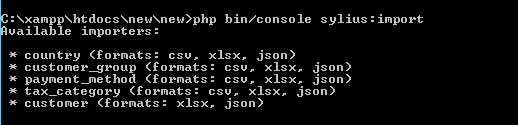 Available importers show that in my app may upload with Excel, but always show Skip 1.
 and here is my Excel
 any clue of this??
@stevangoldduck Just guessing after having looked at the code, but maybe the empty values in Birthday could be a problem.
The skipped value is only set in the ResourceImporter, if ha row is incomplete.
My next guess would be that the FALSE in Subscribed_to_newsletter could be a problem.
Have you tried it with a csv-file yet, maybe it is a xlxs-related problem?

I just wanna close this.
- Follow the Development guide for Importer
- Just make sure your file as same as like this picture below for Excel
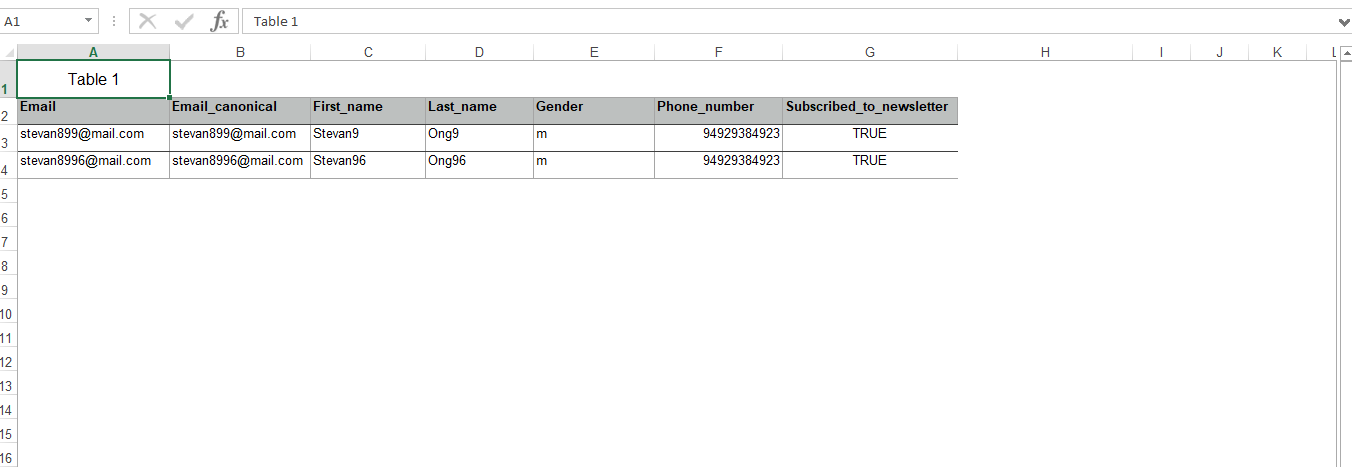 Match the column with your HeaderKey in Generic ResourceProcessor
 - For CSV file format, you can check the examples in the tests/Behat/Resources/fixtures
Did you try and remove the first row and move everything else up so the table starts at 1-A?
Yeah i've tried it and still skipped. With the example above, the data can be imported.
I don't know why it's happening, we can't exactly put the data from A-1 row.