

 FriendsOfShopware
Sending test emails in administration doesn't use template files
PHP Version
7.4
Shopware Version
6.4.10
Actual behaviour
When I send a test email from Admin -> Settings-> Email templates it does not use the template from file system, but the ones from database. Same happens when clicking the preview icon.
Expected behaviour
When the plugin is activated, preview and send test email functions should also use the templates from theme file system
Steps to Reproduce?
- Log in into shopwares admin area
- go to Settings -> Email templates
- choose Order Confirmation
- click an "send test email" symbol on the right
- enter mail recipient, choose sales channel
- click send button

I guess I would rather remove the entire module using an option as I assume that people don't want that module anymore as templates defines it 🤔

I guess I would rather remove the entire module using an option as I assume that people don't want that module anymore as templates defines it 🤔
I would like to continue using this feature as it is much more convenient than placing a new order, registering an account, etc. every time I make a change to the template.
I guess I would rather remove the entire module using an option as I assume that people don't want that module anymore as templates defines it 🤔
I would like to continue using this feature as it is much more convenient than placing a new order, registering an account, etc. every time I make a change to the template.
Maybe a command to send test mails instead? :D

People still want that test feature. Showed the plugin to my project manager today and the feature was missed right away. It is much more easier to use the test email than to generate the neccessary mail by registration or whatever.

Hi,
i got it working for me, when i click on the test-mail send button i get the renderet Theme file instead of the database content. I replaced the contents in the Database with simple Theme Extend Snippets like so:
{% sw_extends "@myTheme/email/en-GB/order_confirmation_mail/html.twig" %}
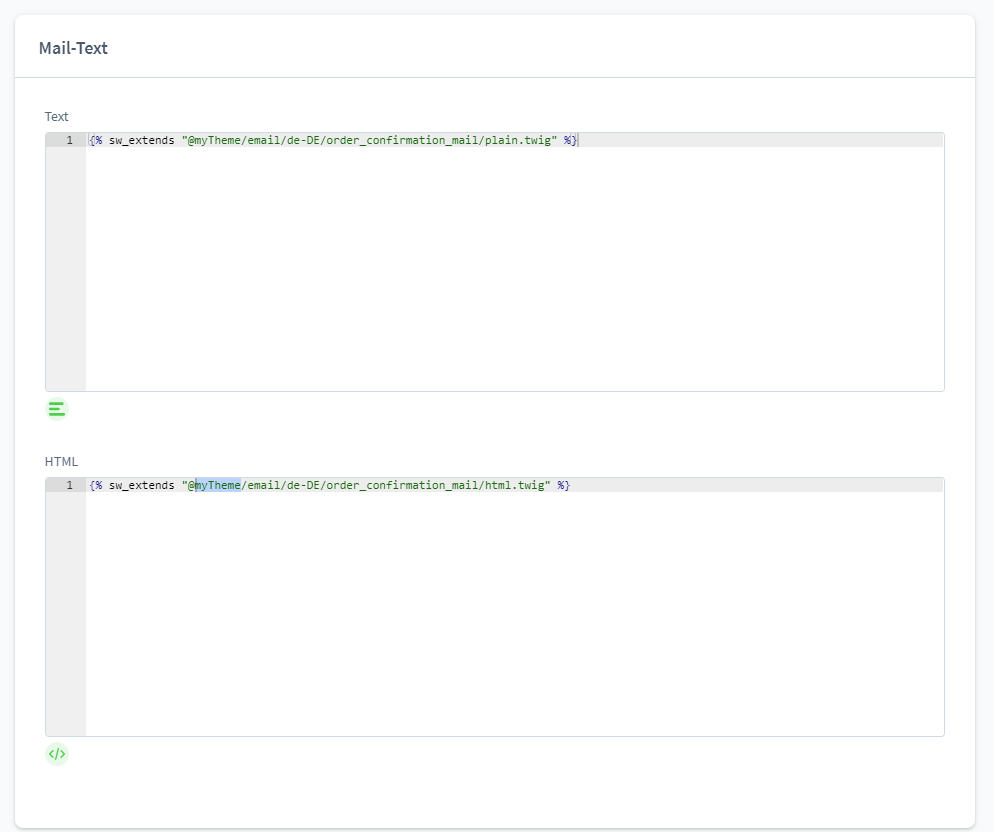
Don yet know if there will be a problem somewhere else, but maybe you want to give it a shot.
Edit: Note: Order Items and Order Adresses are empty when using the function in the backend!
Edit2: The Preview also works when changing the entries in the backend. But they also do not show the addresses or order items

Hi,
Is there any news on this topic? It would be nice to have a preview option to see what the current template looks like. Everything else is a bit difficult.
@danielDigitalArt Unfortunately, this does not work for me, as SW 6 interprets this as a syntax error.
Best regards

I think we could get the preview-functionality working with the template-files, but we'd need a slight non-breaking change in the administration:
In the component that triggers the API-Call to \Shopware\Core\Content\MailTemplate\Api\MailActionController::send we'd need to provide the mailTemplateId and mailTemplateTypeId to the API. Thats here
We could then use some of the exisiting events, for example the MailBeforeValidateEvent to replace the templates with the content from the filesystem. This would more or less be the same logic as currently implemented in the FlowSubscriber, so I think we could just move the logic to a subscriber for the MailBeforeValidateEvent.
What do you guys think? I'd be willing to tackle this further, of course the precondition is that we can get the change merged in the administration :)

@danielDigitalArt Unfortunately, this does not work for me, as SW 6 interprets this as a syntax error.
Best regards
@mbuchwaldt is just retested this in SW 6.6.6.1 and it still worked. Only missing translated Values and Address-Data, but the template itself is loaded.
Hi,
i got it working for me, when i click on the test-mail send button i get the renderet Theme file instead of the database content. I replaced the contents in the Database with simple Theme Extend Snippets like so:
{% sw_extends "@myTheme/email/en-GB/order_confirmation_mail/html.twig" %}
@danielDigitalArt can you share the table name and entry i need to change?

@niklaswolf I think on the call is everything we need (looking on Version 6.6.9.0 here):
{
    "contentHtml": "<div style=\"font-family:arial; font-size:12px;\">\n\n    {% if order.orderCustomer.salutation %}{{ order.orderCustomer.salutation.translated.letterName ~ ' ' }}{% endif %}{{ order.orderCustomer.firstName }} {{ order.orderCustomer.lastName }},<br>\n    <br>\n    Im Anhang dieser E-Mail finden Sie die Stornorechnung für Ihre Bestellung mit der Nummer: {{ order.orderNumber }}<br>\n    <br>\n    Sollten Sie Fragen haben, zögern Sie nicht, uns zu kontaktieren.\n    <br>\n</div>\n",
    "contentPlain": "{% if order.orderCustomer.salutation %}{{ order.orderCustomer.salutation.translated.letterName ~ ' ' }}{% endif %}{{ order.orderCustomer.firstName }} {{ order.orderCustomer.lastName }},\n\nIm Anhang dieser E-Mail finden Sie die Stornorechnung für Ihre Bestellung mit der Nummer: {{ order.orderNumber }}\n\nSollten Sie Fragen haben, zögern Sie nicht, uns zu kontaktieren.\n",
    "mailTemplateData": {
        "order": {
            "orderNumber": "10060",
            "orderCustomer": {
                "firstName": "Max",
                "lastName": "Mustermann"
            }
        },
        "salesChannel": {
            "name": "Storefront"
        }
    },
    "recipients": {
        "[email protected]": "[email protected]"
    },
    "salesChannelId": "fe6c20cd96a14619ad7cdd6110675fe6",
    "mediaIds": [],
    "subject": "New document for your order",
    "senderName": "{{ salesChannel.name }}",
    "documentIds": [],
    "testMode": true,
    "mailTemplateTypeId": "c7deebf5eb4b457baac3e7f917c7cf04",
    "mailTemplateId": "a08663ff9e0a466b892f86177e12bfd1"
}

@Schrank you are right, because my PR was merged :) Should be there since 6.6.7.0
So now we could progress with https://github.com/FriendsOfShopware/FroshPlatformTemplateMail/issues/34#issuecomment-2363260413