

 FreeTubeApp
I can't get Potplayer to work as a the external player
Guidelines
- [X] I have encountered this bug in the latest release of FreeTube.
- [X] I have searched the issue tracker for a bug report that matches the one I want to file, without success.
Describe the bug
I use Potplayer instead of VLC so I want to use it even with Freetube, and since the command line is very simple like in VLC, i expected to work, but the only thing the eternal button does is launch Potplayer and no video is even attempted to be openned, ie nothing happens once Potplayer is launched.
outside Freetube, in order to open a youtube link, The command I use is "PotPlayerMini64.exe http://youtube_link", just like vlc. but in Freetube, when I enter the path for Potplayer and then choose a video to be played with Potplayer, the player is launched and nothing else happens.
Here is the command line for Potplayer
Usage: PotPlayerMini64.exe ["content"] [/switch]
"content" :You can specify a file, folder or URL as content. -You can specify multiple contents by separating them with a space. -You can specify titles for URLs by separating them with a backslash () at the end of URLs. ("http://...\title of this url") -Wildcards (*,?) are allowed. -The setting "Misc > When Files Opened" affects this when a file is specified.
	:Plays streaming media from stdin
          -Example usage: youtube-dl.exe -o - -f best[ext=webm] https://www.youtube.com/watch?v=l22sS8DEiVU | PotPlayerMini64.exe -
/filedlg :Opens the open file dialog box. /urldlg :Opens the open URL dialog box. /folderdlg :Opens the open folder dialog box. /simple :Opens file navigator. /cap :Runs screen capture. /cam :Runs webcam/Other devices. /atv[:ch] :Runs Analog TV device from the specified channel. /dtv[:ch[-idx]] :Runs Digital TV device from the specified channel. /dvd :Runs DVD device. /cd[:drive] :Runs the specified drive. /add :Appends the specified content(s) into playlist. /insert :Inserts the specified content(s) just below the item being played in playlist.(Or adds at the end of playlist if there is nothing playing at the time) /autoplay :Plays the last played item. /same :Loads and plays the specified contents as multiple streams. -You can independently select loaded video and audio streams under Video/Audio/Filters context menus. /sort :Sorts the specified contents by name before adding them into playlist. /randomize :Sorts the specified contents by randomly before adding them into playlist. /new :Plays the specified content(s) within a new instance of the program. -The setting "F5 > General > Multiple instances" does not affect this. /current :Plays the specified content(s) within an existing instance of the program. -The setting "F5 > General > Multiple instances" does not affect this. /clipboard :Appends content(s) from clipboard into playlist and starts playback immediately. /seek=time :Starts playback of the specified/last played content from the specified time point. -time format is: hh:mm:ss.ms (OR specify seconds only e.g. /seek=1800 to start at 30th min) /sub="subfile" :Loads the specified subtitle(s) from the specified paths or URLs. /user_agent="ua":Sets user agent header for HTTP(S) requests. /referer="ref" :Sets referer header for HTTP(S) requests. /headers="hdrs" :Appends the specified header(s) to HTTP(S) requests. /title="title" : Use title config="name" :Activates the specified preset.
Expected Behavior
To play the video.
Issue Labels
content not loading
FreeTube Version
v0.15
Operating System Version
w10 1809
Installation Method (If applicable)
No response
Last Known Working FreeTube Version (If Any)
No response
Primary API used
No response
Additional Information
No response
Nightly Build
- [ ] I have encountered this bug in the latest nightly build.

@Janaue is this still an issue for u on v0.17.1?

Yes it still does not work with potplayer So to recap, I use vlc portable and i put its path like this
 and it works with a stock profile for vlc...
then I use potplayer portable from https://portableapps.com/apps/music_video/potplayer-portable and I just put its path mimicking VLCportable, the player launches but nothing happens On the task manage by windows, here is the command line used by potplayer

I bet it is the --rate=1.25 which is unknown for potplayer. So i think there should be an option just to passe a naked URL to a custom player.
This issue is stale because it has been open 28 days with no activity. Remove stale label or comment or this will be closed in 7 days.
![github-actions[bot] avatar](https://avatars.githubusercontent.com/in/15368?v=4 "Published by a pub.dev verified publisher")
This issue is stale because it has been open 28 days with no activity. Remove stale label or comment or this will be closed in 7 days.
This issue is stale because it has been open 28 days with no activity. Remove stale label or comment or this will be closed in 7 days.
I am on v0.18.0-nightly-2526 Bêta and there is still the flag --rate=1.25 which prevents potplayer to read the video, when using the ''VLC"' entry to define the path to potplayer. It is better to offer an option ''generic player'' which transmits only the URL.
I would also like to add support for potplayer (cmdline command: potplayer64mini) or generic player as well.

This issue is stale because it has been open 28 days with no activity. Remove stale label or comment or this will be closed in 7 days.
This issue is stale because it has been open 28 days with no activity. Remove stale label or comment or this will be closed in 7 days.
Hello,
I was able to get it working using v0.18.0-Beta, almost perfectly.
i copied the filename of potplayer and rename it "VLCPortable.exe"

and it works BUT there is an extra file which is actually an argument, see the picture below:
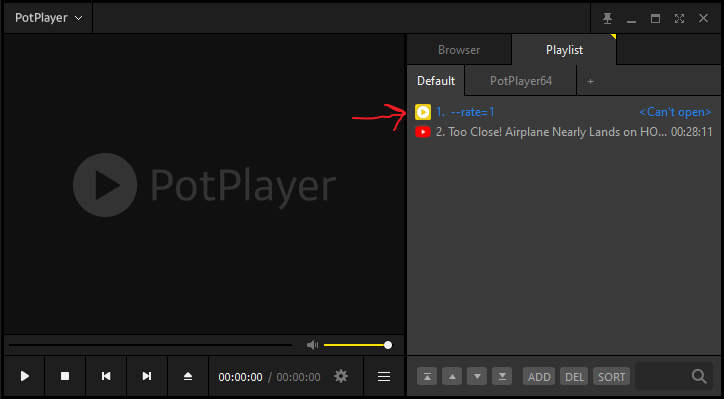
I saw the more info via potplayer, it's \url\ --rate=1
I wasn't sure how to correct this? 🤔
EDIT:
forgot to mention this:
i run the command VLCPortable.exe blah/blah-URL via powershell and it worked fine.

Hi @Janaue the title of this bug report indicates that there is a bug with FT because the assumption is made that if VLC is supported, Potplayer should be too because it is similar in use. This unfortunately is not the case. I would like u to create a Feature request instead. I'll be closing this as this isnt a bug with FT.