

 FreeLanguageTools
Error 'NoneType' object has no attribute 'write'
While trying to add note I get this error " 'NoneType' object has no attribute 'write' "
My anki settings :


What OS? Latest version? Also, how did the error appear: on the status bar, or on a warning window, or on the standard output?

Windows 11
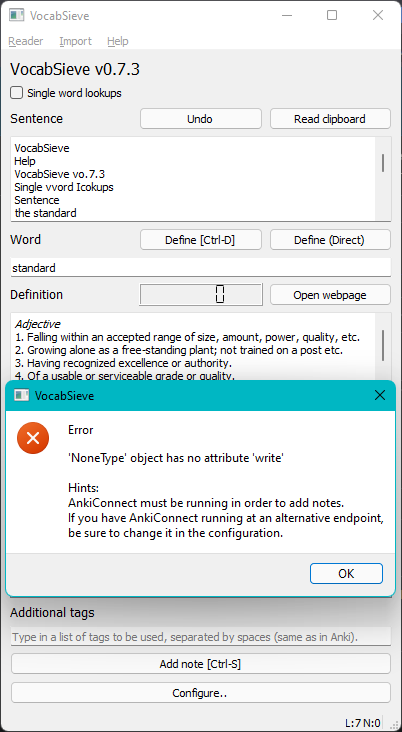 The sentence was " the standard output " it looks different because it did clipboard autocopy while taking screenshot.
Anki is running.
The sentence was " the standard output " it looks different because it did clipboard autocopy while taking screenshot.
Anki is running.
There might have been a bug in the earlier implementation which suppresses standard output when making a note. Can you try using this latest build? https://ci.appveyor.com/api/buildjobs/w6soviu9n0gukkw8/artifacts/cx_freeze%2Fdist%2FVocabSieve-0.8.0-win64.msi
Though, according to my testing, it works normally in a Windows 10 VM. If you would like to help with debugging and are at least marginally familiar with python, I suggest you join the Telegram or Element chat room.
That warning window appears because there is an underlying error which is masked by the exception catching mechanism. I removed the exception catching code temporarily. Try installing this version: https://ci.appveyor.com/api/buildjobs/b0a0yy0iuqvnylb5/artifacts/cx_freeze%2Fdist%2FVocabSieve-0.8.0-win64.msi
This time, it should give a longer error with more details, though it might crash.
The problem is with the latest anki verson. It works 2.1.49 or lower.
I was using 2.1.49 for testing, since 2.1.51 is not considered stable yet, and Anki has a tendency to break addons on each release in mysterious ways. However, I installed 2.1.51 (qt5 version) on my win10 vm, and it seems to work pretty normally, so I am still not able to reproduce what you are experiencing. Maybe at some point I'll get a win11 vm for testing, but for now, probably best to stick to 2.1.49.
Does this still happen? From what I tested with win10, I have not seen anything like this.