

 Fox2Code
Update module when its repo is switched
Is your feature request related to a problem? Please describe. For example, the "NFC Screen Off" module recently switched from Magisk Modules Repo to Androidacy Modules Repo. I didn't know there was an update available.
Describe the solution you'd like An ability to update a module when it changes repos.
Describe alternatives you've considered If there are concerns over "fraudulent" modules, at least detect the repo change and alert the user, and let them decide.
Thanks for this handy app!

My app detect updates based on version code, the same version of a module can be on multiple repos.
Magisk-Modules-Repo links started to die so I had to remove it as a repository, Androidacy should have the same modules.
I only add repos that do check and remove fraudulent/malicious modules.
If you find any malicious or fraudulent code in a module, please report it to the repository hosting that module directly.

Also if a module is malicious, high chance it has installed some kind of malware elsewhere in the phone, showing update has no benefits, but I asked my telegram chat if it was ok if the app contained a basic Antivirus and they said they were ok with it.
Also multiple repo are allowed to have the same modules, I think what you are asking is more of an annoyance that anything else, if I'm to implement a feature like this it have to be not annoying for the user.
I don't see a way to implement such mechanism effectively, and neither a way to make this effective against fraud.
Also please note that my app currently don't keep track from which repo a module was installed.
Good to know, thanks. Was worth a shot to ask but I didn't know if it was a painless thing or a can of worms to open up. Don't open that can of worms, heh.
Thanks again for this app. It's very handy!
Well just report fraudulent modules to the correct repository, you can also join the telegram channel to report malicious modules. Telegram: https://t.me/Fox2Code_Chat
I've deleted/uninstalled, via FMMM, that module in question, rebooted, reinstalled via FMMM (not install from storage), rebooted, and it's still not acting as if it's paired to the repo it was downloaded from. The "info" button/icon doesn't exist.
Since I don't want to miss out on another missed update, do you know where the problem may exist in this situation? Do I reach out to the module creator, or Magisk?
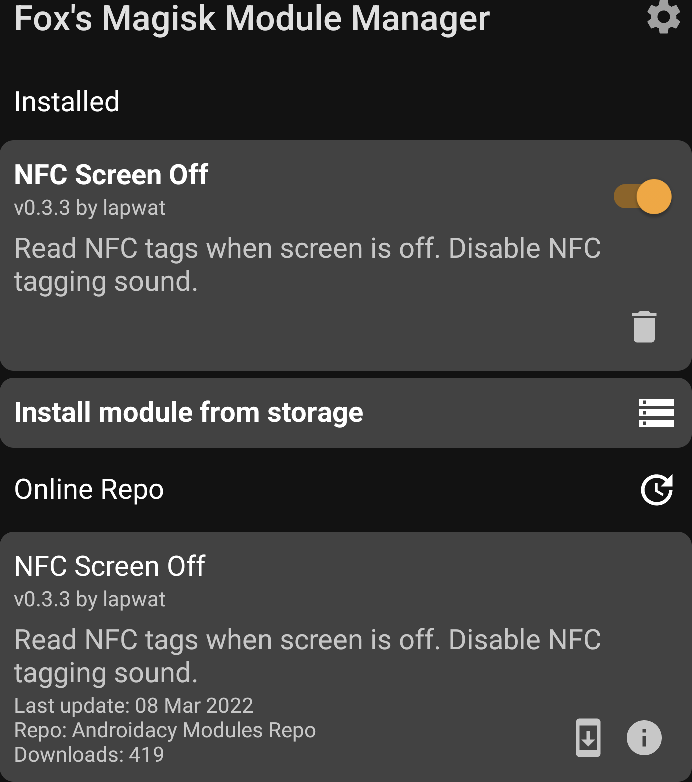
REPOSTING BECAUSE: github posted twice, I deleted one comment, and now I cannot edit the remaining comment for some reason, and the comment doesn't show when I browse not logged in. Unsure of what's going on.
I noticed that for another module, Magisk Bootloop Protector, my installation shows "Magisk Modules Alt Repo", and the FMMM search shows it's only on "Androidacy Modules Repo". It looks like it exists on both repos when I search them independent of FMMM.
I'm inferring that to mean that FMMM makes it transparent to the user, and instead of showing two listings, it just sees that they're the same and doesn't show one? If so, then it seems like there's already some crossover that could allow for an update to be shown as available if, for some reason, it's removed from one repo and updated on the other.
If not, and there isn't some handy transparency applied, I did an installation (non-update, but an installation on top, as if it was an update) from the Androidacy Modules Repo via the FMMM search, rebooted, and it didn't update its repo association on the installed list to Androidacy Modules Repo. That has me concerned that it won't alert me of an update for any module, ever again, if it was once installed via one repository, and then it exists on a new repository and no longer on the old one. Does FMMM save "installed from" information, somehow and somewhere, but maybe there's a flag set which disallows updating from another repository, disallows update notifications from another repository, and also is not updating the FMMM database of "installed from" info even once a module has been deleted/uninstalled?
EDIT: Maybe there was a miscommunication on my initial post as well. The NFC module I mentioned was installed from the Magisk Modules Repo at v0.3.2. It no longer existed there and was on a new repo, at v0.3.3. There was an update available, but I never knew it because FMMM didn't display that an update was available. I happened to see it near the top of the list when I was scrolling through the most recently added/updated modules in the repos below.
@Jon8RFC it looks like some weird issue with version change detection. The app shows you the one from the repo that has a more recent update available.

I gotcha, thanks. Hopefully that can be resolved.
Describe alternatives you've considered If there are concerns over "fraudulent" modules, at least detect the repo change and alert the user, and let them decide.
Also to further clarify on the miscommunication--I'm not concerned about fraudulent modules. That statement was more of a preemptive argument in the event that the response to my request was something to the tune of "FMMM intentionally won't allow a module installed from repo ABC to be seamlessly updated from repo XYZ, because it could be a fake/fraudulent module"...with regard to why my module wasn't being shown to have an update available.
@Jon8RFC "I'm not concerned about fraudulent modules." I'm concerned about that too. But repos are community repos, so I don't own or manage them, they are by the community for the community. This is why I have such strict rules about module monitoring policy.
This issue is no longer being considered. The repo with the newest version will be used. You can, of course, reinstall from the new repo to force it to use that repo version.