
victory
 victory copied to clipboard
 FormidableLabs
Victory Native Stack Area not making correct graph
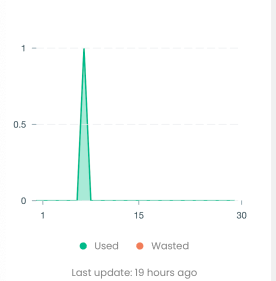
Hey, I'm using victory stack area chart but facing an issue that I'm getting value of y = 3 but in graph it's going over 4 in y axis as shown in pic below. Can anyone tell me how can fix that.
my code for stacked area chart
  <VictoryChart
          theme={VictoryTheme.material}
          height={300}
          containerComponent={
            <VictoryVoronoiContainer
              labels={datum => {
                if (datum.datum.y !== null && datum.datum.y !== 0) {
                  return `${datum.datum.day}: ${datum.datum.y} ${datum.datum.childName}`;
                } else {
                  return '';
                }
              }}
              labelComponent={
                <VictoryTooltip
                  renderInPortal={false}
                  style={stackedAreaStyle.toolTipTextColor}
                  flyoutStyle={stackedAreaStyle.toolTipFlyOut}
                />
              }
            />
          }
          width={370}>
          <VictoryStack height={200}>
            {!isEmpty && (
              <VictoryArea
                name={strings.WASTED}
                style={{
                  data: stackedAreaStyle.victoryAreaWaste,
                }}
                data={wastedData}
                y={(datum: any) => datum.y}
                // x={(datum: any) => datum.day}
              />
            )}

            {!isEmpty && (
              <VictoryArea
                name={strings.USED}
                style={{
                  data: stackedAreaStyle.victoryAreaUsed,
                }}
                data={usedData}
                y={(datum: any) => datum.y}
                // x={(datum: any) => datum.day}
              />
            )}
          </VictoryStack>
          <VictoryAxis
            fixLabelOverlap
            tickValues={numXAxis}
            style={stackedAreaStyle.xAxis}
            tickCount={3}
          />
          {!isEmpty ? (
            <VictoryAxis
              fixLabelOverlap
              dependentAxis
              orientation="left"
              style={areaChartStyles.yAxis}
              tickCount={2}
              crossAxis={false}
              tickFormat={y => y}
            />
          ) : (
            <VictoryAxis
              dependentAxis
              tickValues={areaChartYAxisStatic}
              orientation="left"
              style={areaChartStyles.yAxis}
            />
          )}
        </VictoryChart>

Have you tried to unwrap <VictoryArea /> from <VictoryStack />?
<VictoryChart ... >
  ...
  <VictoryArea ... />
  <VictoryArea ... />
  ...
</VictoryChart>

@vozaldi If I unwrap <VictoryArea /> from <VictoryStack /> then how can I make stack chart?
The <VictoryStack /> is accumulating your y values, that's why your y = 3 coordinate is exceeding it's original value.
const data1 = [{ x: 1, y: 2 }, { x: 2, y: 1 }];
const data2 = [{ x: 1, y: 3 }, { x: 2, y: 2 }];
                       ^
                       when inside <VictoryStack /> will become 2 + 3 = 5
Just by leaving both <VictoryArea /> unwrapped should fix your issue
@skanwarjeet try using transparent background for the <VictoryArea /> fill style. For example: fill: 'rgba(255,0,0,0.5)'
<VictoryArea
  ...
  style={{
    data: {
      stroke: 'green',
      strokeWidth: 2,
      fill: 'rgba(0, 255, 0, 0.33)',
    },
  }}
  ...
/>
@vozaldi it worked but if both area have same value then one is hiding.
This issue is stale because it has been open for 90 days with no activity. If there is no activity in the next 7 days, the issue will be closed.
![github-actions[bot] avatar](https://avatars.githubusercontent.com/in/15368?v=4 "Published by a pub.dev verified publisher")
This issue was closed because it has been inactive for 7 days since being marked as stale. Please open a new issue if you believe you are encountering a related problem.