

 FormidableLabs
Code gets garbled when I select it
I'm getting garbled text when I select text:

It seems like it happens when there are spaces in the code. It removes blank lines, and I notice the problem doesn't happen if there is no newlines.
Here is the example code in the screenshot:
() => {
  const Menu = ({ onSelect }) => (
    <Dropdown.Menu onSelect={onSelect}>
      <Dropdown.Item eventKey={1}>New File</Dropdown.Item>
      <Dropdown.Item eventKey={2}>New File with Current Profile</Dropdown.Item>
      <Dropdown.Item eventKey={3}>Download As...</Dropdown.Item>
      <Dropdown.Item eventKey={4}>Export PDF</Dropdown.Item>
      <Dropdown.Item eventKey={5}>Export HTML</Dropdown.Item>
      <Dropdown.Item eventKey={6}>Settings</Dropdown.Item>
      <Dropdown.Item eventKey={7}>About</Dropdown.Item>
    </Dropdown.Menu>
  )

  const MenuPopover = ({ onSelect, ...rest }) => (
    <Popover {...rest} full>
      <Menu onSelect={onSelect} />
    </Popover>
  )

  const trigger = React.useRef()

  return (
    <Whisper
      placement="bottomStart"
      trigger="click"
      triggerRef={trigger}
      speaker={<MenuPopover onSelect={() => trigger.current.hide()} />}
    >
      <Button>File</Button>
    </Whisper>
  )
}
If I remove the blank lines, it looks (correct) like this:
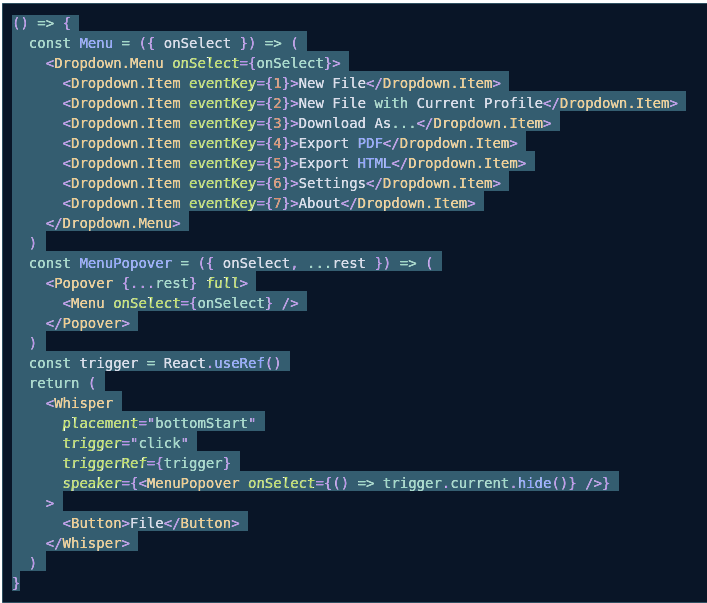

I can't seem to reproduce on codesandbox, so it might be something with my UI lib (rsuite.) I noticed I get the same issue if I put padding on the style of the editor. It looks like it applies it to the highlighted code, but not the textarea.

I think the issue is that we've got a fixed prop for react-simple-code-editor. It works by overlaying the highlighted code with a textarea, so it has to take extra care with the padding and has a separate prop for it: https://github.com/FormidableLabs/react-live/blob/master/src/components/Editor/index.js#L78
We'll either need to make it configurable or set it to zero. You can probably work around this for now by adding a border with the same background colour to your code highlighted area, or by wrapping it

Yep, I figured it out. I think rsuite was setting a height for .token or something.
I noticed that .token.plain (which seems to make the newlines) were 0-height. In my case I did this to fix it:
.token.plain {
  height: 1.43em;
}
I got the height by playing witt the size in dev-tools, and it seems to work even if I resize with ctrl+scroll.
Feel free to close this. As a sidenote, great lib! Super-useful for our styleguide.

@lealcy Could you provide some more information and a code example to reproduce? Which browser, font settings, and css are you using? Are you able to replicate the issue in our docs? https://commerce.nearform.com/open-source/react-live/docs

@lealcy Could you provide some more information and a code example to reproduce? Which browser, font settings, and css are you using? Are you able to replicate the issue in our docs? https://commerce.nearform.com/open-source/react-live/docs
Everything I'm using is default:
Edge 124.0.2478.51 (64 bits) with no extensions Theme: Light (High Contrast) Windows 11 ver. 10.0.22621.3447
That's the same I'm running as well, but I'm not able to reproduce it.
If you have custom CSS, sometimes line heights can interfere. Could you share some example code?