

 FormerLurker
[FR] G5 Bezier cubic spline
It might worth adding a branch for G5 interpolation for playing around.
This study compares G1 (linear) / G2_3 (arc) / G5 (cubic spline) movements and concludes: https://www.sciencedirect.com/science/article/pii/S2351978919311059
- G1 causes resonance because of sharp movements
- G2_3 were fastest
- G5 is 2nd fastest, but most precise and smallest gcode https://marlinfw.org/docs/gcode/G005.html
The authors already started monetizing on it: https://www.ulendo.io/ https://www.kickstarter.com/projects/s2a/ulendo-better-faster-3d-printing

@mrx23dot, ulendo looks like it is firmware, is it not? Not sure what's going on there, but it looks like maybe their motion planner is not only based on segments, like marlin. I've actually been thinking about this as well, and it makes sense. Curves are predictable all along the path of the curve, but you never know where the next G1 is going to take you :)
Regarding G5, I've thought about it. The process is a bit more complicated and the math isn't quite as pretty. I'm sure you could achieve better compression and tool-paths with G5. Without implementing it, it's hard to tell how much exactly. I don't think I've ever seen any complicated gcode with G5s before for reference.
I think another barrier (not one that is impossible to overcome) would be firmware. SO SO many people think arc welder is broken because their firmware is old, has arcs disabled, or has serious flaws in the implementation. That would change with time, of course. Anyway, it is still a good idea, and one I've put a lot of thought into, and I'll keep it on the agenda for further study.

Thanks for considering. We need to have goals to have a bleeding edge version :) https://marlinfw.org/docs/gcode/G005.html has a nice interactive demo what to expect from it.
I was mainly considering it for klipper (with the power of pi4) that gives you high speed out of the box, but since I saw it in marlin I thought I mention it. It easy to bottleneck marlin even on 32bit SKR at high feedrate.
ulendo calculates it in the cloud and feeds it via usb, so they can charge a license for it..
For the noobs it might worth creating a test GUI tool that instructs the printer to move a G3 via USB if that's a common problem. (or a button in octo) maybe with a feedback like home X via G3.
We need to have goals to have a bleeding edge version :)
Less than a year ago, that was arcwelder, lol! I agree though.
It easy to bottleneck marlin even on 32bit SKR at high feedrate.
I wish more people knew this. I hear so many people claiming there are 0 planner issues when printing from SD, even though there is plenty of evidence (side-by-sides using G2/G3 vs G1, surface defect before/afters, print time comparisons, etc..). I often feel like I'm wasting my breath when I try to explain otherwise. There is a lot of misinformation out there, though, and it's hard to sort it out. I am trying to put together a video that shows some of the evidence for my case.
For the noobs it might worth creating a test GUI tool that instructs the printer to move a G3 via USB if that's a common problem.
I have added a firmware checker in the latest release candidate for Octoprint. It does several things to detect if G2/G3 is enabled. Even still, I've gotten 'error' reports about firmware not having arcs enabled, as if it were a problem with the ArcWelder plugin... PPL just want it to work, and don't really understand what is going wrong, why it is going wrong, or where it is going wrong. Anyway, G2/G3 support has actually gotten better since arc welder came out, probably due, at least in part, to arcwelder itself, so that's good!
ulendo calculates it in the cloud and feeds it via usb, so they can charge a license for it..
Wasn't this a university project? Must EVERYTHING be monetized?? ug...
It's easy to see that 32bit+marlin can be a bottleneck, if you turn up the feedrate the LCD becomes unusably slow (to a point where you cannot stop your print).
Meanwhile as proof of concept is it possible to use arcwelder to round sharp moves/corners with arcs? It would act like a low pass filter. And mechanically speaking it would produce lower G forces so speed/acceleration could be turned up.
Funny, it reminds me of discussions in the 1990s about CNC controls and the ability of CAD/CAM software to generate circular, linear or spline interpolations. Finally 30 years later the CNCs have evolved, the integrated processing speeds and digital compressor have made this problem disappear completely and the generation of G1 trajectories is no longer a problem. I bet it will be the same thing pretty soon even on our lowCost printing machines.

Looks like someone already beat us to it (although it was abandoned 6years ago)
https://hackaday.io/project/7045-splinetravel download: https://github.com/DeepSOIC/SplineTravel create a 'presets' named folder next to the exe. Try to slice it, if it fails uncheck 'seam concealment' https://github.com/DeepSOIC/SplineTravel/wiki/Travel-re-generator-settings https://github.com/DeepSOIC/SplineTravel/wiki/How-to-guide results: https://hackaday.io/project/7045-splinetravel/log/23880-test-prints
It's written in VB so only runs on Windows.
@mrx23dot, thanks for the link! I'll take a look and see what it does. However based on this statement:
* blows up G-code size insanely (typical figure is three times, on objects with mostly straight lines this can be much worse a factor)
I don't think it's doing exactly what we think it's doing. I also can't find 'G5' anywhere in the code, but I found 'G1'. I will try it out and see what it's doing.
FYI, when I started arc welder, I found other projects that were attempting to do what arc-welder is doing, but none that I saw could quite pull it off. However, if I DO find something that does this (g5 implementation), I'm not going to re-invent the wheel if I can help it.
Yeah, that implementation is just a proof of concept, it suppose to smoothen moves, but still keep compatibility with G1, so fast possible tool path but big files, thus it will need a klipper at least, maybe marlin+PC host. Worst case we could run an arcwelder on it. (800KB -> 12MB)
It does some weird stuff that's for sure, maybe it was only ment to be for big/simple objects?
 there are some spline movements, only not at the correct place.
 files.zip
Looks like marlin has already implented it #define BEZIER_CURVE_SUPPORT https://github.com/MarlinFirmware/Marlin/pull/3744
Hi, SplineTravel author here, if you have any questions i can answer them.
So far, i have not really understood what your project is about.
SplineTravel does not use G5, it tessellates splines into straight-line segments (G1-s).

Cheers for joining, the goal is to take gcode and fit splines over points
- to remove sharp corners/turns (in order to increase/maintain speed/acceleration)
- and possibly reduce file size by storing splines in G5. (like ArcWelderLib merges G1 lines into G2/G3 arcs)
To prove the concept I found your tool for point 1 (even tough it works with G1). But based on the images above it looks like it was designed for something else (like for only round objects?).
Fitting a spline through some points is a very well solved problem, look for "bspline interpolation". Splinetravel was designed for 3d-printing, where there are print moves (head moves and deposits plastic, movement can be pretty fast) and travel moves (head is repositioning to the next place where it is to start moving and depositing plastic).
Print moves need to be executed precisely, but travel moves are just a way to get from point a to point b. That's where splinetravel comes in. I hope it's pretty clear from the documentation.
SplineTravel was meant to remove the need to decelerate at the end of each print move, and do it during travel instead. This could, in theory, decrease printing time (especially if all print moves are smooth, like circles), although i don't think I have ever achieved an actual decrease in practice.
SplineTravel is not supposed to glue up a bunch of g1 moves into a spline. The moves that matter (print moves, i.e. G1'es with an E value) are left intact, save for seam concealment trickery.
It seems to me you want to join a bunch of g1-es into some splines (g5), and that is totally NOT what splinetravel is about. SplineTravel modifies travel trajectory so that it looks nothing like the original, because the trajectory of travel doesn't matter, as the extruder isn't depositing plastic.
Sorry, my bad.
Meanwhile I found a few packages for spline fitting used in CNC. https://github.com/OpenNurbsFit/OpenNurbsFit https://github.com/pradeep-pyro/tinynurbs https://github.com/orbingol/NURBS-Python
- pip install --user geomdl.cli
- download https://github.com/orbingol/geomdl-examples
- python ex_curve01.py gives
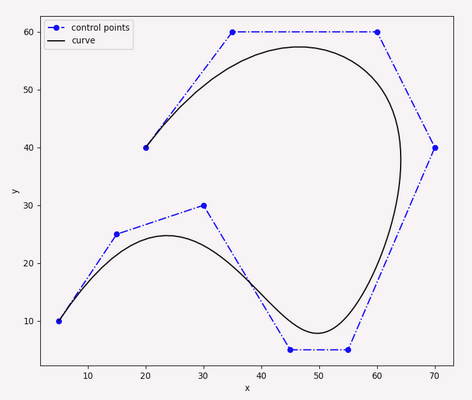 Looks promising.
@DeepSOIC, thanks for participating, and providing your insights. I was pretty sure (though I didn't have enough time to dig in) that your project was not related to what we are attempting. Feel free to continue if you are so inclined, but in any case, I was delighted to see you pop in!
@mrx23dot, the problem isn't fitting the points (though it is something that would need to be dealt with), but rather ensuring our constraints on the fit are met. I've yet to find a similar feature in any of the libraries I've looked at, though admittedly I don't really know much about this, so maybe I overlooked something obvious. I haven't looked at splines since college (I wrote a function fitter way back in the day), so I'll have to reeducate myself. Ideally, the 'resolution' parameter from ArcWelder could constrain the curves the same way they are done for G2/G3. Additionally, and I think this is probably the easier of the two problems, the start and end points cannot deviate from the original path at all (just like your example).
Simple enough
- you have to input the control points that you think are not on a line, with endpoints being on lines. This is already done in arcwelder.
- Then we fit a spline, which simplifies the curve. (at this point you could even do an arcwelder on it to get G2/G3-s)
- Simplify description of the spline to 3points [start, 1st control, end]
- gives output of
- G5 [E
] [F ] I7.23 J6.67 P7.57 Q1.87 X3.11 Y7.37 (I couldn't make sense how to store it in G5 code) - 3 points merging infinite amount of points on an arc, end point are not changed


I'm sure it's far from perfect, like the control point is fast but inaccurate estimate. I read that someone already used G5 in reprap forum.
@mrx23dot, what about detecting the maximum deviation between the new curve and the original tool-path? That's really the bit I'm not sure how to do (this wasn't exactly straightforward even for simple curves), and it's also an extremely critical element for getting this working. I searched for papers on either limiting or calculating the deviation, and the ones I found that looked similar to this use case were quite recent and also behind a paywall (which is pretty much expected). Admittedly, I haven't searched too much yet, so it could have more to do with the keyword I used and the search rankings rather than availability. What I was hoping was to find an opensource library with a suitable license that has this capability built-in.
That's simple, I added worst case deviation distance from original points. It's not optimal for every control point it iterates spline points at given resolution. It should be possible to do it by handling the spline object as a function. (I would assume it would use recursive approximation thus speed penalty)
This code gives 0.19 error in axes unit. The best would be to display 2 plots on one. arc.zip
If error is too much a smaller input segment is needed. Only restriction is that this spline concept is symmetric.
@mrx23dot, that's a step in the right direction. However, we not only need to find the maximum deviation from the control points, but also between any point along the toolpath and any point along the spline. Still, one could implement this without that and see what happens.
Next part: any chance of finding a library in c++? I'd hate to rewrite the whole project in Python, which would be dog slow compared to the c++ version. Ideally it would be compatible with c++11 since modern compilers aren't typically installed on many non-development machines. That wouldn't impact the binaries, but would definitely impact the octoprint plugin, at least until I figure out a way of pre-compiling the python extensions.
I found a few that work for c++14 pretty quickly.
Correction:
I believe this line
between any point along the toolpath and any point along the spline.
should be
between any point along the toolpath and the closest point along the spline.
Also, I will take a look at the code in more detail, and get it running as soon as I can get some time. Many of my concerns may not really be valid, and I'll figure that out as I dig in.
For first step could you input a (quite) few extreme arcs? I guess you already have the coordinates of points that need arcifying, just print them in this format: "[20.444, 10.666]," Just to see how to make it fail. Especially for asymmetric situations.
Also someone please test G5 on a real machine, this code should create a 5cm S shape:
G0 X0 Y0
G5 I0 J50 P0 Q-50 X50 Y50

I already collected some C++ libs above, but better test this good before wasting time on low level.
I already collected some C++ libs above, but better test this good before wasting time on low level.
I hear that!!!
G0 X0 Y0
G5 I0 J50 P0 Q-50 X50 Y50
Will test this out after work.
Question: If we are generating G5 commands, should G2/G3 also be used, or do you think there should be a switch (arcs/Bezier curves)? If we use both, ideas for choosing between arc/bezier curves?
No idea, the best way would to tell is to create a branch for G5, run the same test files on both and compare the worst ones, I don't think G5 would cover everything, I'm sure this implementation would fail on complete circles.
Looks like G5 allows 2 control points not just one. We can leave that for rev2. Format is
- start-point where we currently stand,
- IJ 1st control point relative to start-point
- PQ 2nd control point relative to XY
- XY: end point
With one control point, and dual humps:
G0 X0 Y0
G5 I0 J50 P0 Q0 X50 Y50
G5 I0 J50 P0 Q0 X100 Y100
Here is one more thing to think about: visualizing the gcode file.
I will test in simplify 3d, but I'm expecting it not to work. We will need to make sure G5s work in the OctoPrint gcode viewer, and maybe update pretty gcode viewer as well (I submitted a PR for that a while back to show Arcs as generated with Marlin's arc interpolation, so it is the most accurate one I know of).
From experience I can tell you there is no better way to debug arc generation than simply looking at rendered gcode :)
Hey, wait a minute!? You ARE using simplify :) That's a relief. The thought of trying to do this blind was kind of scary. Also, I apologize for not paying as close attention to your posts today as I normally would, but my excuse is that work is busy, but I'm excited enough to want to comment :)
An interesting property if 2 control points align the 2 connected splines will be tangential. So they can be easily chained. (or at least if they are generated at the same time)
@mrx23dot, very interesting. I've also been thinking about how to include G2/G3 with G5. I think both processes need to run together (G2/G3 and G5 interpolation), and we can take the one that includes the most points as the 'winner'. Pretty simple :)
Here is a good torture test gcode, Arcwelder produces +28% bigger code. Is that expected? Is it possible to print points on the curve?
@mrx23dot, I got different results than you did:
2021-02-08 13:48:05.146 - arc_welder.gcode_conversion - INFO -  percent_complete:100.00, seconds_elapsed:0.04, seconds_remaining:0.00, gcodes_processed: 7341, current_file_line: 7418, points_compressed: 4617, arcs_created: 585, num_firmware_compensations: 0, compression_ratio: 2.16, size_reduction: 53.71%
2021-02-08 13:48:05.153 - arc_welder.gcode_conversion - INFO -
Extrusion/Retraction Counts
   Min          Max     Source  Target Change
---------------------------------------------
  0.000mm to   0.002mm       1       1   0.0%
  0.002mm to   0.005mm       0       0   0.0%
  0.005mm to   0.010mm       0       0   0.0%
  0.010mm to   0.050mm      24       6 -75.0%
  0.050mm to   0.100mm      43       0-100.0%
  0.100mm to   0.500mm    2210     139 -93.7%
  0.500mm to   1.000mm    1889     183 -90.3%
  1.000mm to   5.000mm    1183     758 -35.9%
  5.000mm to  10.000mm     111     272 145.0%
 10.000mm to  20.000mm      75     125  66.7%
 20.000mm to  50.000mm      21      41  95.2%
 50.000mm to 100.000mm       0       0   0.0%
          >= 100.000mm       2       2   0.0%
---------------------------------------------
Total distance source:.............7085.038mm
Total distance target:.............7085.205mm
   Total count source:...................5559
   Total count target:...................1527
 Total percent change:.................-72.5%
You can see the file size reduction and compression ratio if you scroll right. Here is the visualization:

It looks really good to me. I need to see a layer/by/layer view to really dig in, but can take a look soon.
Hey, and this is unrelated to this issue, but I would be interested in doing a 'travel moves only' torture test. I had a user ask about compatibility with a laser cutter, and I realized I specifically omitted travel moves from arc welder. It wouldn't be TOO difficult to add them (not a walk in the park, but not terrible), but I would need some kind of test like this.
I realized I didn't answer this question:
Is it possible to print points on the curve
but I"m not sure what you're wanting exactly. Are you wanting to see what the firmware will do with the curves, for example are you wanting to see the interpolated segments? Something else?
Try this, but you still need dxg->gcode 2D slicer 2D_torture.zip
Regarding 3D: From ArcWelder could you export the following absolute coordinates? curve1 contains points: (1,2), (2,5.5), (7,5.3) in X,Y curve2 contains points: (10,20), (3.5,5), ... ... I will try to fit a spline on it and check if it matches the original intent.
G1 causes resonance because of sharp movements
Isn't Junction Deviation in Marlin solve exactly this problem?

@xorza if you want speed then you need to reduce the resonances, smooth fast movements.

I've spent more than a week trying to get G5 to work properly on my Creality CR6-SE. I did recompile the community firmware (Thx Sebastian Damann) to enable the G5 command, but after dealing with a different extrusion rate, I still could not get it to function. I've given up for now, but part of my confusion stems from the documentation on marlinfw.org. For the G5 command, the section under NOTES indicates P,Q are the X,Y offsets from the current position, while under USAGE it indicates that P,Q are the X,Y offsets from the final position. Does anyone know which one of these is real? Have you gotten G5 to work on your system?
