
clash_for_windows_pkg

clash_for_windows_pkg copied to clipboard
 Fndroid
[Bug]: 使用tap模式时,cfw-tap一直显示网线未插入
请认真检查以下清单中的每一项
- [x] 已经搜索过,没有发现类似issue
- [X] 已经搜索过文档,没有发现相关内容
- [X] 已经尝试使用过最新版,问题依旧存在
- [X] 使用的是官方版本(未替换及修改过安装目录程序文件)
软件版本
0.20.12 (https://github.com/Fndroid/clash_for_windows_pkg/releases/download/0.20.12/Clash.for.Windows-0.20.12-win.7z)
操作系统
Windows x64
系统版本
Windows 10 专业版 22H2
问题描述
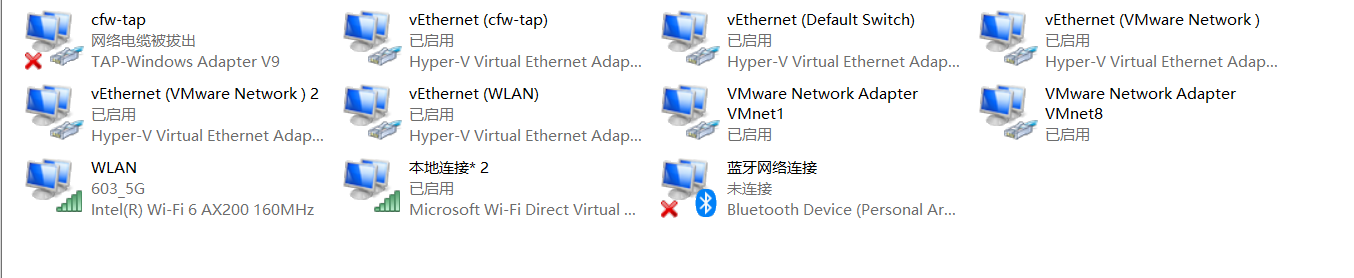
点击tap device-》install 之后会出现cfw-tap网卡,此时显示网线未接入,然后按照网上的指引配置mixin并开启,cfw-tap网卡还是显示未接入(一直未接入),powershell 无法被代理。不确定需要怎么开启。
复现步骤
启动cfw(文件目录D:\clash for win\clash-0.20.12\)
1点击tap device -》manage-》install
2配置并开启mixin
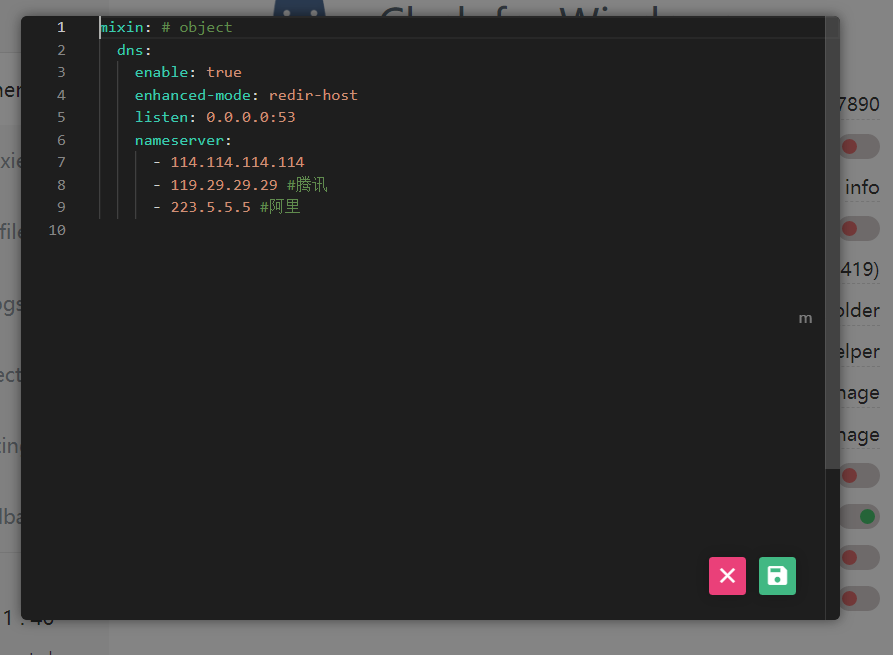 结果还是显示未网线插入
日志文件
logs
[2023-01-19-175412.log](https://github.com/Fndroid/clash_for_windows_pkg/files/10455702/2023-01-19-175412.log)

[2023-01-19-174801.log](https://github.com/Fndroid/clash_for_windows_pkg/files/10455709/2023-01-19-174801.log)

[2023-01-19-174626.log](https://github.com/Fndroid/clash_for_windows_pkg/files/10455714/2023-01-19-174626.log)

[2023-01-19-174545.log](https://github.com/Fndroid/clash_for_windows_pkg/files/10455716/2023-01-19-174545.log)

[2023-01-19-174529.log](https://github.com/Fndroid/clash_for_windows_pkg/files/10455718/2023-01-19-174529.log)
logs
[2023-01-19-174124.log](https://github.com/Fndroid/clash_for_windows_pkg/files/10455722/2023-01-19-174124.log)
其他补充
之前安装过easyconnect,但是已经删除,并以管理员身份执行了netsh winsock reset。 已开启hyper-v 不确定以上两个操作是否有影响
