
clash_for_windows_pkg
 clash_for_windows_pkg copied to clipboard
 Fndroid
[Bug]: TUN Mode引发NCSI显示无网络连接,但实际上网正常
请认真检查以下清单中的每一项
- [ ] 已经搜索过,没有发现类似issue
- [x] 已经搜索过文档,没有发现相关内容
- [x] 已经尝试使用过最新版,问题依旧存在
- [x] 使用的是官方版本(未替换及修改过安装目录程序文件)
软件版本
0.19.23
操作系统
Windows x64
系统版本
Windows 11 21H2
问题描述
与以下一些issue的情况类似: #1902 #1943 (但是完全没有作用)
情况体现:
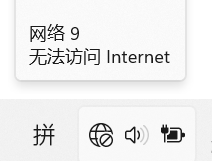
问题按照TUN stack的不同分为两种情况:
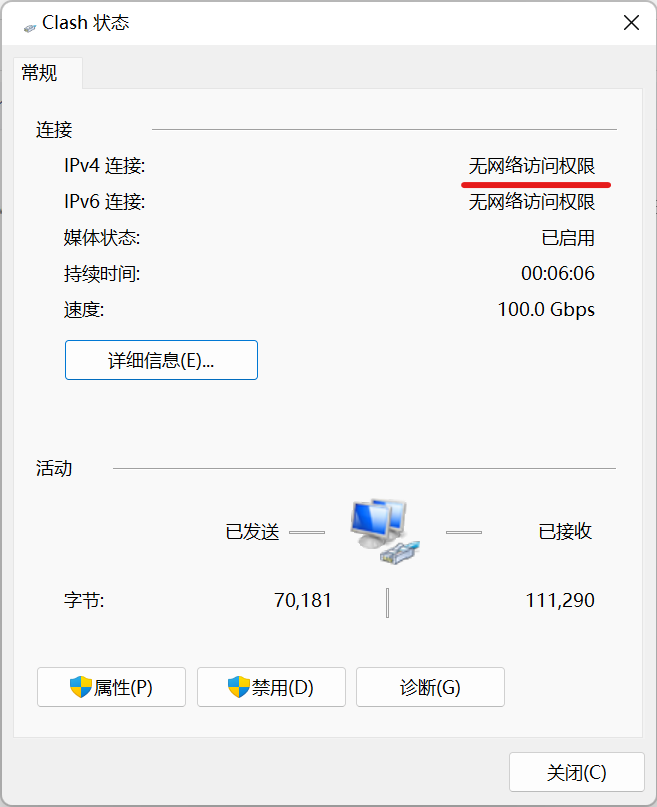
stack: gvisor
-
网络适配器状态中显示:无网络访问权限
-
nslookup:反馈正常
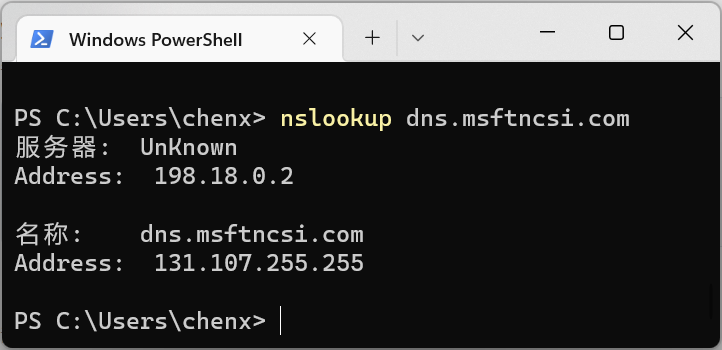
没有任何头绪,不清楚为何无法访问。此时是可以正常上网的,但是直接使用NCSI的软件(如EA App)就会提示无法上网。并且值得注意的是,我的其他网络连接是提示正常的,不知为何Windows只关注Clash的。
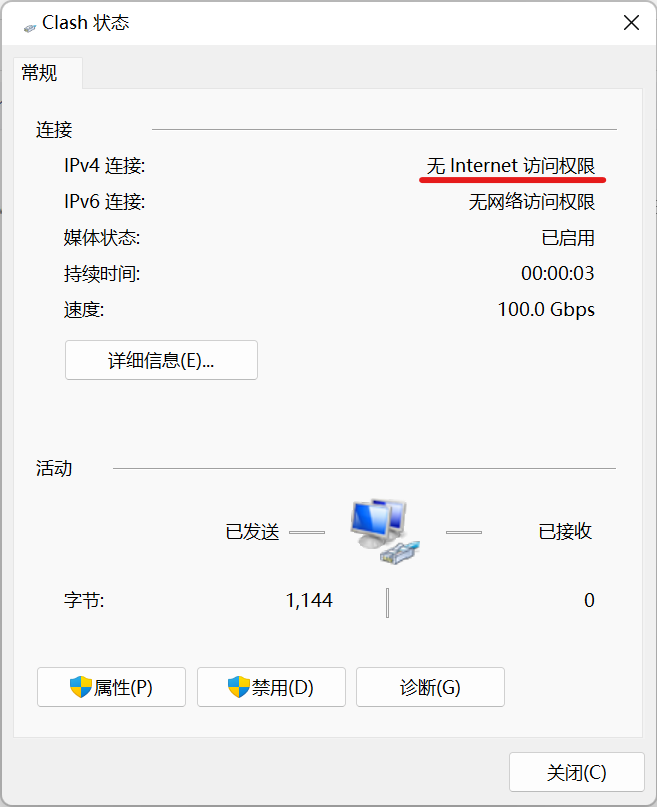
stack: system
我已经将clash-win64.exe加入防火墙中
-
网络适配器状态中显示:无Internet访问权限 根据经验,是DNS解析不正确导致的
-
nslookup:反馈异常,不是微软提供的131.107.255.255,疑似问题关键
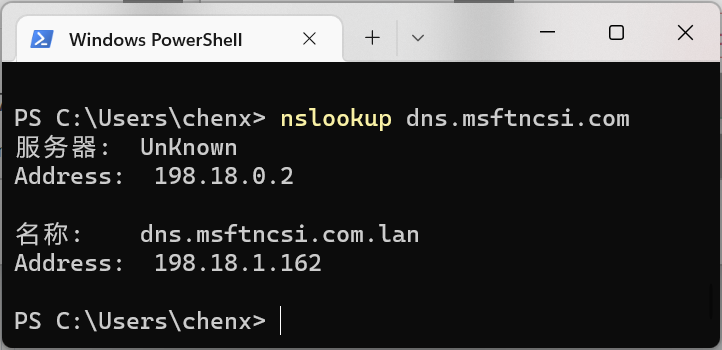
怀疑Clash的fake-ip-filter没有生效
复现步骤
- 启用TUN Mode
- 选择TUN stack为对应情况
日志文件
No response
其他补充
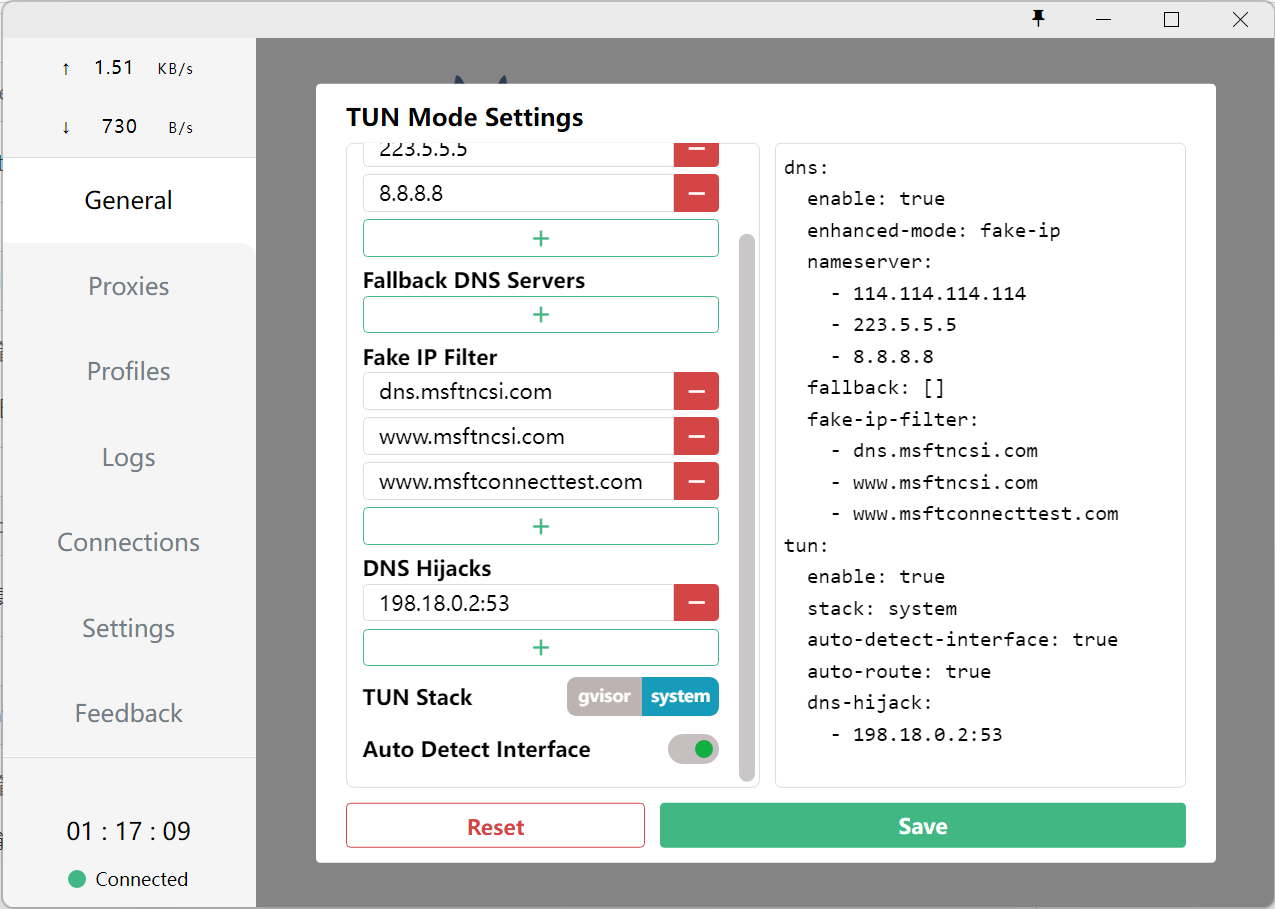
这是我的TUN配置:


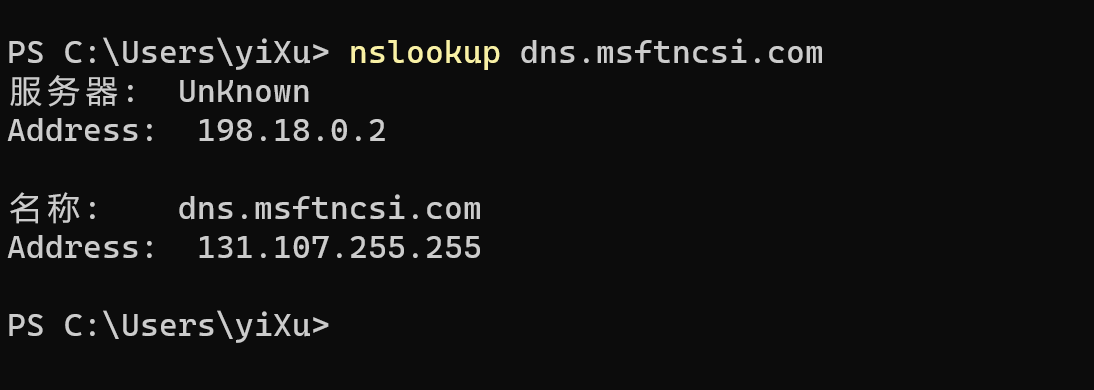
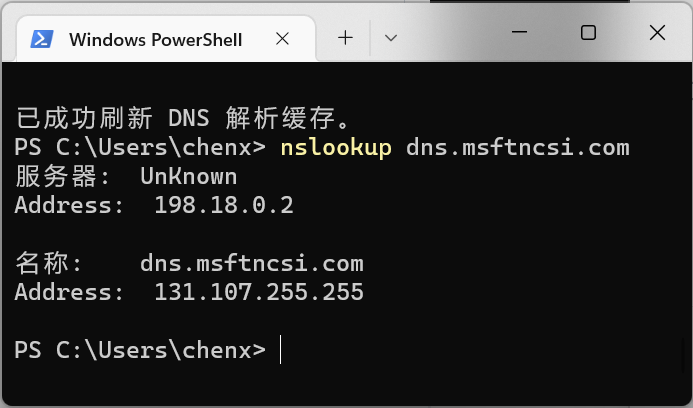 @yi-Xu-0100 现在一样了,我用了stack: gvisor,但是依然提示无连接
@yi-Xu-0100 这是 stack: system 时的日志,给出的就是之前的 dns.msftncsi.com.lan
time="2022-07-02T17:32:34+08:00" level=info msg="RESTful API listening at: 127.0.0.1:52104"
time="2022-07-02T17:32:34+08:00" level=error msg="Start Mixed(http+socks) server error: listen udp 127.0.0.1:52105: bind: An attempt was made to access a socket in a way forbidden by its access permissions."
time="2022-07-02T17:32:34+08:00" level=info msg="Start initial compatible provider 🍃 Proxies"
time="2022-07-02T17:32:34+08:00" level=info msg="Start initial compatible provider 🍂 Domestic"
time="2022-07-02T17:32:34+08:00" level=info msg="Start initial compatible provider ☁️ Others"
time="2022-07-02T17:32:34+08:00" level=info msg="Start initial compatible provider ⭐️ Auto"
time="2022-07-02T17:32:34+08:00" level=debug msg="Generate GUID: {330EAEF8-7578-5DF2-D97B-8DADC0EA85CB}"
time="2022-07-02T17:32:34+08:00" level=info msg="Tun Proxy listening at: Clash(198.18.0.1)"
time="2022-07-02T17:32:34+08:00" level=error msg="Start Mixed(http+socks) server error: listen udp 127.0.0.1:52105: bind: An attempt was made to access a socket in a way forbidden by its access permissions."
time="2022-07-02T17:32:46+08:00" level=debug msg="[TUN] hijack udp dns: 198.18.0.2:53"
time="2022-07-02T17:32:47+08:00" level=debug msg="[TUN] hijack udp dns: 198.18.0.2:53"
time="2022-07-02T17:32:47+08:00" level=debug msg="[TUN] hijack udp dns: 198.18.0.2:53"
time="2022-07-02T17:32:55+08:00" level=debug msg="[TUN] hijack udp dns: 198.18.0.2:53"
time="2022-07-02T17:32:55+08:00" level=debug msg="[TUN] hijack udp dns: 198.18.0.2:53"
time="2022-07-02T17:32:55+08:00" level=debug msg="[TUN] hijack udp dns: 198.18.0.2:53"
time="2022-07-02T17:33:00+08:00" level=debug msg="[TUN] hijack udp dns: 198.18.0.2:53"
time="2022-07-02T17:33:00+08:00" level=debug msg="[TUN] hijack udp dns: 198.18.0.2:53"
time="2022-07-02T17:33:00+08:00" level=debug msg="[TUN] hijack udp dns: 198.18.0.2:53"
time="2022-07-02T17:33:05+08:00" level=info msg="Start initial compatible provider ☁️ Others"
time="2022-07-02T17:33:05+08:00" level=info msg="Start initial compatible provider 🍂 Domestic"
time="2022-07-02T17:33:05+08:00" level=info msg="Start initial compatible provider ⭐️ Auto"
time="2022-07-02T17:33:05+08:00" level=info msg="Start initial compatible provider 🍃 Proxies"
time="2022-07-02T17:33:05+08:00" level=debug msg="Generate GUID: {330EAEF8-7578-5DF2-D97B-8DADC0EA85CB}"
time="2022-07-02T17:33:06+08:00" level=info msg="Tun Proxy listening at: Clash(198.18.0.1)"
time="2022-07-02T17:33:06+08:00" level=debug msg="[Stack] Failed to dummy bind, retry in 1 second... (1/10)"
time="2022-07-02T17:33:06+08:00" level=error msg="Start Mixed(http+socks) server error: listen udp 127.0.0.1:52105: bind: An attempt was made to access a socket in a way forbidden by its access permissions."
time="2022-07-02T17:33:07+08:00" level=debug msg="[Stack] Failed to dummy bind, retry in 1 second... (2/10)"
time="2022-07-02T17:33:08+08:00" level=debug msg="[Stack] Failed to dummy bind, retry in 1 second... (3/10)"
time="2022-07-02T17:33:09+08:00" level=debug msg="[Stack] Failed to dummy bind, retry in 1 second... (4/10)"
time="2022-07-02T17:33:10+08:00" level=debug msg="[Stack] Address 198.18.0.1 ready for bind"
time="2022-07-02T17:33:11+08:00" level=debug msg="[TUN] hijack udp dns: 198.18.0.2:53"
time="2022-07-02T17:33:11+08:00" level=debug msg="[TUN] hijack udp dns: 198.18.0.2:53"
time="2022-07-02T17:33:11+08:00" level=debug msg="[TUN] hijack udp dns: 198.18.0.2:53"
time="2022-07-02T17:33:43+08:00" level=debug msg="[TUN] hijack udp dns: 198.18.0.2:53"
time="2022-07-02T17:33:43+08:00" level=debug msg="[TUN] hijack udp dns: 198.18.0.2:53"
time="2022-07-02T17:33:43+08:00" level=debug msg="[TUN] hijack udp dns: 198.18.0.2:53"
Start Mixed(http+socks) server error: listen udp 127.0.0.1:52105: bind: An attempt was made to access a socket in a way forbidden by its access permissions
有没种可能,就是端口被占用了😂
那个有点误导,因为是重开了clash,有点小问题😂 这是重新录了一遍的log:
time="2022-07-02T17:41:22+08:00" level=info msg="RESTful API listening at: 127.0.0.1:53614"
time="2022-07-02T17:41:22+08:00" level=info msg="Mixed(http+socks) proxy listening at: 127.0.0.1:53615"
time="2022-07-02T17:41:22+08:00" level=info msg="Start initial compatible provider ⭐️ Auto"
time="2022-07-02T17:41:22+08:00" level=info msg="Start initial compatible provider 🍃 Proxies"
time="2022-07-02T17:41:22+08:00" level=info msg="Start initial compatible provider ☁️ Others"
time="2022-07-02T17:41:22+08:00" level=info msg="Start initial compatible provider 🍂 Domestic"
time="2022-07-02T17:41:22+08:00" level=debug msg="Generate GUID: {330EAEF8-7578-5DF2-D97B-8DADC0EA85CB}"
time="2022-07-02T17:41:22+08:00" level=info msg="Tun Proxy listening at: Clash(198.18.0.1)"
time="2022-07-02T17:41:22+08:00" level=debug msg="[Stack] Failed to dummy bind, retry in 1 second... (1/10)"
time="2022-07-02T17:41:23+08:00" level=debug msg="[Stack] Failed to dummy bind, retry in 1 second... (2/10)"
time="2022-07-02T17:41:24+08:00" level=debug msg="[Stack] Failed to dummy bind, retry in 1 second... (3/10)"
time="2022-07-02T17:41:25+08:00" level=debug msg="[Stack] Failed to dummy bind, retry in 1 second... (4/10)"
time="2022-07-02T17:41:26+08:00" level=debug msg="[Stack] Address 198.18.0.1 ready for bind"
time="2022-07-02T17:41:26+08:00" level=debug msg="[TUN] hijack udp dns: 198.18.0.2:53"
time="2022-07-02T17:41:26+08:00" level=info msg="[TCP] 198.18.0.1:53986 --> kv501.prod.do.dsp.mp.microsoft.com:443 match DomainSuffix(microsoft.com) using 🍂 Domestic[DIRECT]"
time="2022-07-02T17:41:31+08:00" level=debug msg="[TUN] hijack udp dns: 198.18.0.2:53"
time="2022-07-02T17:41:31+08:00" level=info msg="[TCP] 198.18.0.1:53990 --> v20.events.data.microsoft.com:443 match DomainSuffix(microsoft.com) using 🍂 Domestic[DIRECT]"
time="2022-07-02T17:41:46+08:00" level=debug msg="[TUN] hijack udp dns: 198.18.0.2:53"
time="2022-07-02T17:41:46+08:00" level=debug msg="[TUN] hijack udp dns: 198.18.0.2:53"
time="2022-07-02T17:41:46+08:00" level=debug msg="[TUN] hijack udp dns: 198.18.0.2:53"
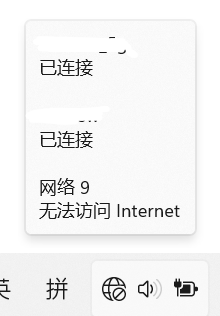
并且有一个很奇怪的现象。
有时开了tun mode,出现下图情况,图标就正常
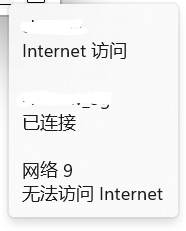 但是经常过了一会,就会Internet连接变成已连接,然后提示断网
https://superuser.com/questions/1618647/connected-to-the-internet-but-windows-10-says-no-internet
仅供参考
https://superuser.com/questions/1618647/connected-to-the-internet-but-windows-10-says-no-internet
仅供参考
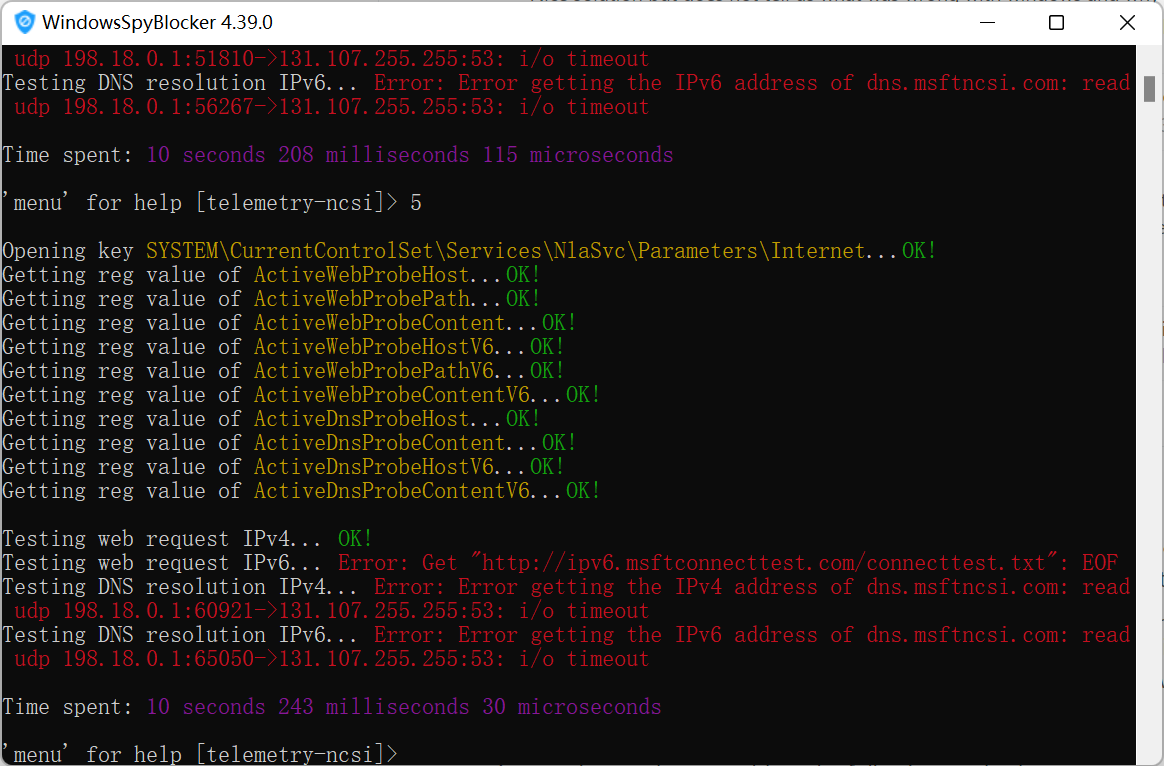 没用,就算更换成火狐的全OK也提示不能上网。难搞
发现一个线索 在repo:dantmnf/NCSIOverride发现:
Notes
Npcap (bundled with Wireshark/Nmap) is known to break NCSI.
为了调试这个东西我装了wireshark,或许是原因?😕

我认为目前仍然缺少诊断信息。下面列出几个值得考虑的方面。
在下文的示例代码中,所有输出都按照我的偏好指定排版。你可以根据自己的需要选择其他的排版命令。
NCSI log
-
日志名称:
Microsoft-Windows-NCSI/Operational -
视图路径:
Applications and Services Logs\Microsoft\Windows\NCSI\Operational
NCSI 的日志记录了决策过程,有助于确定讨论范围。
约束 NCSI
作为常规诊断步骤之一,不妨关闭 Active Probing 或 Passive Probing,分别观察 NCSI 在单一模式下的行为。
建议通过 Group Policy (组策略)来设置。
解读 Interface GUID
解码 NCSI 事件相当繁琐,即使在 Event Viewer (事件查看器)中,也需要自行查询 InterfaceGuid。
下面提供一种基于 Get-NetAdapter 的查询方法,对解读 NCSI 事件够用。而若想查出所有设备的 GUID,则需要复杂的 WMI 和 Registry (注册表)操作。
Get-NetAdapter -IncludeHidden |
    Select-Object InterfaceIndex, InterfaceGuid, Name, InterfaceDescription |
    Out-GridView -Title 'MSFT_NetAdapter'
在 CLI 阅读日志
如果你不喜欢 Event Viewer,不妨 Get-WinEvent。
$LogName = 'Microsoft-Windows-NCSI/Operational'
$Filter = @{
    LogName   = $LogName
    StartTime = (Get-Date).AddDays(-1)
}

$Messages = Get-WinEvent -FilterHashtable $Filter | Select-Object TimeCreated, Message

$Messages | ConvertTo-Json -Depth 1 | Set-Clipboard
$Messages | Out-GridView -Title $LogName
甚至可以 ToXml(),再手撕原始数据。
参考资料
IP routing
https://github.com/Fndroid/clash_for_windows_pkg/issues/3193#issuecomment-1172870485
经常过了一会,就会 Internet 连接 变成 已连接,然后提示断网
只要有一个设备无 Internet 就会提示无法上网
NCSI 在 OSI 第 7 层(TCP/IP 第 4 层)。当多个 NIC (网卡)存在连接时,Windows 在 OSI 第 3 层(TCP/IP 第 2 层)的行为已经相当复杂。
Windows 不仅考虑 metric (权值;度量;费用;代价),而且会尝试 load balancing (负载平衡)。有时候就魔怔了,例如,误用没有 Internet 访问权限的 NIC,出现“既能上网又不能上网”的情况。
| # | OSI | # | TCP/IP | # | Wireshark |
|---|---|---|---|---|---|
| 7 | Application | ||||
| 6 | Presentation | ||||
| 5 | Session | 4 | Application | 5 | Application |
| 4 | Transport | 3 | Transport | 4 | Transport |
| 3 | Network | 2 | Internet | 3 | Network |
| 2 | Data Link | 2 | Data Link | ||
| 1 | Physical | 1 | Link | 1 | Physical |
查看 routing table
Get-NetRoute 检查一下 routing table (路由表)?
InterfaceIndex 的含义需要在 Get-NetIPInterface 查询。
$Interfaces = Get-NetIPInterface -ConnectionState Connected | Sort-Object AddressFamily, InterfaceIndex
$InterfaceIndexes = $Interfaces | Select-Object -ExpandProperty InterfaceIndex -Unique
$RoutingTable = Get-NetRoute -InterfaceIndex $InterfaceIndexes

$Interfaces | Format-Table -AutoSize
$RoutingTable | Format-Table -AutoSize
修改 routing table
很久以前,在 Network and Sharing Center (网络和共享中心)控制面板中有一些界面,但后来大都被移除了。所以,现在只能用命令。例如:
$NewIfMetric = @{
    InterfaceIndex  = 9
    AddressFamily   = 'IPv4'

    InterfaceMetric = 1
}

Set-NetIPInterface @NewIfMetric -Confirm
注意,PowerShell 为 Set-NetIPInterface 的一些参数生成了 enum,并进行隐式类型转换。传参时一定要准确拼写,否则会转换失败。
例如,AddressFamily 参数接受由 IPv4 和 IPv6 这两种值构成的 array (数组)。
$T1 = (Get-Command Set-NetIPInterface).Parameters.AddressFamily.ParameterType
$T2 = $T1.GetElementType()

$T1, $T2 | Format-List Name, BaseType
$T2 | Get-Member -Static -MemberType Properties | Format-Table -AutoSize
Name     : AddressFamily[]
BaseType : System.Array

Name     : AddressFamily
BaseType : System.Enum


   TypeName: Microsoft.PowerShell.Cmdletization.GeneratedTypes.NetIPInterface.AddressFamily

Name MemberType Definition
---- ---------- ----------
IPv4 Property   static Microsoft.PowerShell.Cmdletization.GeneratedTypes.NetIPInterface.AddressFamily IPv4 {get;}
IPv6 Property   static Microsoft.PowerShell.Cmdletization.GeneratedTypes.NetIPInterface.AddressFamily IPv6 {get;}
参考资料
-
Network Subsystem Performance Tuning | Windows Server Networking
-
Strong and Weak Host Models | TechNet Magazine September 2007
DNS resolution
nslookup 是经典的选择,但它的一个缺点是输出非常紧凑。我倾向于使用 DnsClient 拉取详细的信息。
write-ncsi-dns-report.ps1
#Requires -Version 5.1
#Requires -Modules DnsClient, NetTCPIP

$InterfaceIndexes = Get-NetIPInterface -ConnectionState Connected | Select-Object -ExpandProperty InterfaceIndex -Unique
$Domains = @('www.msftconnecttest.com', 'dns.msftncsi.com')

function Write-Caption
{
    [CmdletBinding()]
    param
    (
        [Parameter(Mandatory = $true, Position = 0)]
        [ValidateNotNullOrEmpty()]
        [string]
        $Caption
    )

    Write-Host ('   ' + $Caption) -NoNewline -ForegroundColor Black -BackgroundColor Green
    Write-Host
}

Clear-DnsClientCache

Write-Caption 'Settings: Global'

Get-DnsClientGlobalSetting | Format-List

Write-Caption 'Settings: NRPT'

Get-DnsClientNrptGlobal | Format-List

# Available in Windows 11, Windows Server 2022, and above.
if (Get-Command -Module DnsClient -Name Get-DnsClientDohServerAddress -ErrorAction Ignore)
{
    Write-Caption 'Settings: DoH'

    Get-DnsClientDohServerAddress | Format-Table -AutoSize
}

Write-Caption 'Settings: NIC'

Get-DnsClient -InterfaceIndex $InterfaceIndexes | Format-List

Get-DnsClientServerAddress -InterfaceIndex $InterfaceIndexes | Format-Table -AutoSize

foreach ($Name in $Domains)
{
    Write-Caption "Records: $Name"

    Resolve-DnsName -Name $Name |
        Group-Object Type |
        ForEach-Object { Format-List -InputObject $_.Group }
}


我把tun里的 TUN Stake改为system就可以了,我也乱搞的,莫名其妙就好了
没有用,您看我的issue中把两个不同stack类型都尝试过,然而还是触发了相同的问题


https://superuser.com/questions/1618647/connected-to-the-internet-but-windows-10-says-no-internet
仅供参考
这个办法有用啊,用WindowsSpyBlockerApply Firefox NCSI的这个
我dns解析得出来,但还是显示Clash无网络连接
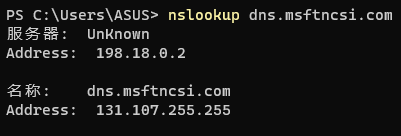 附上TUN配置:
dns: enable: true enhanced-mode: fake-ip nameserver: - 114.114.114.114 - 223.5.5.5 - 8.8.8.8 fallback: [] fake-ip-filter: - +.stun.. - +.stun...* - +.stun.... - +.stun.....* - ".n.n.srv.nintendo.net" - +.stun.playstation.net - xbox...microsoft.com - "..xboxlive.com" - ".msftncsi.com" - "*.msftconnecttest.com" - WORKGROUP tun: enable: true stack: system auto-route: true auto-detect-interface: true dns-hijack: - any:53
stack的两个模式换了没效果
