Fndroid
[Bug]: failed to clash core,logs are not available.
请认真检查以下清单中的每一项
- [ ] 已经搜索过,没有发现类似issue
- [ ] 已经搜索过文档,没有发现相关内容
- [ ] 已经尝试使用过最新版,问题依旧存在
- [ ] 使用的是官方版本(未替换及修改过安装目录程序文件)
软件版本
0.19.20
操作系统
Windows x64
系统版本
Windows 10 pro
问题描述
failed to clash core,logs are not available.
复现步骤
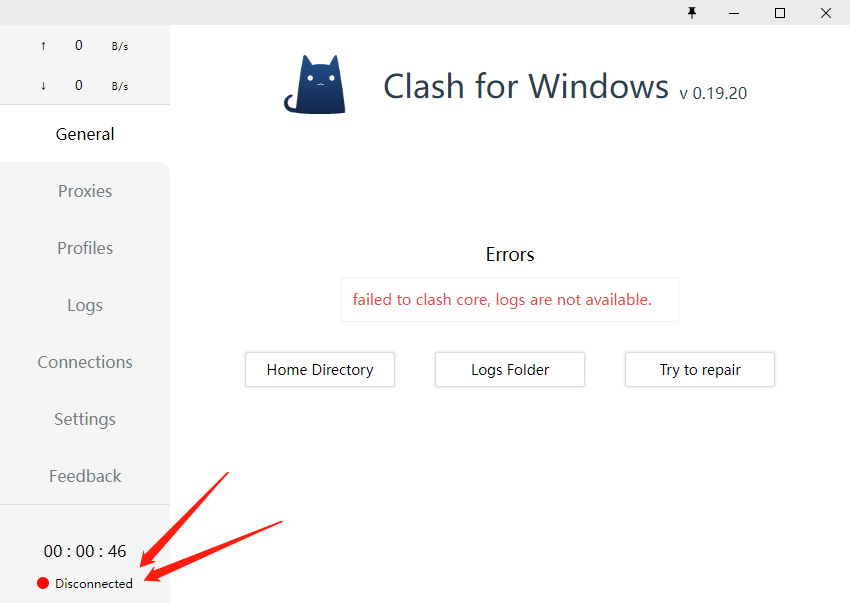
日志文件
time="2022-06-07T17:00:25+08:00" level=error msg="External controller listen error: listen tcp 127.0.0.1:11740: bind: Only one usage of each socket address (protocol/network address/port) is normally permitted." 2022/06/07 17:00:26 bolt.Close(): funlock error: The segment is already unlocked. time="2022-06-07T17:00:26+08:00" level=warning msg="[CacheFile] can't open cache file: timeout" time="2022-06-07T17:00:26+08:00" level=error msg="Start Mixed(http+socks) server error: listen tcp 127.0.0.1:7890: bind: Only one usage of each socket address (protocol/network address/port) is normally permitted."
其他补充
No response

一般就是两个可能,
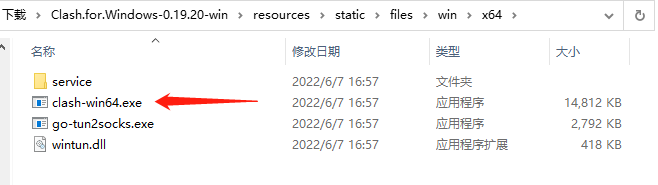
- 安装目录里 resource/static/files/x64/clash-win64.exe 被删了
- 杀毒软件(defender)禁止了,把安装目录加到白名单


一般是两个可能,
- 安装目录里 resource/static/files/x64/clash-win64.exe 被删了
- 杀毒软件(defender)杜绝了,把安装目录加到白名单
我已经尝试了很多遍,安装的版本和7z都用上了,感觉就是没法连接到核心。
单独运行 安装目录里 resource/static/files/x64/clash-win64.exe 就出现这个错误提示:
time="2022-06-07T17:00:25+08:00" level=error msg="External controller listen error: listen tcp 127.0.0.1:11740: bind: Only one usage of each socket address (protocol/network address/port) is normally permitted." 2022/06/07 17:00:26 bolt.Close(): funlock error: The segment is already unlocked. time="2022-06-07T17:00:26+08:00" level=warning msg="[CacheFile] can't open cache file: timeout" time="2022-06-07T17:00:26+08:00" level=error msg="Start Mixed(http+socks) server error: listen tcp 127.0.0.1:7890: bind: Only one usage of each socket address (protocol/network address/port) is normally permitted."
而如果直接运行clash for windows.exe 出现这样的logs
time="2022-06-07T18:12:12+08:00" level=info msg="Mixed(http+socks) proxy listening at: 127.0.0.1:7890" time="2022-06-07T18:12:12+08:00" level=info msg="RESTful API listening at: 127.0.0.1:14123"
最早就已经把目录放到杀毒软件的信任里面,也放到了排除项里面,最后彻底把windows defender 直接关闭了。
我自己感觉有可能是电脑上安装了Fiddler Classic 导致端口有问题。
但是怎么破还没找到办法SocketPro 和 0dcloud 均能正常使用,我想用clash就是想把他们合在一个软件里,MAC和android都正常,就是这个windows头疼。
我自己感觉 https://user-images.githubusercontent.com/61899589/172352097-9173e80d-60b6-4b3d-bc76-a2d634619609.png
这个Disconnected是个关键问题,感觉是端口的问题。
在Linux平台上也有这个问题,瞎摸一通发现,resources->static->files->linux->x64下面的两个可执行文件都没有权限,需要手动chmod,在debian 11上,不知道是不是概率触发

i also have facing this same error on Mac. i am using mac os x capitan. How do i fix this problem ?

我也遇到了相同的问题,用的18.4和19.24版本都报错,之前在这台电脑用了两个月了都很正常,也没有装新的杀毒软件什么的,软件重装、删除.config/clash、重启都试过了,没有用

This issue is stale because it has been open 60 days with no activity. Remove stale label or comment or this will be closed in 7 days
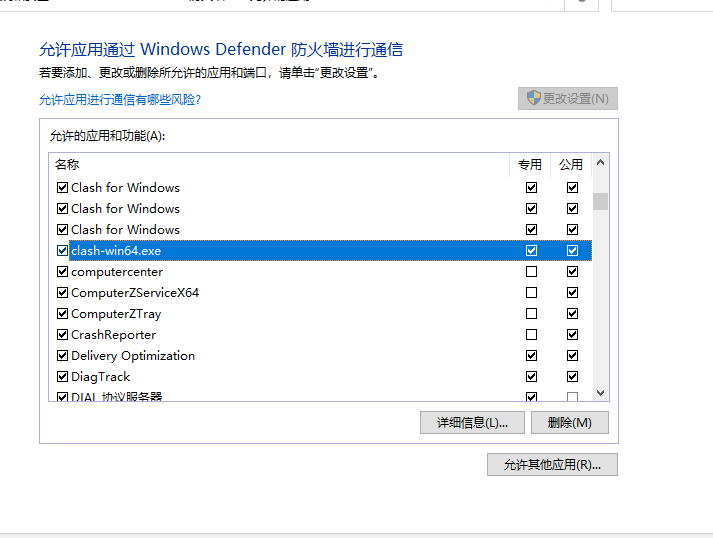
中国玩家,win10, 解决八法,打开windows安全中心--防火墙与网络保护--允许应用通过防火墙--更改设置--允许其他应用--浏览--选择clash目录下的resources\static\files\win\x64\clash-win64.exe--点添加,这样就行了