

 Floris497
Not working with Catalina 10.15.1 build:19B88
Hi guys, patched yesterday and it worked. Just went off and when i wake up today, i got black screen in my external display, i wont even 4k@60hz, just 2k@60hz. Unpatched and patched again using v5, did sudo mount -uw / before, to avoid read-only, but nothing. Someone know why?
MBP 13" Retina 2014 A1502 EMC 2875
uko ~/Downloads ❯ ./CoreDisplay-patcher.command patch v5            7s 14:18:44
SIP looks to be disabled, all good!
Patching CoreDisplay with patch version 5
Re-signing /System/Library/Frameworks/CoreDisplay.framework/Versions/A/CoreDisplay
/System/Library/Frameworks/CoreDisplay.framework/Versions/A/CoreDisplay: replacing existing signature
update_dyld_shared_cache: warning: x86_64h rejected from cached dylibs: /System/Library/PrivateFrameworks/HelloWorldMacHelper.framework/Versions/A/HelloWorldMacHelper (("Could not find dependency '/System/Library/PrivateFrameworks/UHASHelloExtensionPoint-macOS.framework/Versions/A/UHASHelloExtensionPoint-macOS'"))
update_dyld_shared_cache: x86_64h incorporating 1767 OS dylibs, tracking 980 others, building closures for 2255 executables
**The code is still the same. Patch seemed to run, but was probably for the wrong version.**
If you are running a new OS, run ./CoreDisplay-patcher.command md5 and ask the maintainer of this script to add support for your system.
uko ~/Downloads ❯ ./CoreDisplay-patcher.command md5                                                                                               1m 14s 14:20:02
---- BEGINNING MD5 HASH SUMS ---- version: 10.15.1 build:19B88

     otool CoreDisplay: 487f4f7ea1b4f189db895063ed5b0039
 otool CoreDisplay.bak: 487f4f7ea1b4f189db895063ed5b0039
           CoreDisplay: 80944356547d60f60b216348ca0f5e95
       CoreDisplay.bak: 8098d4a5b850a7dcb841bd7a75e45474

---- ENDING MD5 HASH SUMS -------

Same issue here:
 Downloads % sudo ./CoreDisplay-patcher_1.command md5
---- BEGINNING MD5 HASH SUMS ---- version: 10.15.1 build:19B88

     otool CoreDisplay: 487f4f7ea1b4f189db895063ed5b0039
 otool CoreDisplay.bak: 0d64ad0502866f101d4abdafcec54f66
           CoreDisplay: 7e3dcb5a85f0a9a6b0fb0e6672db3cf3
       CoreDisplay.bak: 0e2342a0798719765e3e12f8c34e7a5b

---- ENDING MD5 HASH SUMS -------
MacBook (Retina, 12-inch, 2017) macOS 10.15.1 (19B88)

@ukogonzalez it looks like you forced the patch 2 times.. thus removing your original backup.. only way to recover is by reinstalling the os with recovery..
@serg-e what is the exact problem you are facing? did it ever work for you before?

Hi, I have problem with unknown version of CoreDisplay. It is the first time I try to install the patch on my macbook 2016. I assume it means the patch isn't installed, is that right?
Mais-MacBook:~ mai$ ~/Downloads/CoreDisplay-patcher.command
SIP looks to be disabled, all good!

Unknown version of CoreDisplay found.
---- BEGINNING MD5 HASH SUMS ---- version: 10.15.1 build:19B88

     otool CoreDisplay: 0d64ad0502866f101d4abdafcec54f66
 otool CoreDisplay.bak: 0d64ad0502866f101d4abdafcec54f66
           CoreDisplay: 0e2342a0798719765e3e12f8c34e7a5b
       CoreDisplay.bak: 0e2342a0798719765e3e12f8c34e7a5b

---- ENDING MD5 HASH SUMS -------

Same problem on a 2018 MBP 13"
SIP looks to be disabled, all good!

Unknown version of CoreDisplay found.
---- BEGINNING MD5 HASH SUMS ---- version: 10.15.1 build:19B88

     otool CoreDisplay: 0d64ad0502866f101d4abdafcec54f66
 otool CoreDisplay.bak: NO FILE (this is okay)
           CoreDisplay: 0e2342a0798719765e3e12f8c34e7a5b
       CoreDisplay.bak: NO FILE (this is okay)

---- ENDING MD5 HASH SUMS -------

same here on 2017 MBP 13"
Unknown version of CoreDisplay found.
---- BEGINNING MD5 HASH SUMS ---- version: 10.15.2 build:19C46a

     otool CoreDisplay: 7890407b91286661edbcb789fee22c7a
 otool CoreDisplay.bak: NO FILE (this is okay)
           CoreDisplay: 7706d5454cfa2979f414d0bd61581b08
       CoreDisplay.bak: NO FILE (this is okay)

---- ENDING MD5 HASH SUMS -------```

@ukogonzalez it looks like you forced the patch 2 times.. thus removing your original backup.. only way to recover is by reinstalling the os with recovery..
@serg-e what is the exact problem you are facing? did it ever work for you before?
@Floris497 Tried this MBP 2018 but it enables 60hz only for 1080p
sudo ./CoreDisplay-patcher.command md5 Password: ---- BEGINNING MD5 HASH SUMS ---- version: 10.15.1 build:19B88
otool CoreDisplay: 487f4f7ea1b4f189db895063ed5b0039
otool CoreDisplay.bak: 0d64ad0502866f101d4abdafcec54f66 CoreDisplay: 7e3dcb5a85f0a9a6b0fb0e6672db3cf3 CoreDisplay.bak: 0e2342a0798719765e3e12f8c34e7a5b
---- ENDING MD5 HASH SUMS -------
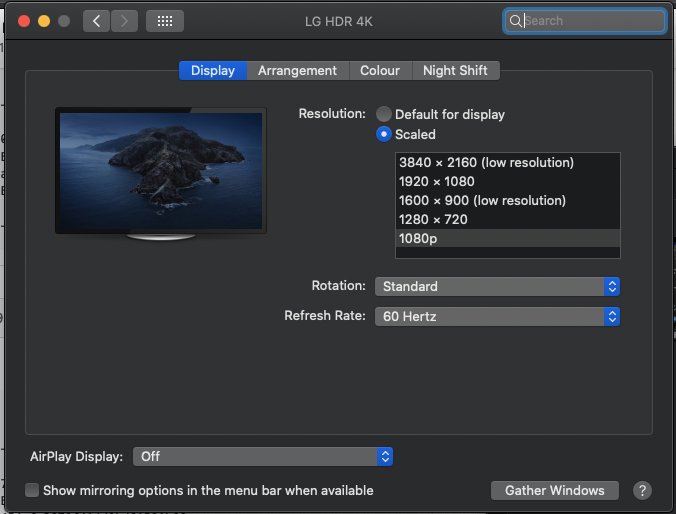
3840*2160 still shows only upto 30hz refresh rate

@ukogonzalez it looks like you forced the patch 2 times.. thus removing your original backup.. only way to recover is by reinstalling the os with recovery.. @serg-e what is the exact problem you are facing? did it ever work for you before?
@Floris497 Tried this MBP 2018 but it enables 60hz only for 1080p
sudo ./CoreDisplay-patcher.command md5 Password: ---- BEGINNING MD5 HASH SUMS ---- version: 10.15.1 build:19B88
otool CoreDisplay: 487f4f7ea1b4f189db895063ed5b0039otool CoreDisplay.bak: 0d64ad0502866f101d4abdafcec54f66 CoreDisplay: 7e3dcb5a85f0a9a6b0fb0e6672db3cf3 CoreDisplay.bak: 0e2342a0798719765e3e12f8c34e7a5b
---- ENDING MD5 HASH SUMS -------
3840*2160 still shows only upto 30hz refresh rate
ah my hdmi adapter was the culprit here.. all good now