
mac-pixel-clock-patch-V2
 mac-pixel-clock-patch-V2 copied to clipboard
 Floris497
unknown NVIDIA driver version - 10.11.6 mid-2014 rMBP 15"
Mac OS X 10.11.6 on mid-2014 rMBP 15" (GTX 750m).
./NVIDIA-patcher.command SIP looks to be disabled, all good! Keep SIP disabled, if enabled again SIP prevent the Nvidia Driver from loading
Unknown version of the Nvidia driver found.. ---- BEGINNING MD5 HASH SUMS ---- version: 10.11.6 build:15G1510
NVDAGK100Hal: 58cc628e0da05805ded203b4c8b2c589
NVDAGK100Hal.bak: NO FILE (this is okay)
---- ENDING MD5 HASH SUMS -------
I'm trying to get a Samsung UN40MU6300 to run at 4k/60hz. I can only get it to run at 30hz with a plugable mini-DP->HDMI2.0 adapter with high-speed HDMI 2.0 cable. With SwitchResX I can force it to 60hz but there is a vertical strip about 4 inches wide all the way down the monitor that is completely glitched out. Was hoping this patch would help somehow but it doesn't want to patch my driver version

Actually.. if you can select the setting already there's little more this patch can help you with.. since that what it does... try nvidia webdrivers tho

same unknown version, but thanks. guess I will have to trial-and-error random numbers in switchresx to see if anything works

no, I was never able to get my 2014 rmbp to push a 4k 60hz and gave up trying
On Tue, Jan 7, 2020 at 11:09 AM Menno Holtkamp [email protected] wrote:
Hey @JohnnyCashout https://github.com/JohnnyCashout did you manage to get it working the way you want?
— You are receiving this because you were mentioned. Reply to this email directly, view it on GitHub https://github.com/Floris497/mac-pixel-clock-patch-V2/issues/186?email_source=notifications&email_token=AG6DMD6WVHSLG72BSD3KGKTQ4SZOLA5CNFSM4DNRXJ52YY3PNVWWK3TUL52HS4DFVREXG43VMVBW63LNMVXHJKTDN5WW2ZLOORPWSZGOEIJSRII#issuecomment-571680929, or unsubscribe https://github.com/notifications/unsubscribe-auth/AG6DMD5Y72H7KQIJ7EK5BITQ4SZOLANCNFSM4DNRXJ5Q .
@JohnnyCashout thanks for the swift response.
Eventually I applied a workaround: my monitor allows multiple HDMI inputs. I now use two of them @ 1920 x 2160 @ 60hz using a vertical split.
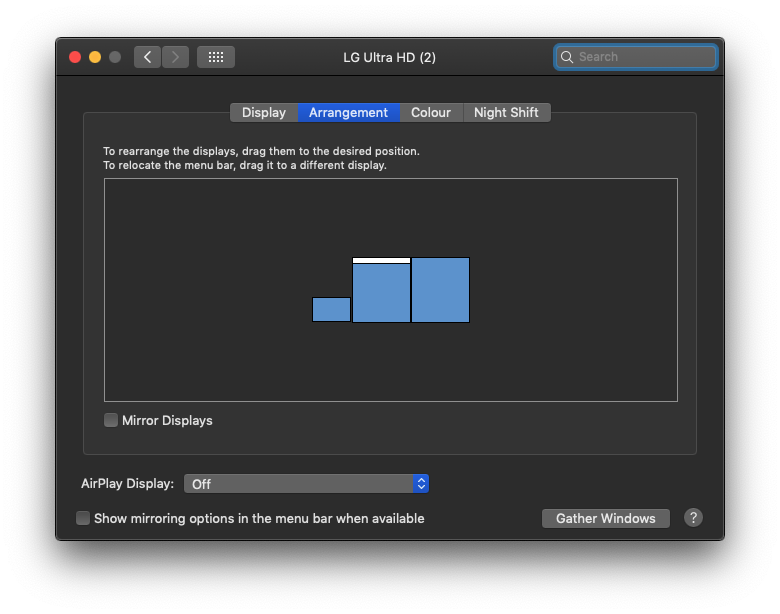
  Displays:
Colour LCD:
  Display Type:	Built-In Retina LCD
  Resolution:	2560x1600 Retina
  Framebuffer Depth:	24-Bit Colour (ARGB8888)
  Mirror:	Off
  Online:	Yes
  Rotation:	Supported
  Automatically Adjust Brightness:	No
LG Ultra HD:
  Resolution:	1920 x 2160
  UI Looks like:	1920 x 2160 @ 60 Hz
  Framebuffer Depth:	24-Bit Colour (ARGB8888)
  Main Display:	Yes
  Mirror:	Off
  Online:	Yes
  Rotation:	Supported
  Automatically Adjust Brightness:	No
LG Ultra HD:
  Resolution:	1920 x 2160
  UI Looks like:	1920 x 2160 @ 60 Hz
  Framebuffer Depth:	24-Bit Colour (ARGB8888)
  Mirror:	Off
  Online:	Yes
  Rotation:	Supported
  Automatically Adjust Brightness:	No
Note I also tried a horizontal split (which allows a centered dock on the bottom and a full-width menu bar on the top), but that resulted in less quality of text.