
flood
 flood copied to clipboard
 Flood-UI
Flood upload/download graph broken after page refresh
Type: Bug Report
- [x] Try to follow the update procedure described in the README and try again before opening this issue.
- [x] Please check the F.A.Q..
- [x] Please check the Troubleshooting wiki section.
Your Environment
- Version used:
- Version (stable release)
git --no-pager tagv1.0.0 - Commit ID (development release)
git --no-pager log -1bb553506a86225811a965563af99bf8e39cc433f
- Version (stable release)
- Environment name and version:
- Node.js version
node --versionv13.2.0 - npm version
npm --version6.13.1 - Web browser
name and versionGoogle Chrome 78.0.3904.108
- Node.js version
- Operating System and version: Windows 10 Pro 1909
Summary
Usually you can monitor upload and download speeds in the top left graph. With the latest updates this functionality works, but if you refresh the browser with F5 the graph breaks.
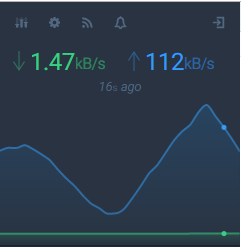
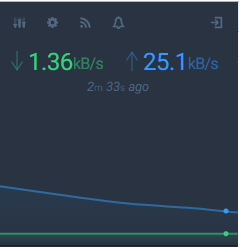
Note the time interval on the both screenshots. On the first it shows correctly 16s ago, on the second it shows 2m 33s.
Expected Behavior
The graph should work after refresh of the page. If i remember good it worked before.
Current Behavior
Graph breaks when you refresh the browser.
Possible Solution
Do not know.
Steps to Reproduce
- login to flood.
- check the upload and download graph.
- refresh the browser with refresh button or F5 key.
- observe the graph again.
Context
None.

For me, this seems to happen when I reload *.com/flood/overview instead of *.com/flood

It's also an issue in the (offical?) docker container.
For me the graph only works when I load the page via *:3000/ (and it auto redirects to /overview) but doesn't work (flat lines) when loading via *:3000/overview
