

 FlaUI
FlaUI
WPF Styles hides subelements
Describe the bug We have a TabControl which is styled. But when trying to find sub elements of that TabControl, they are not visible, neither in FlaUInspector or through code. Removing the Style makes the subelements visible again. Is this a common issue with styled UI elements? Was told that the style was basically making the control to a cusom control, if that is so, is there an easy way to fix it?
I have attached a small sample that can reproduce the issue.
Code snippets This is the style code for the TabControl.
<Style TargetType="{x:Type TabControl}">
            <Setter Property="OverridesDefaultStyle" Value="True" />
            <Setter Property="Width" Value="auto"/>
            <Setter Property="TabStripPlacement" Value="Left"/>
            <Setter Property="HorizontalContentAlignment" Value="Left"/>
            <Setter Property="HorizontalAlignment" Value="Stretch"/>
            <Setter Property="Template">
                <Setter.Value>
                    <ControlTemplate TargetType="{x:Type TabControl}">
                        <Grid KeyboardNavigation.TabNavigation="Local">
                            <Grid.ColumnDefinitions>
                                <!--Tab Collumn-->
                                <ColumnDefinition  Width="auto"/>

                                <!--Border Collumn-->
                                <ColumnDefinition  Width="auto"/>

                                <!--Content Collumn-->
                                <ColumnDefinition  Width="*"/>
                            </Grid.ColumnDefinitions>
                            <VisualStateManager.VisualStateGroups>
                                <VisualStateGroup x:Name="CommonStates">
                                    <VisualState x:Name="Disabled">
                                        <Storyboard>
                                            <ColorAnimationUsingKeyFrames Storyboard.TargetName="Border"
                                                                          Storyboard.TargetProperty="(Border.BorderBrush).(SolidColorBrush.Color)">
                                                <EasingColorKeyFrame KeyTime="0" Value="#FFAAAAAA" />
                                            </ColorAnimationUsingKeyFrames>
                                        </Storyboard>
                                    </VisualState>
                                </VisualStateGroup>
                            </VisualStateManager.VisualStateGroups>

                            <TabPanel  x:Name="HeaderPanel"
                                       Grid.Row="0"
                                       Grid.Column="0"
                                       Panel.ZIndex="1"
                                       IsItemsHost="True"
                                       HorizontalAlignment="Left"
                                       KeyboardNavigation.TabIndex="1" />

                            <Border x:Name="Border"
                                    Grid.Column="1"
                                    HorizontalAlignment="Left"
                                    BorderThickness="1,0,0,0"
                                    KeyboardNavigation.TabNavigation="Local"
                                    KeyboardNavigation.DirectionalNavigation="Contained"
                                    KeyboardNavigation.TabIndex="3">
                                <Border.BorderBrush>
                                    <SolidColorBrush Color="#e0e3ed"/>
                                </Border.BorderBrush>
                            </Border>
                            <ContentPresenter Grid.Column="2" ContentSource="SelectedContent" />
                        </Grid>
                    </ControlTemplate>
                </Setter.Value>
            </Setter>
        </Style>
Screenshots
This is how the sample looks
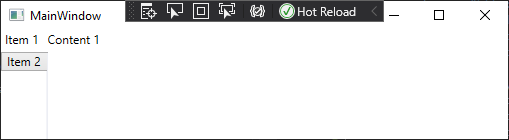 2 tab items, each with a content just named "Content #".
This is what FlaUInspect finds with style active

This is what it finds with the style commented out
 As can be seen, the Content text item is now visible.

Found the root cause. The ContentPresenter in the style was missing the x:Name="PART_SelectedContentHost". Adding that and the sub elements becomes visible again. Closing the issue.