
intellij-pdf-viewer

intellij-pdf-viewer copied to clipboard
 FirstTimeInForever
Can't render Simplified Chinese fandol text
Simplified Chinese character in PDF can't be rendered if they are using the default "Fandol" font.
System and IDEA information
XeTeX 3.141592653-2.6-0.999994 (TeX Live 2022/Arch Linux)
IntelliJ IDEA 2022.2 Beta (Ultimate Edition)
Build #IU-222.3345.16, built on July 7, 2022
Licensed to IntelliJ IDEA EAP user: [REDACTED]
Expiration date: August 6, 2022
Runtime version: 17.0.3+7-b469.19 amd64
VM: OpenJDK 64-Bit Server VM by JetBrains s.r.o.
Linux 5.15.50-1-manjaro
GC: G1 Young Generation, G1 Old Generation
Memory: 1500M
Cores: 4
Registry:
    debugger.new.tool.window.layout=true
    ide.experimental.ui=true
    eslint.additional.file.extensions=svelte

Non-Bundled Plugins:
    [REDACTED]
    com.firsttimeinforever.intellij.pdf.viewer.intellij-pdf-viewer (0.14.0)

Kotlin: 222-1.7.0-release-282-IJ3345.16
Current Desktop: KDE
MWE:
% compile with `xelatex main.tex`
\documentclass{article}

\usepackage{xeCJK}

\begin{document}
    English.
    English.
    中文。English.
\end{document}
Using PDF Viewer in IntelliJ IDEA will look like this:
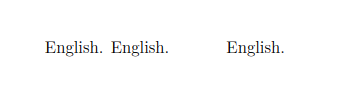
But the expected behavior is:
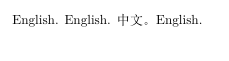
However, specifying other font instead of the default "Fandol" font will make everything looks good.
