

 File-New-Project
High CPU usage.. is this normal?
Description
It's constantly using 10-15% CPU is this [normal? On core i5 9600k There is no sound even playing. Don't know if it's related to https://github.com/File-New-Project/EarTrumpet/issues/402 because my RAM usage is only about 30MB.
Screenshots
Here is a pastebin of error reporting https://pastebin.com/1SXjQt8F

Does it always happen? If so, find EarTrumpet.exe in Task Manager > Details, right-click it, Create Dump File. Then attach the dump here or email it to [email protected]. Thanks!

@riverar
I sent my dump just now. I had to upload it to MEGA because it's like 600MB... Changing the volume in the mixer is what's triggering high CPU usage. It takes 1-3 seconds to change the slider location.
Looking at the ETW trace it seems like one thread is getting really stuck in MediaNotificationWorker, UI thread seems to be just waiting for the message, I assume it's blocking on the notification result.
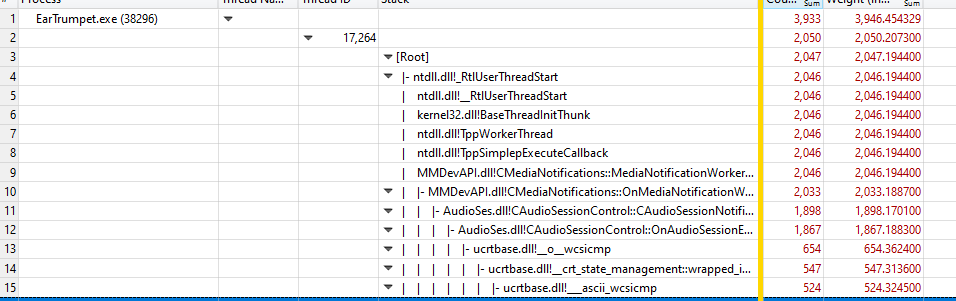

Significant chunk of the Notification thread is in the enumeration, that could be a problem for my machine. I have motherboard audio, display port monitor audio, steinberg CL 1 audio interface, rift s vr headset, and I use bluetooth headphones. Most of those are disabled though. I don't know this API so I'm not sure if it's MS API that does something O(n^2) or maybe you call it too often.


Nothing is jumping out at me here that indicates there's an EarTrumpet bug so closing this for now. I'll keep an eye on CPU usage issues. If you find out more, let us know!