EarTrumpet
 EarTrumpet copied to clipboard
 File-New-Project
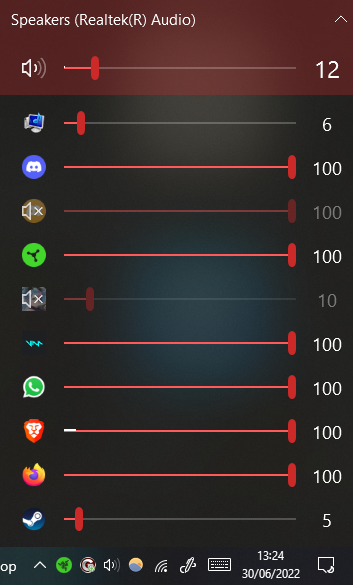
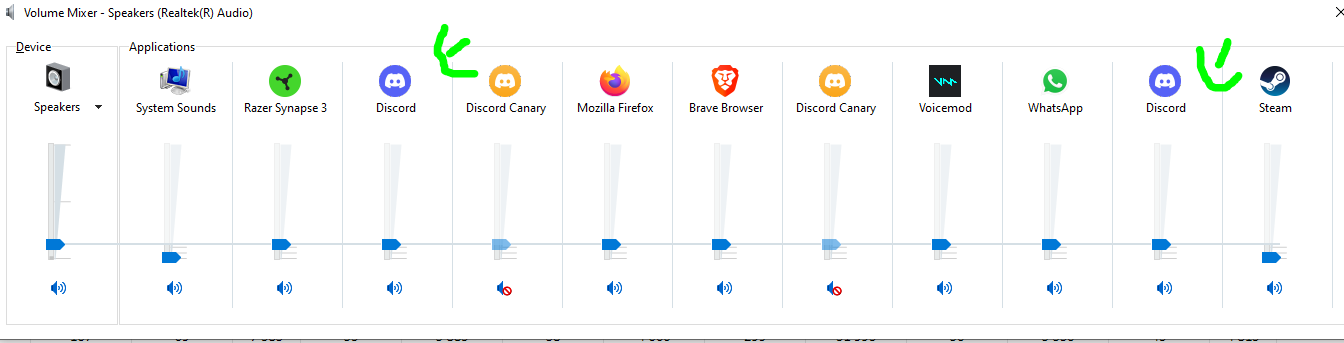
Bug? Cannot control Discord sounds and screen sharing separately to discord voice calls whilst old windows mixer can.
Summary
Amazing App however I would like to request a feature/bug fix I use discord a lot, personally I love that on the classic windows mixer you can control the sound of the users in call separately to the sound of the discord app, i.e. if someone is screen sharing or joins a call you can lower that sound, whilst keeping the volume of the presenter high. In Eartrumpet there is only one volume control for discord for some reason. Would be amazing if there was an update to address this as it may happen with other apps also.
I have tested with Base discord and Discord Canary as well as shown by the images below
Steps to reproduce
Install discord have at least 2 people in the call open classic volume mixer when a user joins the call or rings the 2nd discord out put should make the sound effect sounds, whilst the first carries the call audio channel eartrumpet will only show a single audio channel
EarTrumpet version
2.2.0.0
Windows version
19044.1766
Additional information
No response

@Cypherthegreat right click the discord icon, and it will fold out showing both instances.

I agree that it's non-intuitive, and could do with an icon showing the number of audio sessions that are being hidden.