

 FakeFishGames
Shell 32 degrees messes with the lights
Disclaimers
- [X] I have searched the issue tracker to check if the issue has already been reported.
- [ ] My issue happened while using mods.
What happened?
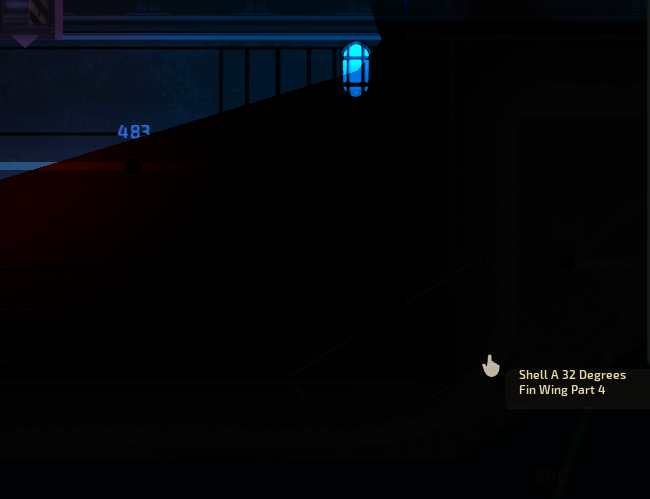
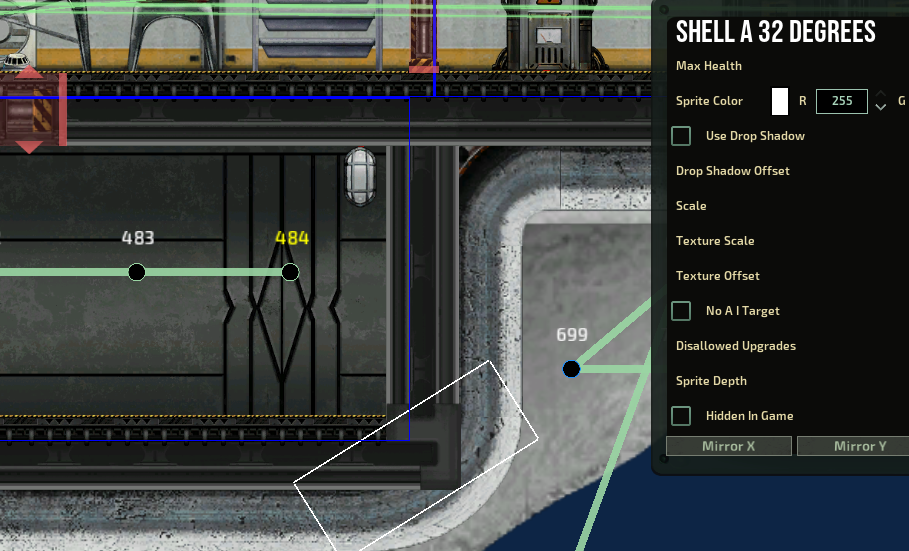
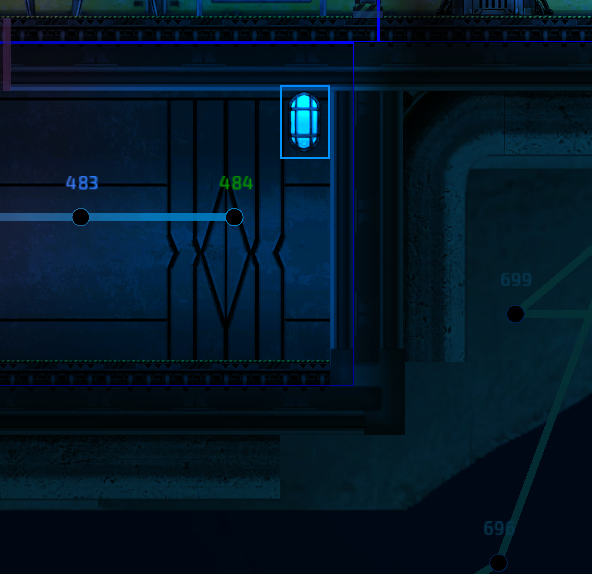
In the sub editor, when placing a lamp in the vicinity of a shell 32 degrees as seen in the photos, the light behaves abnormally, it is not always on the same lamp or in the same area but the only thing in common is the shell 32. Deleting it fixes the lighting issue but because it is a very crucial submarine component, it is extremely painful to not use in builds. Tried everything to fix the issue, such as complete re-install of the game, vanilla only even not using any item assemblies made locally, removing almost all other light sources, all other walls and nothing fixes it, even adjusting its location doesn't work, the only solution is to delete the shell. The game also crashes a few minutes or even seconds of opening the relevant sub in the editor as the lights cause it to crash. Apparently this issue has existed for very long and is recorded in reddit since at least 2018 and so far I didn't see it happen anywhere. The latest update to the game that was released was the only thing that changed since this sub has been in my folder for 2 years now. Suddenly this shell issue has returned. Please see photos and please fix the shadows for this piece.

Reproduction steps
- place a lamp in the editor, turn it on.
- place a shell 32 degrees within a few meters from it.
- turn on lighting visuals to see a strange blind area that does not resemble a shadow from the shell. This is not happening 100% of the time, for my case it is 2 lamps out of 15 of the sub, 8 of those lamps have a shell in their vicinity but for some reason only 2 have this effect. Game usually crashes a few minutes after experimenting with moving parts around and rotating or deleting to fix the lighting bug.
Bug prevalence
Happens regularly
Version
0.18.15.1 / 0.18.15.2 on macOS
-
No response
Which operating system did you encounter this bug on?
Windows
Relevant error messages and crash reports
This is one of the 10 different crash reports received from this issue, I have 9 more if you need further data to be sent:
Barotrauma Client crash report (generated on 19/09/2022 13:11:07)


Barotrauma seems to have crashed. Sorry for the inconvenience!


116B6C514DB831BB68D5A8F96ACE87C4


Game version 0.18.15.1 (ReleaseWindows, branch hf, revision 91a05f31ff)
Graphics mode: 1920x1080 (BorderlessWindowed)
VSync ON
Language: English
Selected content packages: Vanilla, forward railgun, OUTPOST, kastrul guts, r-29 big rig, drone guts, enterprise mk1 26-08-2022, shuttle control, eeeeeeeee, eeee, Elevator Shaft, Enterprise body, Dugong Mini, Cursed Turrers and grindlift, RemoraDroneCursed, RemoraCursed, HAMMER OF DAWN, Dugong Mini plus some toys, Original Navigation Lights, lights assembly, containers, Enterprise Saucer, Dugong Mini cursed, Saucer
Level seed: no level loaded
Loaded submarine: Enterprise Saucer (722E997248A7E5AD2DF8CFC50EDE8E5C)
Selected screen: Barotrauma.GameScreen
SteamManager initialized


System info:
    Operating system: Microsoft Windows NT 10.0.19044.0 64 bit
    GPU name: NVIDIA GeForce GTX 1050 Ti
    Display mode: {Width:1920 Height:1080 Format:Color AspectRatio:1.7777778}
    GPU status: Normal


Exception: Texture is disposed (System.InvalidOperationException)
Target site: Void CheckValid(Microsoft.Xna.Framework.Graphics.Texture2D)
Stack trace:
   at Microsoft.Xna.Framework.Graphics.SpriteBatch.CheckValid(Texture2D texture) in <DEV>\Libraries\MonoGame.Framework\Src\MonoGame.Framework\Graphics\SpriteBatch.cs:line 249
   at Microsoft.Xna.Framework.Graphics.SpriteBatch.Draw(Texture2D texture, Vector2 position, Nullable`1 sourceRectangle, Color color, Single rotation, Vector2 origin, Vector2 scale, SpriteEffects effects, Single layerDepth) in <DEV>\Libraries\MonoGame.Framework\Src\MonoGame.Framework\Graphics\SpriteBatch.cs:line 472
   at Barotrauma.Sprite.Draw(ISpriteBatch spriteBatch, Vector2 pos, Color color, Vector2 origin, Single rotate, Vector2 scale, SpriteEffects spriteEffect, Nullable`1 depth) in <DEV>\Barotrauma\BarotraumaClient\ClientSource\Sprite\Sprite.cs:line 219
   at Barotrauma.Items.Components.LightComponent.Draw(SpriteBatch spriteBatch, Boolean editing, Single itemDepth) in <DEV>\Barotrauma\BarotraumaClient\ClientSource\Items\Components\LightComponent.cs:line 85
   at Barotrauma.Item.Draw(SpriteBatch spriteBatch, Boolean editing, Boolean back) in <DEV>\Barotrauma\BarotraumaClient\ClientSource\Items\Item.cs:line 488
   at Barotrauma.Submarine.DrawBack(SpriteBatch spriteBatch, Boolean editing, Predicate`1 predicate) in <DEV>\Barotrauma\BarotraumaClient\ClientSource\Map\Submarine.cs:line 227
   at Barotrauma.GameScreen.DrawMap(GraphicsDevice graphics, SpriteBatch spriteBatch, Double deltaTime) in <DEV>\Barotrauma\BarotraumaClient\ClientSource\Screens\GameScreen.cs:line 263
   at Barotrauma.GameScreen.Draw(Double deltaTime, GraphicsDevice graphics, SpriteBatch spriteBatch) in <DEV>\Barotrauma\BarotraumaClient\ClientSource\Screens\GameScreen.cs:line 128
   at Barotrauma.GameMain.Draw(GameTime gameTime) in <DEV>\Barotrauma\BarotraumaClient\ClientSource\GameMain.cs:line 1003
   at Microsoft.Xna.Framework.Game.DoDraw(GameTime gameTime) in <DEV>\Libraries\MonoGame.Framework\Src\MonoGame.Framework\Game.cs:line 669
   at Microsoft.Xna.Framework.Game.Tick() in <DEV>\Libraries\MonoGame.Framework\Src\MonoGame.Framework\Game.cs:line 511
   at Microsoft.Xna.Framework.SdlGamePlatform.RunLoop() in <DEV>\Libraries\MonoGame.Framework\Src\MonoGame.Framework\SDL\SDLGamePlatform.cs:line 94
   at Microsoft.Xna.Framework.Game.Run(GameRunBehavior runBehavior) in <DEV>\Libraries\MonoGame.Framework\Src\MonoGame.Framework\Game.cs:line 398
   at Microsoft.Xna.Framework.Game.Run() in <DEV>\Libraries\MonoGame.Framework\Src\MonoGame.Framework\Game.cs:line 368
   at Barotrauma.Program.Main(String[] args) in <DEV>\Barotrauma\BarotraumaClient\ClientSource\Program.cs:line 59


Last debug messages:
[19/09/2022 13:04:12] Attempting to open ALC device "OpenAL Soft on Headset Earphone (MH752)"
[19/09/2022 13:04:05] Logged in as wearhint (SteamID STEAM_1:0:73800665)

Possibly due to the https://github.com/Regalis11/Barotrauma/issues/3366! P.S. Similar problems (https://github.com/Regalis11/Barotrauma/issues/8044, https://github.com/Regalis11/Barotrauma/issues/8414) were associated with the same thing.

Thank you for the report!
I am unable to replicate this, which implies its either fixed for the next version (and fixed in current unstable) or if possible it would help if we could get a submarine file that reliably demonstrates the issue?
I tried similar-looking conditions and moving the light around / removing and adding "Shell A 32 degrees" piece with no success:
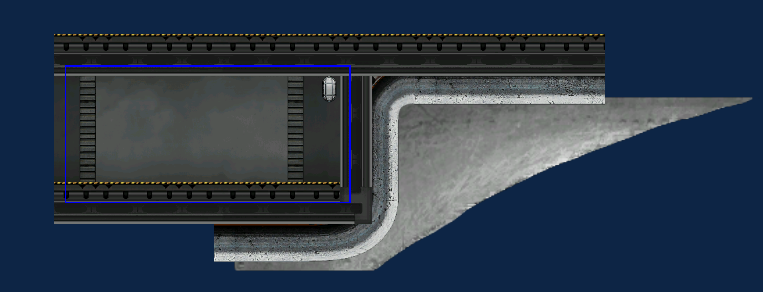
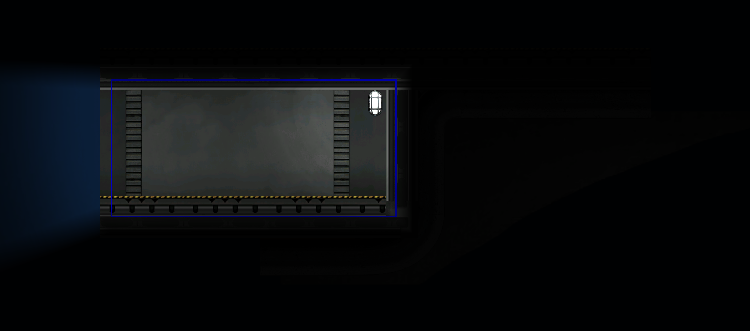

I found a way around the issue by moving the shell away from the light pixel by pixel, i replicated the effect by moving the shell one pixel closer to the light as can seen on the top left of the save file attached.
Another thing I didn't mention is that moving the light itself away, leaves the same shadow behind, so placing the light inside the shadow on the first image for example, would look exactly the same, lamp completely hidden in the darkness, as if that hull piece is diagonally cut in half like a different room, yet the light from the lamp would still light up the rest of it...
However the effect cannot be replicated to the bottom right as had previously been shown, I doubt it is fixed, it may have to do with the complexity of a sub, the amount of time the save file is open in editor or the sub been played, the number of shells in the vicinity that bug out the lighting, which is why it might affect all lights.
Like I said, this only shows up in my case on 5-10% of the lamps, I have seen other github issues with this weird light effect coming from the shapes of the actual pieces instead of their image but in this case, the light doesn't look like the shell pieces actual shadow, just appears like its being blocked or bugs out because of 2 or 3 shells within a few meters from it, causing some kind of glitch on the shadows.
please find the links for the sub file here: https://fastupload.io/en/KDtPaAgD6ymqIyb/file https://fastupload.io/en/OZQxkwCVyJ477nE/file
I noticed somewhat similar lighting weirdness when just using a plasma cutter or a welder on a wall
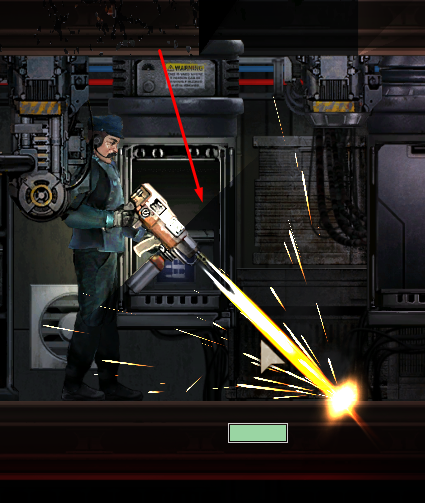
Video: https://www.youtube.com/watch?v=Nn7LSxeLLoY
Testing environment used on the video: lightest.zip

it does look similar, its weird how my lamp does like a 30 degree shadow while your welding does a perfect 45 degree... we might be experiencing multiple lighting bugs due to some limitation of the game engine and its just more pronounced now.
@NilanthAnimosus @Rokvach
I seem to have discovered a pattern:
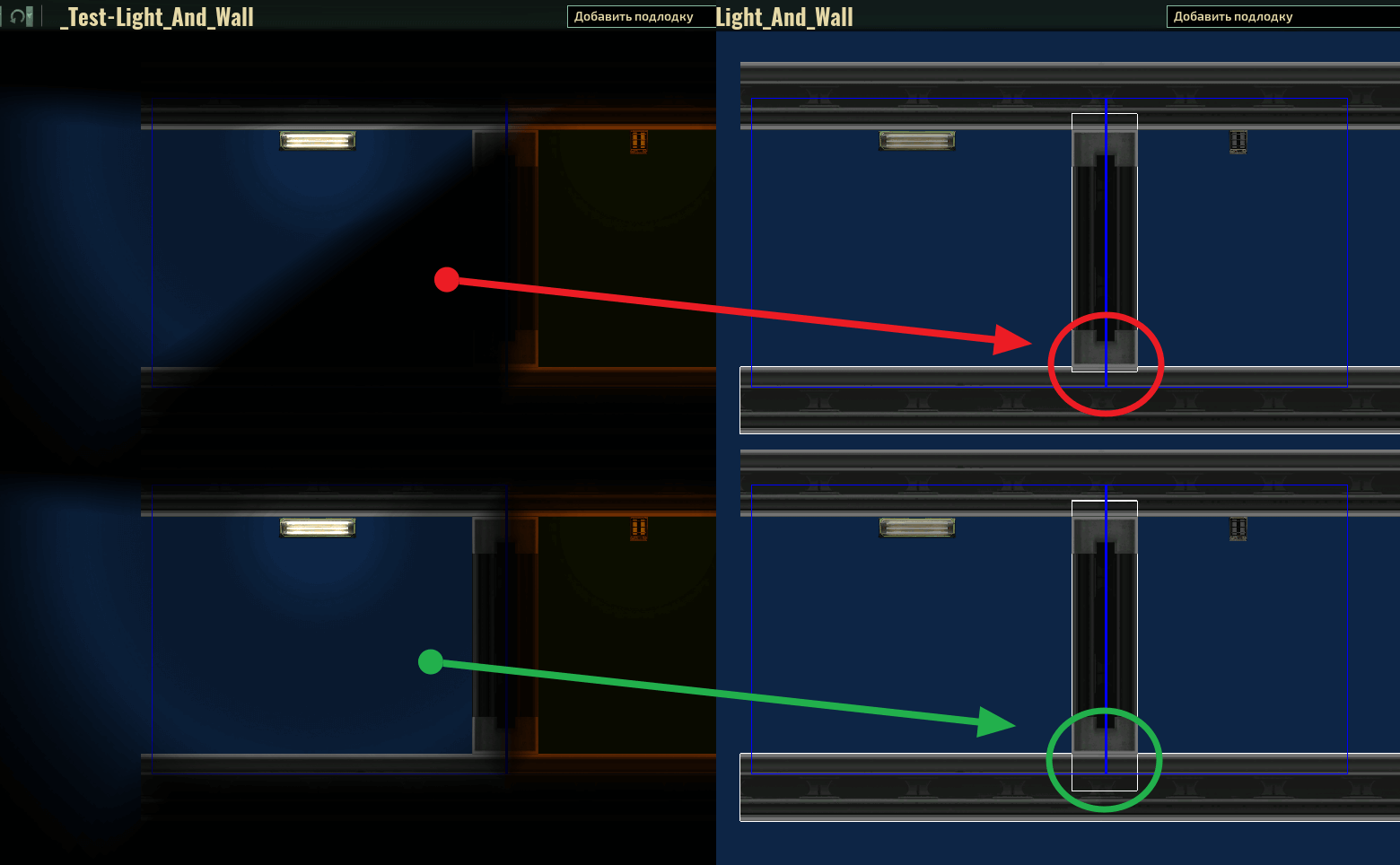 This is due to the way the perpendicular walls intersect (penetration depth)!
Ver 0.19.14.0
This is due to the way the perpendicular walls intersect (penetration depth)!
Ver 0.19.14.0
Test chamber (with error): _Test-Light_And_Wall.zip
https://user-images.githubusercontent.com/93348499/198122005-9980a0dc-c87b-46cf-a5c0-c4a56ac62fa4.mp4
P.S. In addition, may be important the sequence when placing objects..!? The submarine is often rebuilt. But I’m not sure about this.