
FTB-Modpack-Issues
 FTB-Modpack-Issues copied to clipboard
 FTBTeam
[Bug]: SB3 Ars Nouveau Chunkloading Server Lag
Modpack
FTB Stoneblock 3
Modpack version
1.3.0
Log Files
No response
Describe the bug
It seems something very slowly causes Mean Tick Time buildup and server lag when chunkloading an Ars Nouveau setup without players being nearby. There's no issue when a player is near the setup, but as soon as the player leaves the area/server and "unloads" the chunks, over the next 30-60 minutes or so while the FTB map is set to forceload the chunks, the server slowly begins to lag. After a while, it becomes almost unplayable due to the TPS getting low, and teleporting over to load the Ars setup causes a very sharp spike in mean tick time (from like 60 up to like 300), and my game usually stops responding for a while. After the tick time spikes, it falls back down to it's usual around 20 or so and my game eventually starts to respond again. Leaving the setup overnight will eventually cause the server to crash.
Steps to reproduce
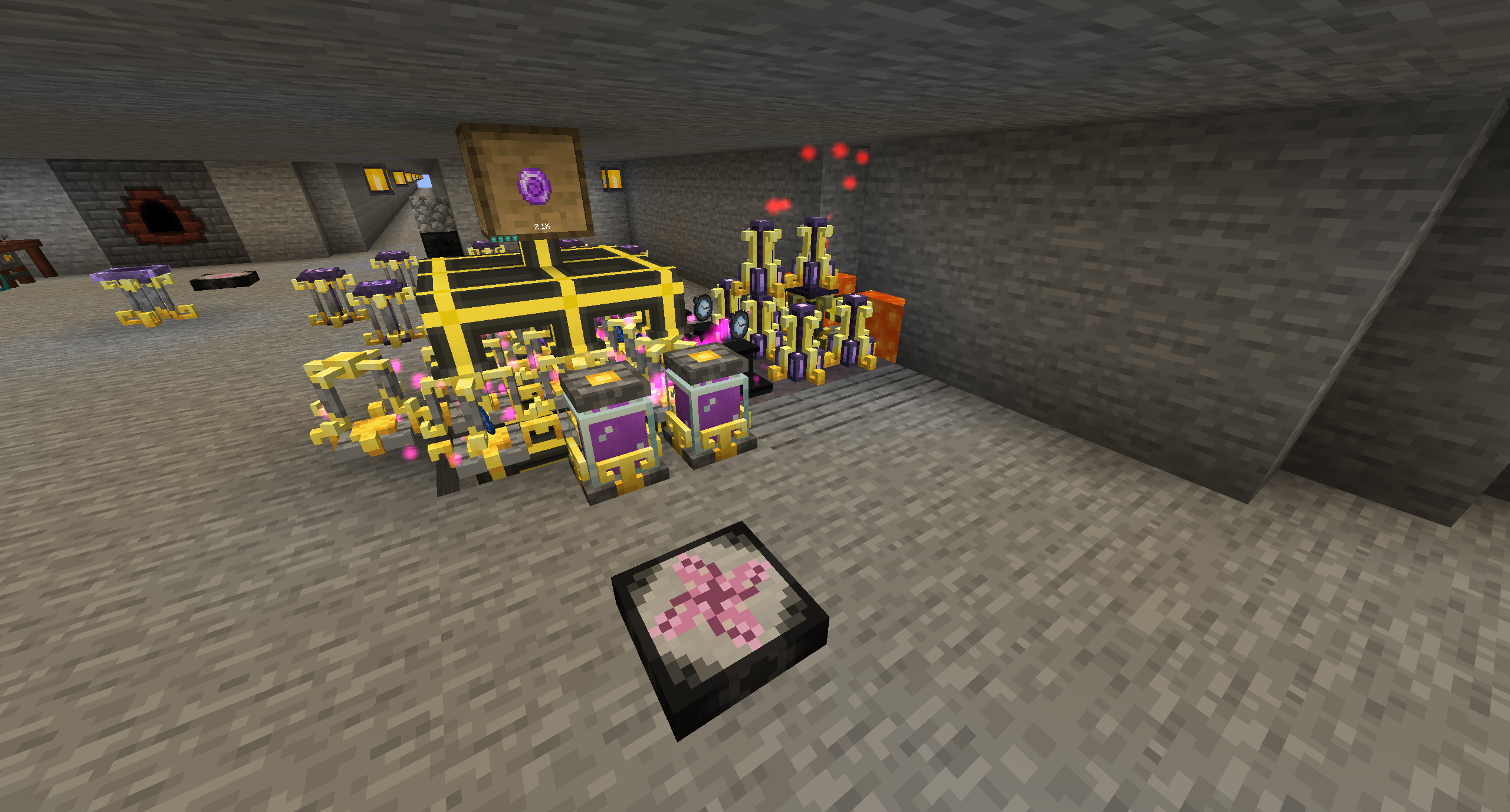
- Make an Ars Nouveau setup to produce source gems. A few jars being provided with source and a few imbuement chambers automatically receiving lapis and exporting the gems
- Chunkload the area using the FTB Claim map
- Unsure if this is required, but turn on a watch of flowing time or two nearby (might just speed up the issue)
- Leave the area so it's not loaded by an actual player
- Wait 10-30 minutes and occasionally check server TPS, Mean tick time will slowly rise and start to lower the Mean TPS to lag the server. Teleporting to the area will nearly crash the player's game, and TPS will spike very high before going back to normal
Expected behaviour
Server TPS to not lower when force loading an Ars Nouveau setup
Screenshots
Additional information
No response

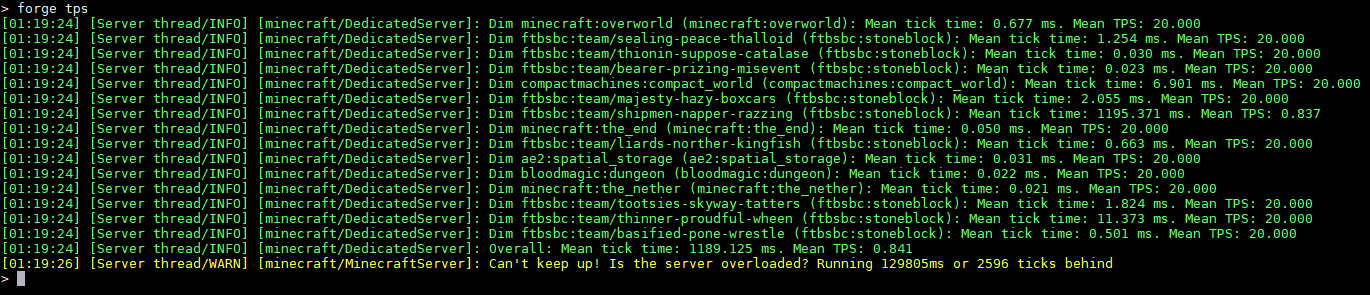
After posting this I left the Ars Nouveau setup force loaded for about 60 minutes to test (with 3 watches of flowing time on), the mean tick time climbed up from 20 to 50ms in that time. After teleporting to the Ars Nouveau setup, I almost crashed and the Mean Tick time skyrocketed to 1189 with the Mean TPS going down to 0.841. This lasted about 10 seconds until it went back down to normal.
Does this setup cause problems with the watches of flowing time disabled/removed from the area? I have noticed that watches of flowing time in general are causing issues and stacking them REALLY makes the problem much worse.
Suggestion: I installed Observable (Also it's dependency mod) to sniff out lag causing problem blocks on my server, it's basically Lag Goggles for 1.18 and watches of flowing time have been a consistent problem and the laggiest block in the game on every profile, you may consider installing this mod to check what's going on... simple scan with observable and it'll tell you what's breaking where.

Does this setup cause problems with the watches of flowing time disabled/removed from the area? I have noticed that watches of flowing time in general are causing issues and stacking them REALLY makes the problem much worse.
Thought I’d responded to this earlier but apparently I forgot, even without watches the server TPS got worse in under 12 hours. The watches definitely speed up the process of it happening, but it still happens regardless.
Would you be able to obtain a Spark report for us? Spark is a mod included with the modpack already.
To start a profiler when there is a lot of lag, type /spark profiler start. To stop the profiler after 15 to 30 seconds of profiling, type /spark profiler stop.
You can do this from the server console if you want, simply omit the slashes (e.g. spark profiler start).
That will give you a link to the results, which you can post here. That helps us see what the cause of lag is, and TPS being very low means there is a lot of lag.
Also, in-game you can press "Ctrl + U" to bring up the Crash Utilities menu. I think there you can see entities loaded and chunks loaded. I'm not sure there would be much more info in there, but if you see any abnormal entity numbers or just abnormal numbers let us know. If you want to add screenshots for that part, go for it that'll always be helpful. This can only be done in-game though, but you don't need to be where the source of the lag is (you can be at spawn for example).
Thanks in advance for that info!

Would you be able to obtain a Spark report for us? Spark is a mod included with the modpack already. To start a profiler when there is a lot of lag, type
/spark profiler start. To stop the profiler after 15 to 30 seconds of profiling, type/spark profiler stop.
Hope I did this correct, couldn't get the commands to work exactly as you typed them but I think I got them working. Used /spark profiler to start it, and /spark profiler --stop to end it.
While sitting away from base: https://spark.lucko.me/epZYbnkdaI
During teleport back to the base: https://spark.lucko.me/ZKiE9JmQr8
Both of these were done 1h30m after starting the Ars Nouveau setup with 3 watches of flowing time.
Also, in-game you can press "Ctrl + U" to bring up the Crash Utilities menu. I think there you can see entities loaded and chunks loaded. I'm not sure there would be much more info in there, but if you see any abnormal entity numbers or just abnormal numbers let us know.
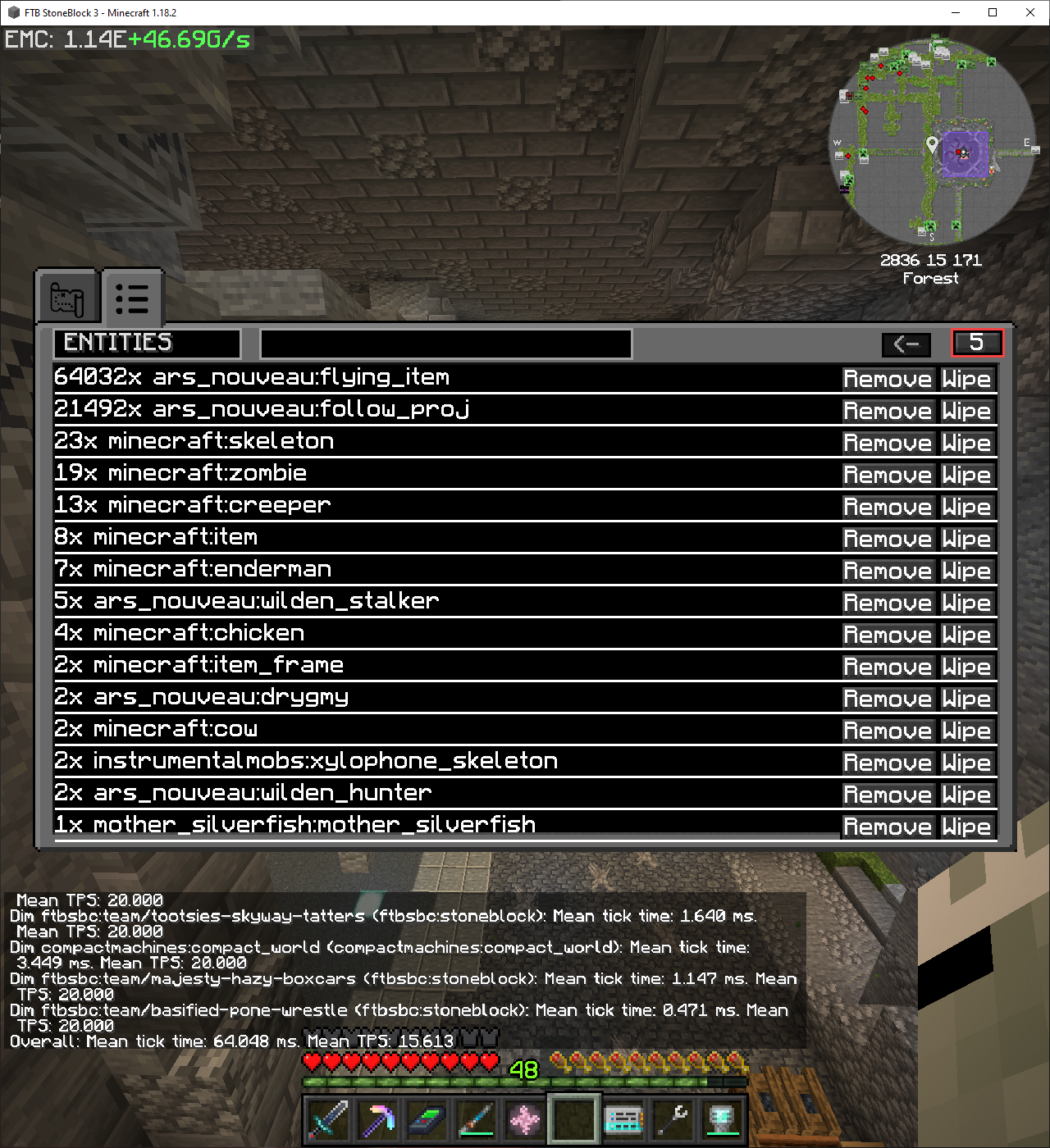
I think this definitely shows what's going on to cause the server lag (see attached screenshot) Screenshot is of the entities 1h30m after with 3 watches of flowing time. Even without the watches of time, the flying_item and follow_proj entities keep stacking, just not as quickly.
Sorry for replying so late, I've just been able to try and reproduce this now with your setup, it was useful.
It looks like this might have been fixed in 1.5.0, since the flying item don't multiply anymore. Here's my small setup:
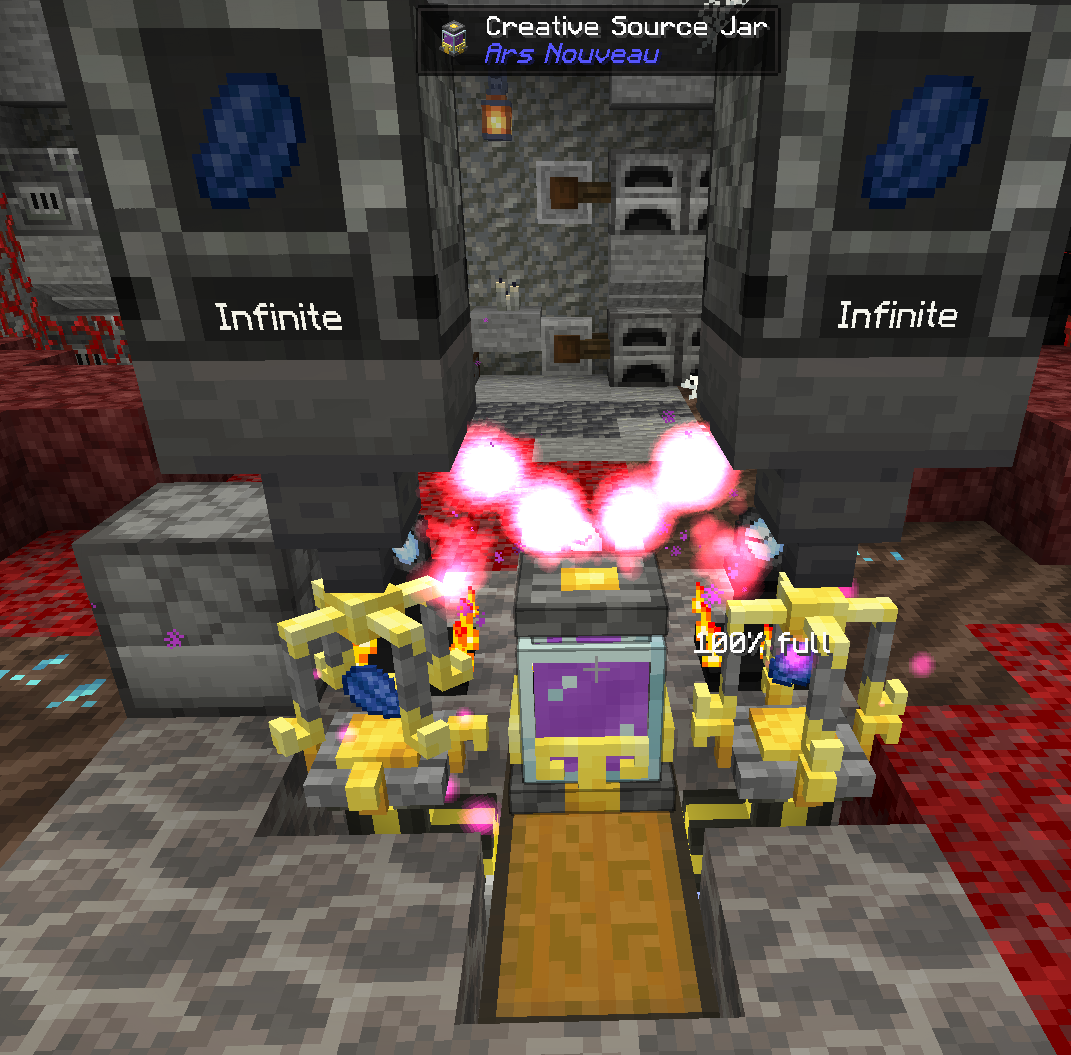
There's 3 watches of flowing time plus 2 imbuement chambers and some source.
If I run the command /kill @e[type=ars_nouveau:flying_item] periodically, it only kills those entities in groups of 5, up to a max of 15 in my current setup:

They don't seem to multiply anymore which would cause tremendous lag like in your spark reports (which were perfect! I could see the flying items were lagging the server in the second one).
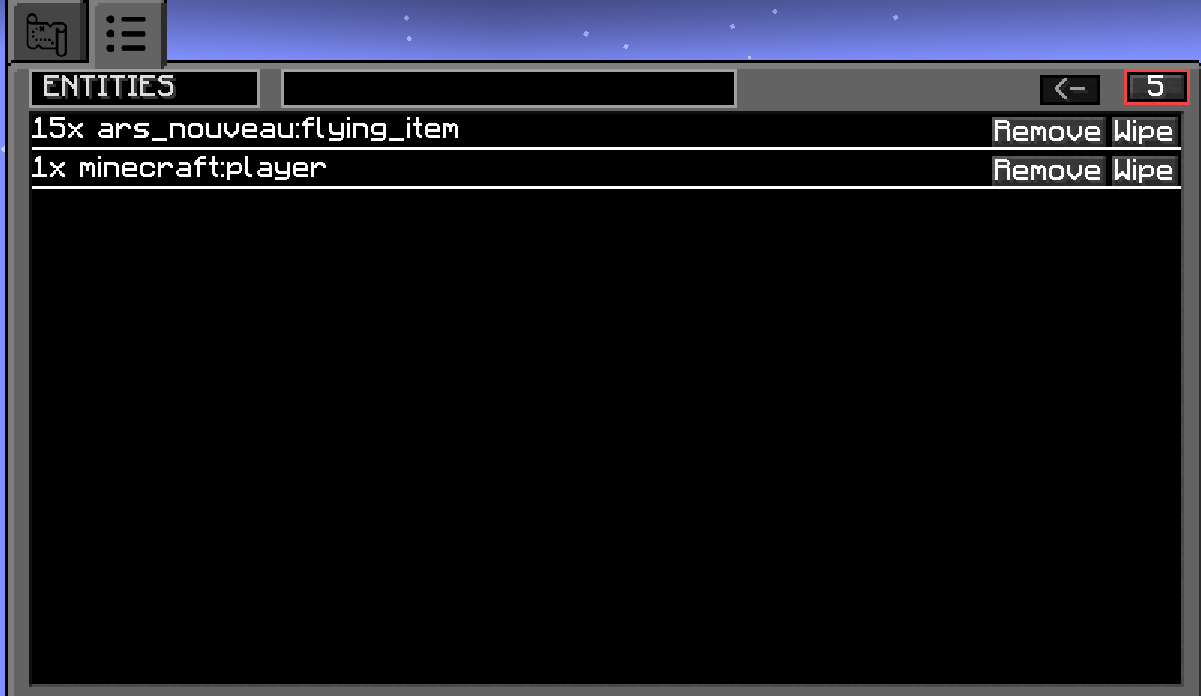
That does look fixed, so I will mark this as fixed. Thanks for reporting 🙂