
FTB-App
 FTB-App copied to clipboard
 FTBTeam
[Bug]: Cannot install packs if app-intalled JDKs fail (and other platform breakages)
What Operating System
Linux (Other)
App Version
202207271710-0f9644f5fc-release
UI Version
unknown (due to the need to wrap electron, FTBApp can't find it's version info)
Log Files
https://paste.sr.ht/~hutzdog/18cd947e43ac1111da797cae2ff40c26866da1c6
Debug Code
FTB-DBGIBONULIHUK (using statically linked build)
^ It's not wrong, I do be on Linux
Describe the bug
The FTB App fails to work due to several factors on certian systems
Steps to reproduce
This bug is multi-faceted, with each workaround leading to another error. They all stem from the same common root of hard-coded library paths, so here are the instances (in order of probable occurrence):
-
The interactive installer is the only way to install the app, which hampers any attempt at packaging the app. This leads to the first problem: Electron executables depend on specific paths in order to work on GNU/Linux systems and, without any way to easily get said executable headless, there is no way for packagers to patch Electron to get it to function. This leads to the need for an ugly hack involving replacing the
ftb-appexecutable with a shell script (likely a link to one due to update persistence) in order to get the app to launch at all. -
Once you get the app open and try to download a pack, the app downloads a JDK in the background that is needed to run the modloader installation step. This also can have linkage issues, resulting in cases where the app is unusable without the ability to specify an external JDK that is used in this step.
-
~The debug tool is dynamically linked (likely unintentionally given the use of the
musllinker), meaning that on multiple systems it fails to run~ fixed in new builds.
Expected behaviour
The app should be able to be patched so that it works on as many systems as possible
Screenshots
No response
Additional information
Providing some form of archive of the installed app and applying the above patches should be enough to provide compatibility far beyond the limits of the user-facing-only installer that prevents packagers from providing patched versions of software which work on their systems. A good test for this is running it under a NixOS environment, since it is quite unique in how it handles paths and is likely to have issues should compatibility be a problem (in addition to serving as an excellent distribution channel over most other Linux systems).
Information
- [X] I have provided as much information as possible

Alright, we actually found a solution for the latter problem that probably should be implemented anyway, as it provides a way to use the natively-configured (and natively-optimized) JDK without much effort and removes the need to download JDKs at all. Reading through the FTBApp script, a file at ~/.install4j is read, and it seems very useful here. It is a TSV-encoded catalogue of all Java installs known to install4j and their respective versions and paths. Using this, the same Java install running the app can probably be reused to run Minecraft, alongside any others known to the programme.
The following uses nushell to display the info (labelled to the best of our ability) in table format.
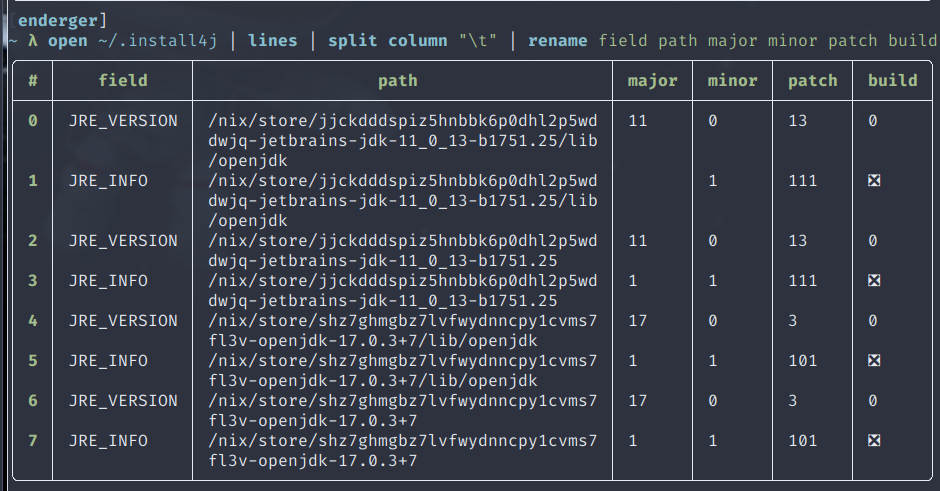
A generic JRE is also visible in the app folder under .install4j/inst_jre.cfg
A working parser in Perl, based on the shell script (has corrected field names, see lines 88-89 of the FTBApp wrapper):
#!/usr/bin/env perl
use v5.10.1;
use warnings;
use strict;

no warnings 'experimental';
use feature "switch";

sub parse_i4j($) {
  my $fname = shift;
  open(my $file, "<", $fname)
      or die "Cannot read $fname: $!";

  while (my $line = <$file>) {
    # Values are tab-separated, but " " is the Perl idiom for splitting on whitespace
    my @fields = split(" ", $line);

    for($fields[0]) {
      when("JRE_VERSION") {
        my ($kind, $dir, $major, $minor, $micro, $patch) = @fields;
        print "$kind @ $dir\n";
        print "Major: $major\n";
        print "Minor: $minor\n";
        print "Micro: $micro\n";
        print "Patch: $patch\n";
      }
      when("JRE_INFO") {
        my ($kind, $dir, $is_openjdk, $modification, $is_64_bit) = @fields;
        print "$kind @ $dir\n";
        print (($is_openjdk == 1) ? "OpenJDK" : "OracleJDK", "\n");
        print "Modified: $modification\n";
        print "Bits: ", ($is_64_bit == 1) ? "64" : "32", "\n";
      }
      default { die "Invalid field: $fields[0]"; }
    }

    print "\n";
  }
}

parse_i4j $ARGV[0];
Oh, I think this has been fixed, please let me know if it has. We did a bunch of work on our installer a little bit ago.
