

 Expensify
getInitialShare and addNewShareListener passing null SharedItem to callback
Current Behavior
The SharedItem passed into the callback from getInitialShare and addNewShareListener is null.
Expected Behavior
The SharedItem is an object containing at least mimeType and data properties.
Steps To Reproduce
- Clone this repo
yarn installyarn startandyarn react-native run-android- Go into your favorite browser and hit the share icon for a link
- Select the
testapp Expected Result: logsitem: <SharedItem>to the console Actual Result: logsitem: nullto the console
Troubleshooting
The provided example app works perfectly fine for me, so I have a feeling it's either an incompatibility issue with react-native-bootsplash or deep linking in react-navigation or simply something (probably in AndroidManifest.xml) that I have missed or misconfigured. The example repo I made is an extremely stripped down and modified version of my app, but it has all the same parts that seemed relevant.
I have tested this with the share function from Brave and Twitter, both of which work on the example app.
Environment
| software | version |
|---|---|
| Android | 10 |
| node | 12.18.3 |
| yarn | 1.22.4 |
| react | 16.13.1 |
| react-native | 0.63.2 |
| react-native-bootsplash | 2.2.5 |
| @react-navigation/native | 5.7.3 |
| react-native-share-menu | 5.0.1 |


Is this problem Android only? Or iOS as well?
I do not have a Mac or any iOS devices to test with unfortunately :/

@marcosmartinezeu Are you using react-navigation and/or react-bootsplash?
@ngregrichardson
Yes. I am using react-navigation.
I have detected that the listener does not detect anything when the application is opened from another app through share extension.
@Gustash
<uses-permission android:name="android.permission.INTERNET" />
<uses-permission android:name="android.permission.CAMERA" />
<uses-permission android:name="android.permission.WRITE_EXTERNAL_STORAGE"/>
<application
  android:name=".MainApplication"
  android:label="@string/app_name"
  android:icon="@mipmap/ic_launcher"
  android:roundIcon="@mipmap/ic_launcher_round"
  android:allowBackup="false"
  android:theme="@style/AppTheme">
    <meta-data android:name="com.facebook.sdk.ApplicationId" android:value="@string/facebook_app_id"/>
    <service android:name="io.invertase.firebase.messaging.RNFirebaseMessagingService">
        <intent-filter>
            <action android:name="com.google.firebase.MESSAGING_EVENT" />
        </intent-filter>
    </service>
    <service android:name="io.invertase.firebase.messaging.RNFirebaseBackgroundMessagingService" />
  <activity
    android:name=".MainActivity"
    android:label="@string/app_name"
    android:configChanges="keyboard|keyboardHidden|orientation|screenSize|uiMode"
    android:launchMode="singleTask"
    android:windowSoftInputMode="adjustResize">
    <intent-filter>
        <action android:name="android.intent.action.MAIN" />
        <category android:name="android.intent.category.LAUNCHER" />
    </intent-filter>
      <intent-filter>
          <action android:name="android.intent.action.VIEW" />
          <category android:name="android.intent.category.DEFAULT" />
          <category android:name="android.intent.category.BROWSABLE" />
          <data android:scheme="XXXXX" android:host="*" />
      </intent-filter>
      <intent-filter>
          <action android:name="android.intent.action.SEND" />
          <category android:name="android.intent.category.DEFAULT" />
          <category android:name="android.intent.category.BROWSABLE" />
          <data android:mimeType="text/plain" />
          <data android:mimeType="image/*" />
          <data android:mimeType="application/*" />

      </intent-filter>
      <intent-filter>
          <action android:name="android.intent.action.SEND" />
          <category android:name="android.intent.category.DEFAULT" />
          <data android:mimeType="text/plain" />
          <data android:mimeType="image/*" />
          <data android:mimeType="application/*" />
          <data android:scheme="XXXXX" android:host="*" />
      </intent-filter>
  </activity>
  <activity android:name="com.facebook.react.devsupport.DevSettingsActivity" />
</application>
@Gustash merged but I am testing with iOS not in Android. I have tried with example APP from repository and it works correctly. Then, I have copied info.plist, AppDelegate, App.js, etc.. from example to my project but it doesn't work.
Can you make sure you added the ShareViewController.swift from the package to your Share Extension target and that the path is referencing the node_modules path? Also, make sure the controller in your Share Extension's storyboard is that ShareViewController
- [X] ShareViewController.swift added
- [X] Check Share Extension`s storyboard
I have tested with ShareViewController and iOS Custom ReactShareViewController in storyboard.
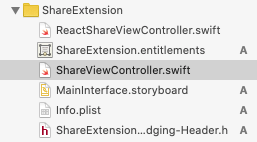
Try running the app target and checking for messages on the Xcode logger, then do the same for the share target. I suspect it's an issue with a mismatched group app id somewhere
Logs from ShareExtension
2020-08-13 14:01:36.212996+0200 ShareExtension[84894:845875] Failed to inherit CoreMedia permissions from 84863: (null) 2020-08-13 14:01:36.283570+0200 ShareExtension[84894:845629] Load 2020-08-13 14:01:36.385165+0200 ShareExtension[84894:845629] [native] Running application ShareMenuModuleComponent ({ initialProps = { }; rootTag = 1; }) 2020-08-13 14:01:36.394851+0200 ShareExtension[84894:845846] [core] SLComposeServiceViewController got NSURL https://elpais.com/sociedad/2020-08-13/siete-comunidades-se-plantean-si-prohiben-fumar-en-la-calle-como-galicia.html for public.url error: (null) 2020-08-13 14:01:36.455419+0200 ShareExtension[84894:845629] [core] SLComposeServiceViewController got attachment coarseType 3 2020-08-13 14:01:37.455145+0200 ShareExtension[84894:845880] [] nw_socket_handle_socket_event [C5.1:1] Socket SO_ERROR [61: Connection refused] 2020-08-13 14:01:37.458222+0200 ShareExtension[84894:845880] [] nw_socket_handle_socket_event [C5.2:1] Socket SO_ERROR [61: Connection refused] 2020-08-13 14:01:37.459152+0200 ShareExtension[84894:845846] [] nw_connection_get_connected_socket [C5] Client called nw_connection_get_connected_socket on unconnected nw_connection 2020-08-13 14:01:37.459383+0200 ShareExtension[84894:845846] TCP Conn 0x6000003e9d40 Failed : error 0:61 [61] 2020-08-13 14:01:37.571600+0200 ShareExtension[84894:845886] [javascript] Running "ShareMenuModuleComponent" with {"rootTag":1,"initialProps":{}} 2020-08-13 14:01:37.641756+0200 ShareExtension[84894:845901] WF: === Starting WebFilter logging for process ShareExtension 2020-08-13 14:01:37.641891+0200 ShareExtension[84894:845901] WF: _userSettingsForUser : (null) 2020-08-13 14:01:37.641994+0200 ShareExtension[84894:845901] WF: _WebFilterIsActive returning: NO 2020-08-13 14:01:38.442373+0200 ShareExtension[84894:845846] [native] Unrecognized font family 'OpenSans-Regular' 2020-08-13 14:01:38.443324+0200 ShareExtension[84894:845846] [native] Unrecognized font family 'OpenSans-Regular' 2020-08-13 14:01:38.443895+0200 ShareExtension[84894:845846] [native] Unrecognized font family 'OpenSans-Regular' 2020-08-13 14:01:38.444292+0200 ShareExtension[84894:845846] [native] Unrecognized font family 'OpenSans-Regular' 2020-08-13 14:01:38.742834+0200 ShareExtension[84894:845846] [native] Unrecognized font family 'OpenSans-Regular' 2020-08-13 14:01:38.743048+0200 ShareExtension[84894:845846] [native] Unrecognized font family 'OpenSans-Regular' 2020-08-13 14:01:38.743893+0200 ShareExtension[84894:845846] [native] Unrecognized font family 'OpenSans-Regular' 2020-08-13 14:01:38.744658+0200 ShareExtension[84894:845846] [native] Unrecognized font family 'OpenSans-Regular' 2020-08-13 14:01:38.923034+0200 ShareExtension[84894:845925] Connection 22: unable to determine interface type without an established connection 2020-08-13 14:01:38.923191+0200 ShareExtension[84894:845925] Connection 22: unable to determine fallback status without a connection 2020-08-13 14:01:38.923556+0200 ShareExtension[84894:845925] Task <542C26B9-8C57-40F8-910C-A785DCACDEBC>.<0> HTTP load failed, 0/0 bytes (error code: -999 [1:89]) 2020-08-13 14:01:38.927316+0200 ShareExtension[84894:845925] Task <66C64282-9C94-4079-8454-D2F06F5AFF49>.<0> HTTP load failed, 0/0 bytes (error code: -999 [1:89]) 2020-08-13 14:01:38.931221+0200 ShareExtension[84894:845925] Task <9A3052F5-B66D-47F7-93E1-89838C19DB18>.<0> HTTP load failed, 0/0 bytes (error code: -999 [1:89]) 2020-08-13 14:02:21.463039+0200 ShareExtension[84894:845926] OPEN APP 2020-08-13 14:02:21.774591+0200 ShareExtension[84894:845629] [native] Invalidating <RCTCxxBridge: 0x7f850f70aff0> (parent: (null), executor: (null))

@caiosba I was experiencing this on Android as well, not sure if the iOS label fits.
I've found that the example code at the bottom of the README works...
https://github.com/meedan/react-native-share-menu
ShareMenuReactView.data().then(({ mimeType, data }) => {
While the example project code containing the following does not...
ShareMenu.getInitialShare(handleShare);
https://github.com/meedan/react-native-share-menu/tree/master/example

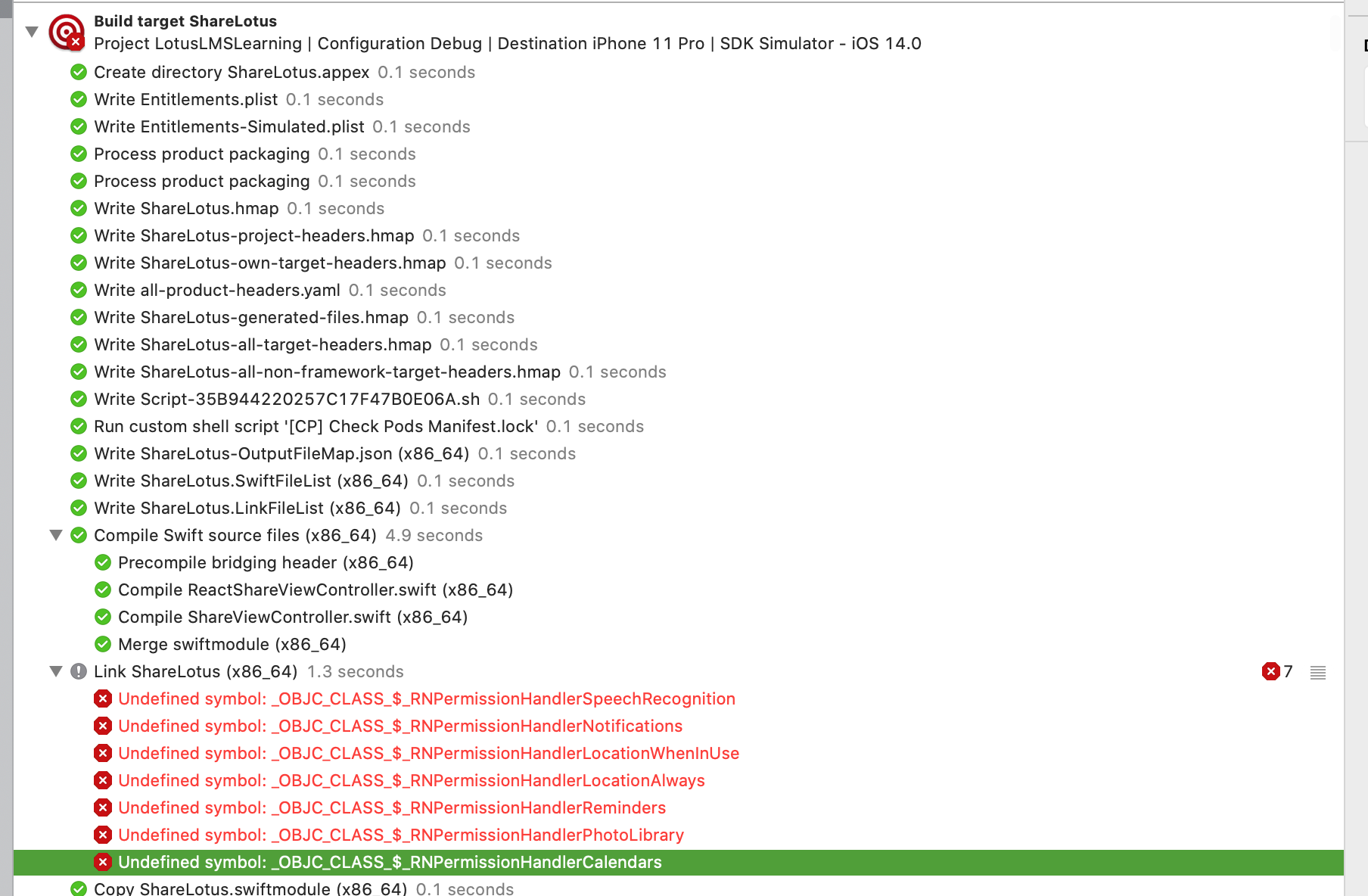

Same problem here. Can get the data and transition to the app, but no event in the app itself and hence no way to get the data after transition

Same problem here. Can get the data and transition to the app, but no event in the app itself and hence no way to get the data after transition
Check group for host app and extansion. They are can be equal.

Ok, I finally figured it out.
If you handle multiple schemas in your app, make sure that the one you added for share extension is first in your plist.
https://github.com/meedan/react-native-share-menu/blob/368167a60f5bdfcc834a333f139d21c8dc009cfa/ios/Modules/ShareMenu.swift#L73 ^ It only looks at the first schema from the app plist
@rpavlovs that's correct. This is mentioned in the README, maybe it's not too clear tho...
https://github.com/meedan/react-native-share-menu/blob/b77a4630c7d32289e619ae6a50fd546cdcc30a89/IOS_INSTRUCTIONS.md#L89
@Gustash Hi there, I have checked the App group, order of schemas in the Info.plist, and done all other steps suggested above. Still, getInitialShare and addNewShareListener are not triggered when I enter the main app using ShareMenuReactView.continueInApp({hello: 'from the other side'});. Any other ideas? Any help is greatly appreciated!

Ok, got it. For anyone struggling with this, this is how is solved it:
Apparently, it's important that your app's and your extension's group name follows this scheme: group.<YOUR_HOST_APP_BUNDLE_ID> (e.g. bundleId = com.mySuperCoolShareApp, app group name: group.com.mySuperCoolShareApp). Otherwise this https://github.com/meedan/react-native-share-menu/blob/693ef19b5ead83e0b3d88224fd9fd1b227424778/ios/ShareViewController.swift#L81 will not execute correctly.
@Gustash Maybe by convention the app group name should never be anything other than the schema the library assumes, but it might be helpful to add that to the documentation anyways.
Same problem was for me. Make sure your app and extension have same group scheme as described above for Debug and Release mode.
I missed group.com.mySuperCoolShareApp for my extension in Release mode.

Okay, everything worked correctly for me in version 5.0.5, but after updating to version 6.0.0 everything broke again! >.<
