

 Expensify
[$1000] A red dot mark should appear on the workspace list to identify which workspace is getting an error
If you haven’t already, check out our contributing guidelines for onboarding and email [email protected] to request to join our Slack channel!
Action Performed:
- Go to staging dot on chrome web
- Select any workspace
- Change the name of the workspace and type in multiple emojis until you get an error
- Click on save
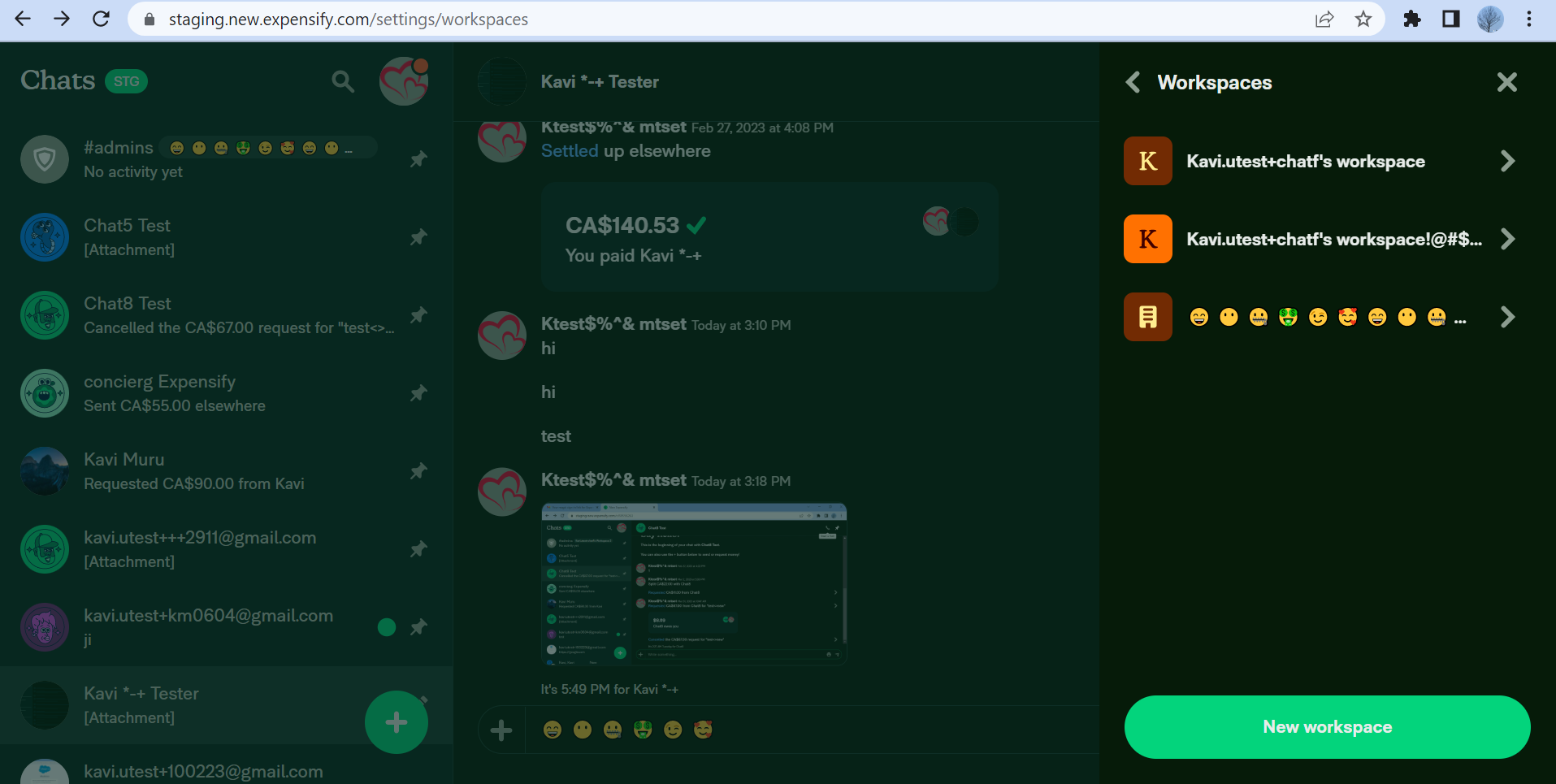
- Now go back to the workspaces on the settings page. Notice that red dot mark is present. Click on the workspaces . Now notice that red dot is not being displayed on the workspace that's getting the error. With this, it becomes difficult to search for the workspace that's getting an error. You need to manually go through each of the workspaces to identify the error location.
Expected Result:
Red dot should be displayed on the right hand side of the workspace's name to identify the workspace which has an error
Actual Result:
Red dot is not appearing on the workspace that's getting an error and thus it becomes difficult to find the error location and need to manually check each workspace one by one.
Workaround:
unknown
Platforms:
Which of our officially supported platforms is this issue occurring on?
- [ ] Android / native
- [ ] Android / Chrome
- [ ] iOS / native
- [ ] iOS / Safari
- [x] MacOS / Chrome / Safari
- [ ] MacOS / Desktop
Version Number: 1.2.98-2 Reproducible in staging?: y Reproducible in production?: y If this was caught during regression testing, add the test name, ID and link from TestRail: Email or phone of affected tester (no customers): Logs: https://stackoverflow.com/c/expensify/questions/4856 Notes/Photos/Videos: Any additional supporting documentation
https://user-images.githubusercontent.com/43996225/231005837-c25b38ec-4333-49e8-90e8-d32d38bf4717.mp4
Expensify/Expensify Issue URL: Issue reported by: @priya-zha Slack conversation: https://expensify.slack.com/archives/C049HHMV9SM/p1680274808391779
Upwork Automation - Do Not Edit
- Upwork Job URL: https://www.upwork.com/jobs/~01a76d3cbdeb5d1409
- Upwork Job ID: 1648491112127827968
- Last Price Increase: 2023-04-26

Triggered auto assignment to @arielgreen (Bug), see https://stackoverflow.com/c/expensify/questions/14418 for more details.

Bug0 Triage Checklist (Main S/O)
- [x] This "bug" occurs on a supported platform (ensure
Platformsin OP are ✅) - [x] This bug is not a duplicate report (check E/App issues and #expensify-bugs)
- If it is, comment with a link to the original report, close the issue and add any novel details to the original issue instead
- [x] This bug is reproducible using the reproduction steps in the OP. S/O
- If the reproduction steps are clear and you're unable to reproduce the bug, check with the reporter and QA first, then close the issue.
- If the reproduction steps aren't clear and you determine the correct steps, please update the OP.
- [x] This issue is filled out as thoroughly and clearly as possible
- Pay special attention to the title, results, platforms where the bug occurs, and if the bug happens on staging/production.
- [x] I have reviewed and subscribed to the linked Slack conversation to ensure Slack/Github stay in sync
I think it's necessary to take a look at this thread to discuss and agree upon the final expected behavior: https://expensify.slack.com/archives/C01GTK53T8Q/p1667841851085549?thread_ts=1666955764.560879&cid=C01GTK53T8Q
This is the PR implementing that thread's conclusion: https://github.com/Expensify/App/pull/12491. Basically, we won't show red dot:
if the error is in the workspace itself and not in policy member or custom unit

@tienifr I agree. Thanks for linking that!
I think the conclusion of that thread makes it pretty clear this isn't a bug, it's behaving as expected. I'm bolding the relevant line:
- If the error is on creation, the error is shown inside the workspace in the main page
- If the error is on deletion, the error is shown in the workspace list
- If the error is on any of the fields:
- If you still have access to the policy, the error is shown next to the field you edited
- If you don't have access to the policy, the error is shown in the workspace list
Going to raise in Slack and see if we want to change this.

@arielgreen Whoops! This issue is 2 days overdue. Let's get this updated quick!
Looks like from the linked thread this is, in fact, a bug. Let's get it fixed.
Current assignee @arielgreen is eligible for the External assigner, not assigning anyone new.
Triggered auto assignment to Contributor-plus team member for initial proposal review - @rushatgabhane (External)
Triggered auto assignment to @joelbettner (External), see https://stackoverflow.com/c/expensify/questions/7972 for more details.
Proposal
Please re-state the problem that we are trying to solve in this issue.
Error brick road indicator is not shown on workspace with errors in Workspace List page.
What is the root cause of that problem?
Currently, red dot will render only if there're policy member or custom unit errors. If the error is on any of the fields (errorFields), it won't render.
https://github.com/Expensify/App/blob/f54a8bd23018644d33114d1820f7e428f18c74f9/src/pages/workspace/WorkspacesListPage.js#L128
Further explaination
This is a regression from https://github.com/Expensify/App/pull/12491.
The point of it is that: Won't show inline red dot (brick road indicator) if there're already error message below.
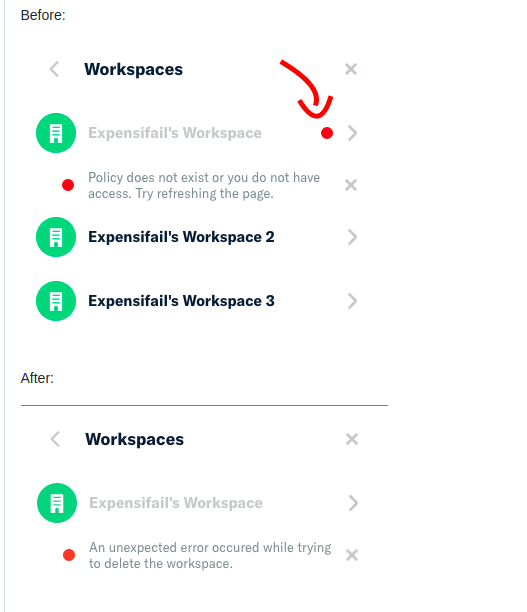
However they actually show different types of errors:
- The below error message show errors in the
errorsfield (usually BE errors)
https://github.com/Expensify/App/blob/d4129812724b1d491fc75a9340caf3239ac19d03/src/pages/workspace/WorkspacesListPage.js#L155
- The inline red dot SHOULD show errors in
errorFieldsfield (errors in the form fields)
The inline red dot before the PR show message from both. https://github.com/Expensify/App/pull/12491 removed it but might not count for errorFields.
What changes do you think we should make in order to solve the problem?
We can't use PolicyUtils.hasPolicyError here since it treats errors and errorFields the same which goes against the above analysis. Instead, we need to write a new function to check if the policy has any error fields (only error fields). For example:
function hasPolicyErrorFields(policy) {
    return _.some(lodashGet(policy, 'errorFields', {}), fieldErrors => !_.isEmpty(fieldErrors));
}
Then use it to display red brick road:
brickRoadIndicator: PolicyUtils.hasPolicyErrorFields(policy) || PolicyUtils.getPolicyBrickRoadIndicatorStatus(policy, this.props.policyMembers)
What alternative solutions did you explore? (Optional)
NA
Result
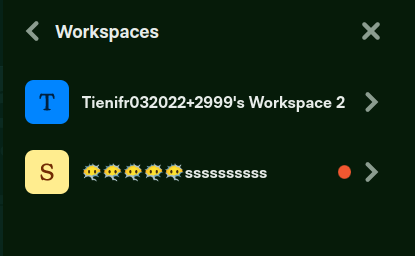
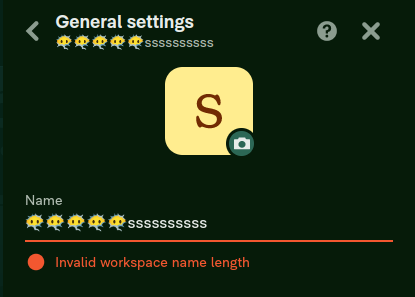
I THINK the proposal from @tienifr looks good. @rushatgabhane I'll let you take it from here.

@joelbettner @rushatgabhane @arielgreen this issue was created 2 weeks ago. Are we close to approving a proposal? If not, what's blocking us from getting this issue assigned? Don't hesitate to create a thread in #expensify-open-source to align faster in real time. Thanks!
@joelbettner yes @tienifr's proposal is exactly what we want!
@arielgreen could you assign them please

📣 It's been a week! Do we have any satisfactory proposals yet? Do we need to adjust the bounty for this issue? 💸
📣 @tienifr You have been assigned to this job by @arielgreen! Please apply to this job in Upwork and leave a comment on the Github issue letting us know when we can expect a PR to be ready for review 🧑💻 Keep in mind: Code of Conduct | Contributing 📖
Thank you for the bump @tienifr! Assigned, please make sure to also apply for the upwork job!
@priya-zha, @rushatgabhane @tienifr this will be merged shortly, friendly reminder to apply here so that payment can be processed!

Reviewing label has been removed, please complete the "BugZero Checklist".
![melvin-bot[bot] avatar](https://avatars.githubusercontent.com/in/179547?v=4 "Published by a pub.dev verified publisher")
The solution for this issue has been :rocket: deployed to production :rocket: in version 1.3.12-0 and is now subject to a 7-day regression period :calendar:. Here is the list of pull requests that resolve this issue:
- https://github.com/Expensify/App/pull/17902
If no regressions arise, payment will be issued on 2023-05-16. :confetti_ball:
After the hold period is over and BZ checklist items are completed, please complete any of the applicable payments for this issue, and check them off once done.
- [ ] External issue reporter @priya-zha
- [ ] Contributor that fixed the issue @tienifr
- [ ] Contributor+ that helped on the issue and/or PR @rushatgabhane
As a reminder, here are the bonuses/penalties that should be applied for any External issue:
- Merged PR within 3 business days of assignment - 50% bonus
- Merged PR more than 9 business days after assignment - 50% penalty
BugZero Checklist: The PR fixing this issue has been merged! The following checklist (instructions) will need to be completed before the issue can be closed:
- [ ] [@rushatgabhane] The PR that introduced the bug has been identified. Link to the PR:
- [ ] [@rushatgabhane] The offending PR has been commented on, pointing out the bug it caused and why, so the author and reviewers can learn from the mistake. Link to comment:
- [ ] [@rushatgabhane] A discussion in #expensify-bugs has been started about whether any other steps should be taken (e.g. updating the PR review checklist) in order to catch this type of bug sooner. Link to discussion:
- [ ] [@rushatgabhane] Determine if we should create a regression test for this bug.
- [ ] [@rushatgabhane] If we decide to create a regression test for the bug, please propose the regression test steps to ensure the same bug will not reach production again.
- [ ] [@arielgreen] Link the GH issue for creating/updating the regression test once above steps have been agreed upon:
Hi @arielgreen, I applied using account - https://www.upwork.com/freelancers/~01212e8255b02ae924 Could you please hire me there, thanks!
All context here - https://expensify.slack.com/archives/C02NK2DQWUX/p1683614947522329
-
The PR that introduced the bug has been identified. Link to the PR: https://github.com/Expensify/App/pull/12491
-
The offending PR has been commented on, pointing out the bug it caused and why, so the author and reviewers can learn from the mistake. Link to comment: https://github.com/Expensify/App/pull/12491/files#r1205708949
-
A discussion in #expensify-bugs has been started about whether any other steps should be taken (e.g. updating the PR review checklist) in order to catch this type of bug sooner. Link to discussion: This isn't exactly a bug, but it was done intentionally and we agreed to it as well - https://expensify.slack.com/archives/C01GTK53T8Q/p1667605980573489?thread_ts=1666955764.560879&cid=C01GTK53T8Q
-
Determine if we should create a regression test for this bug - No I don't think we should.
-
If we decide to create a regression test for the bug, please propose the regression test steps to ensure the same bug will not reach production again N.A.
Calculating payments:
1 business days = 50% bonus
$250 to @priya-zha $1000 + 50% = $1500 to @tienifr $1000 + 50% = $1500 to @rushatgabhane