

 Expensify
[$250] Workspace name is selectable despite being disabled reported by @puneet-here
If you haven’t already, check out our contributing guidelines for onboarding and email [email protected] to request to join our Slack channel!
Action Performed:
- Go to settings > workspaces > create a new one
- Go offline
- Tap on 3 dots and delete
- Go to workspaces section again
- Double click on it
Expected Result:
The name shouldn't be selectable
Actual Result:
The name is selectable2. Archive a chat room
Workaround:
unknown
Platform:
Where is this issue occurring?
- Web
- iOS
- Android
- Desktop App
- Mobile Web
Version Number: 1.2.24-0 Reproducible in staging?: y Reproducible in production?: y Email or phone of affected tester (no customers): Logs: https://stackoverflow.com/c/expensify/questions/4856 Notes/Photos/Videos:
https://user-images.githubusercontent.com/43996225/200317135-81ecfb52-84e9-42d0-9c00-bcb5c4df57b3.mp4
https://user-images.githubusercontent.com/43996225/200317152-31172bf8-bc9d-44b5-9fcd-1fd3784a1df0.mov
Expensify/Expensify Issue URL: Issue reported by: @Puneet-here Slack conversation: https://expensify.slack.com/archives/C01GTK53T8Q/p1667598077178909

Triggered auto assignment to @laurenreidexpensify (Bug), see https://stackoverflow.com/c/expensify/questions/14418 for more details.
![melvin-bot[bot] avatar](https://avatars.githubusercontent.com/in/179547?v=4 "Published by a pub.dev verified publisher")
Proposal
We have to use styles.userSelectNone we can apply it like below
(props.interactive && props.disabled ? {...styles.disabledText, ...styles.userSelectNone} : undefined),
https://github.com/Expensify/App/blob/0724337138a4d80f6603074cc9af5c186cb524ec/src/components/MenuItem.js#L59
Or I think we should add styles of userSelectNone at disabledText since the disabled text shouldn't be selectable anywhere.

Current assignee @laurenreidexpensify is eligible for the External assigner, not assigning anyone new.
Triggered auto assignment to Contributor-plus team member for initial proposal review - @rushatgabhane (External)
Triggered auto assignment to @chiragsalian (External), see https://stackoverflow.com/c/expensify/questions/7972 for more details.

Proposal
For the disabled item, we can add the css property user-select: none to restrict user for selection of text.
In styles.js line num 832 on disabledText we can add this property.
    disabledText: {
        color: colors.gray3,
        MozUserSelect: 'none',
        WebkitUserSelect: 'none',
        userSelect: 'none',
    },

@Pujan92 thanks for you proposal, does that property work on the following platforms?
- firefox web
- safari web
- safari mobile web
- android

@Pujan92 thanks for you proposal, does that property work on the following platforms?
- firefox web
- safari web
- safari mobile web
- android
I just updated the answer which will work for all options.
@Puneet-here sorry, i didn't see your proposal.
does it also work for iOS Safari?
@chiragsaliani like @Puneet-here's proposal https://github.com/Expensify/App/issues/12506#issuecomment-1305628351
🎀 👀 🎀 C+ reviewed
Nice I like your proposal too. Feel free to create the PR @Puneet-here.

📣 @Puneet-here You have been assigned to this job by @chiragsalian! Please apply to this job in Upwork and leave a comment on the Github issue letting us know when we can expect a PR to be ready for review 🧑💻 Keep in mind: Code of Conduct | Contributing 📖
BugZero Checklist: The PR fixing this issue has been merged! The following checklist (instructions) will need to be completed before the issue can be closed:
- [ ] @laurenreidexpensify A regression test has been added or updated so that the same bug will not reach production again. Link to the GH issue for creating the test here:
- [ ] @rushatgabhane @chiragsalian The PR that introduced the bug has been identified. Link to the PR:
- [ ] @laurenreidexpensify The offending PR has been commented on, pointing out the bug it caused and why, so the author and reviewers can learn from the mistake. Link to comment:
- [ ] @laurenreidexpensify A discussion in #contributor-plus has been started about whether any other steps should be taken (e.g. updating the PR review checklist) in order to catch this type of bug sooner. Link to discussion:
- [ ] @laurenreidexpensify Payment has been made to the issue reporter (if applicable)
- [ ] @laurenreidexpensify Payment has been made to the contributor that fixed the issue (if applicable)
- [ ] @laurenreidexpensify Payment has been made to the contributor+ that helped on the issue (if applicable)
The PR that introduced the bug has been identified
Missed during initial implementation and not a regression. Curious if we still have to find the PR?
Updated BugZero Checklist: The PR fixing this issue has been merged! The following checklist instructions will need to be completed before the issue can be closed:
- [x] [@chiragsalian @rushatgabhane] The PR that introduced the bug has been identified. Link to the PR:
- [x] [@chiragsalian @rushatgabhane] The offending PR has been commented on, pointing out the bug it caused and why, so the author and reviewers can learn from the mistake. Link to comment:
- [x] [@chiragsalian @rushatgabhane] A discussion in #expensify-bugs has been started about whether any other steps should be taken (e.g. updating the PR review checklist) in order to catch this type of bug sooner. Link to discussion:
- [x] [@laurenreidexpensify] A regression test has been added or updated so that the same bug will not reach production again. Link to the GH issue for creating the test here: https://github.com/Expensify/Expensify/issues/245095
- [x] [@laurenreidexpensify] Applicable payments have been made. This potentially includes the issue reporter, the contributor that fixed the issue, and/or the contributor+ that helped on the issue.
The solution for this issue has been :rocket: deployed to production :rocket: in version 1.2.28-2 and is now subject to a 7-day regression period :calendar:. Here is the list of pull requests that resolve this issue:
- https://github.com/Expensify/App/pull/12593
If no regressions arise, payment will be issued on 2022-11-24. :confetti_ball:
Missed during initial implementation and not a regression. Curious if we still have to find the PR?
@rushatgabhane that sounds reasonable that we don't need to link the PR here, if there is no blame.
@Puneet-here @rushatgabhane have been paid 👍
Leaving open til I close out TestRail step
@Puneet-here 🙈 Can you please reject the payment and I'll issue the correct amount.
I am not sure how to do that. Can you send a refund request? I am seeing an option to refund but it's not letting me change the amount (and it's showing $0)
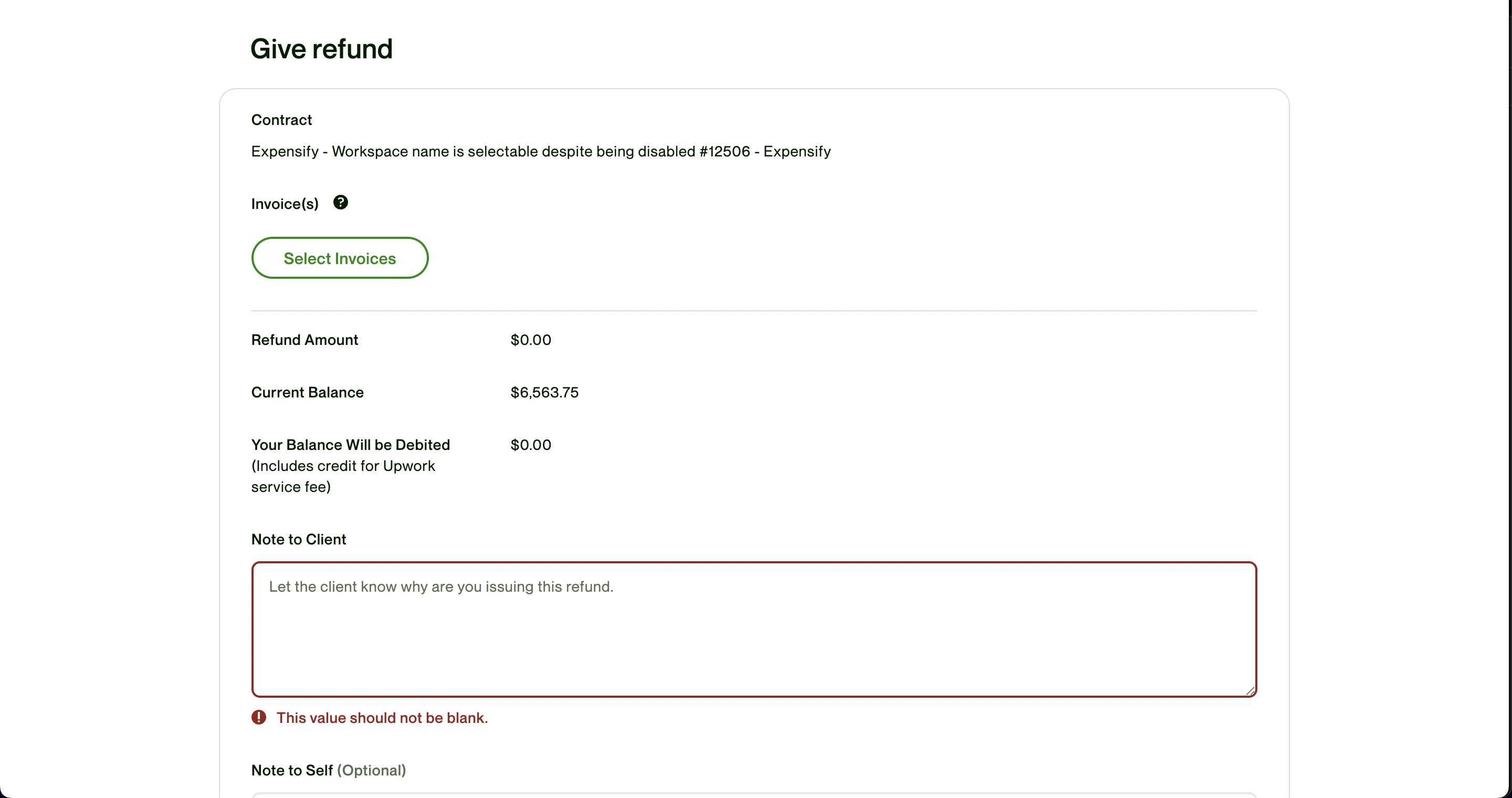
Oh I had to click on select invoices. Upwork new interface made me confused. I just refunded the additional $125