

 Excel-DNA
RTD with multiple allow reference args will block caculation
    let mutable count = 0

    [<ExcelFunction(Name = "eval")>]
    let eval ([<ExcelArgument(AllowReference = true)>] input: obj,[<ExcelArgument(AllowReference = true)>] codeRef: obj)  =
        async {
            do! Async.Sleep(1000)
            count <- count + 1
            return "Hello" + count.ToString()
        } /// Also not worked for `Async.StartAsTask`
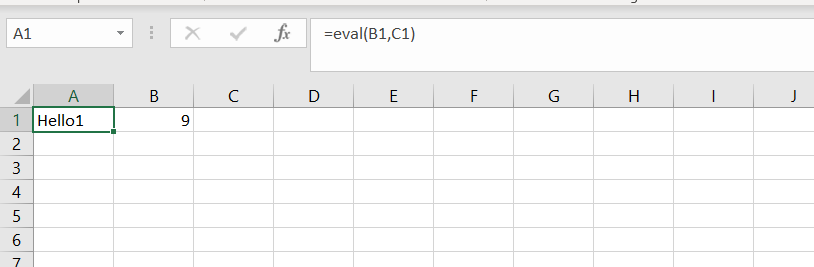
the A1 is only caculated once
after change B1 number
A1 doesn't change to "Hello2"
This issue doesn't exist when (only one allow reference arg) or running in synchronization mode

Block is a incorrent statement
after edit the formular to something else it display "Hello2"
But then edit it back it again it display "Hello1"
So maybe the result is cached in someplace and never change again
Are you using the ExcelDna.Registration library to hook up the async function?
If so, it might be that the ExcelArgument(AllowReference = true) arguments are hooked up in a way that prevents the change in B1 to be detected.

Thanks for your library and answer
Are you using the ExcelDna.Registration library to hook up the async function?
Yes
If so, it might be that the ExcelArgument(AllowReference = true) arguments are hooked up in a way that prevents the change in B1 to be detected.
Maybe
I aslo take an example in https://github.com/humhei/Registration/blob/master/Source/Samples/Registration.Sample/AsyncFunctionExamples.cs#L62
Hi,
Has there been any progress with this? I am seeing the exact same issue.
Thanks.

@pearsonfive Thank you very much for signing up as a GitHub Sponsor for Excel-DNA!
I haven't had a look at this yet. The first step will be to look at the function after the registration re-write. I suspect, but need to confirm, that there are two places where the parameter plays a role in an async function - one is for the 'outside' parameter which determines whether Excel recalculates the UDF function, and the second use is inside the RTD-based async implementation, where the parameter is used to decide whether a new RTD topic should be created - causing the inside of the async function to run again. It might be that your desired behaviour required a change in how the RTD-based calls are set up, by dereferencing and checking that value at the reference.
Can you explain a bit why you need the passed in reference for your function?
@pearsonfive I might need a bit more context to what you are seeing.
When I run the code from the initial post it seems to work OK and I can't reproduce the issue. Every time I make a change in cell B1, I get a new calculation in A1 with #N/A first, then an updated 'Hello' count.
- Are you reproducing the problem with the same F# snippet as the initial post, or equivalent code in C#?
- Have you tried with the pre-release version 1.5.0-rc1 of ExcelDna.AddIn, ExcelDna.Registration and ExcelDna.Registration.FSharp?
- Are you able to put a small sample project on GitHub or somewhere, so I can try to reproduce?
Sorry - yes i'll put a simple example together. A bit swamped at the moment !!