
GPOZaurr
 GPOZaurr copied to clipboard
 EvotecIT
Errors when normalizing properties
`Select-Object : The property cannot be processed because the property "PowerPoint" already exists. At C:\Program Files\WindowsPowerShell\Modules\PSWriteHTML\0.0.148\PSWriteHTML.psm1:16159 char:47 ... $DataTable = $DataTable | Select-Object -Property $Properties
CategoryInfo : InvalidOperation: (@{DisplayName=*...ProxyOverride=}:PSObject) [Select-Object], PSArgumentException FullyQualifiedErrorId : AlreadyExistingUserSpecifiedPropertyNoExpand,Microsoft.PowerShell.Commands.SelectObjectCommand`
This one is coming from PSWriteHTML, GPOZAirr.psm1 generates the same errors on repeated properties. GPOZaurr.psm1 line 18074 I think. That foreach is problematic unless without a validation that the property doesn't already exist in the new hashtable. If I find a fix I'll drop a note.
Awesome module btw, thanks for the hard work!

The error must be coming from Select-Properties cmdlet
- https://github.com/EvotecIT/PSSharedGoods/blob/master/Public/Objects/Select-Properties.ps1
It's not supposed to let 2 ore more identical properties return. That's a weird one. On which object it does that?

First time I see this and I did run gpo analysis a lot - I'll try to investigate that code.
It could be the fault is here.
https://github.com/EvotecIT/GPOZaurr/blob/962d8829d7dad820878e407a27d7d40f97067bce/Public/Invoke-GPOZaurrContent.ps1#L206-L221
I'll try to enhance Select-Properties to deal with duplicates - maybe I've missed something.
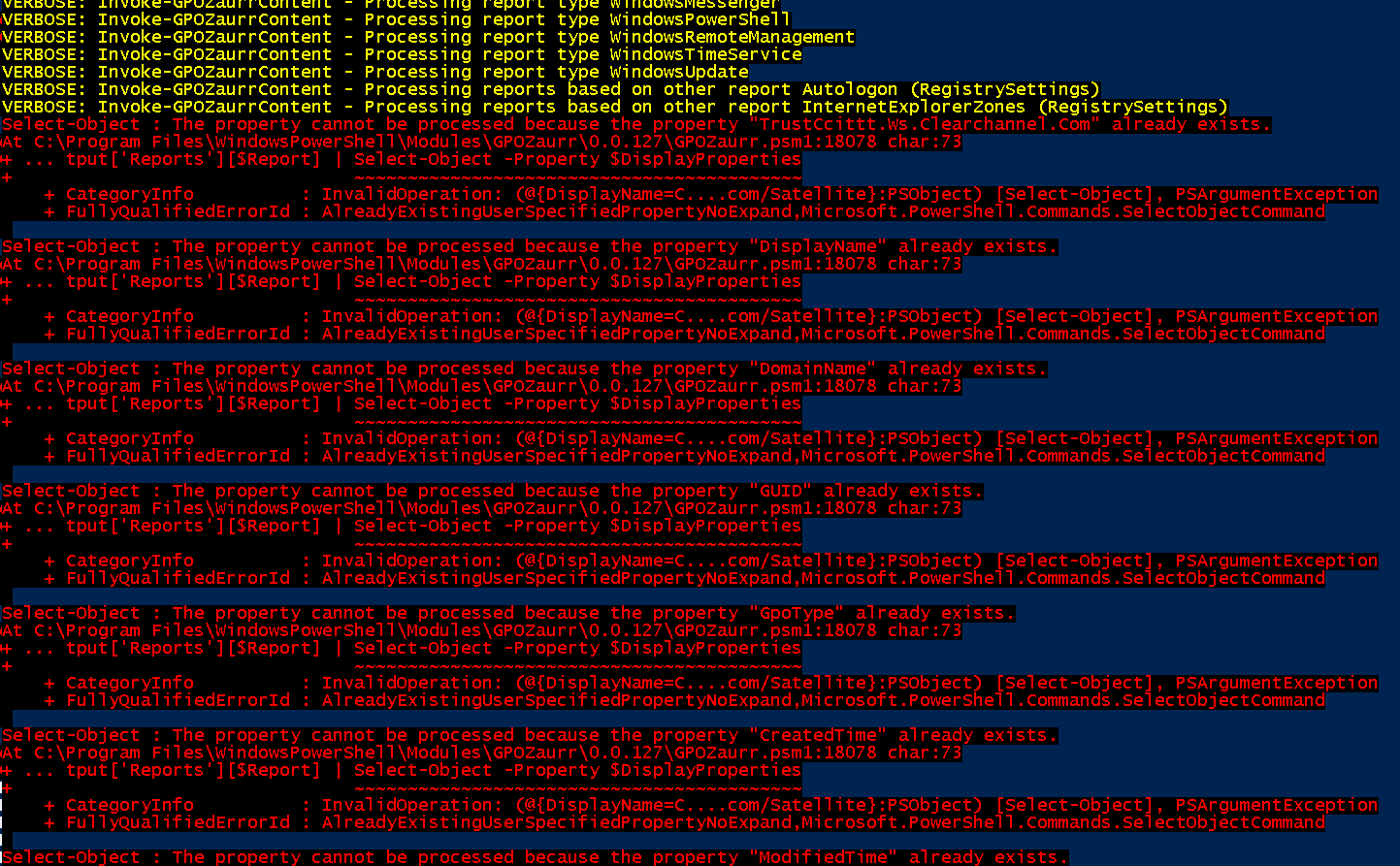
Ye, so it's coming from the lines I pasted. Lemme see if I can prevent it
The copy of the function you linked is not quite identical to the one in the GPOzaurr.psm1. Looks like mainly just spacing/CRLF. Is there something missing?
It's normal. When I publish to PSGallery I do merge all files into one big file copying content from multiple modules and sometimes even removing comments automatically. This "breaks" the structure a bit, so it can differ from the code on GitHub.
Install-Module GPOZaurr -AllowPrerelease -Force
once installed, Import-Module GPOZaurr -Force
Let me know if it fixes your issue
Yes v128. I see the new update to ensure the firstproperties and lastproperties are filtered out, but I think we'll need a new hashtable to dedupe the rest of the properties before inserting into the middle...
I'll play around with it and let you know tomorrow. I've run out of time today. :)
I wonder why I'm having issues with this domain. Old empty root style forest, user domain is a child of root. Running reports from member servers of child domain, 2012 R2, 2008 R2. - PS v5.1 on both. I'll try with something running newer PoSH and/or member of root domain. Anything else I should doublecheck in my environment?
Nah, I can't reproduce it - so not sure why would it not work. Select-Properties shouldn't return dupes and for some reason in your case it does. You would probably need to push debugger in there and see what it returns before it goes into Select-Properties and after.
Two ideas:
-
This looks like zones policy

-
Weird display name? Can you guess where it's coming from?

Generally - would it be possible for you to provide a backup of sorts?
Save-GPOZaurrFiles -GPOPath $PSScriptRoot\GPOs
And then
$Output = Invoke-GPOZaurrContent -GPOPath $Env:USERPROFILE\Desktop\GPOs -Verbose
$Output | Format-Table *
If it bugs out the same way, go into that directory and try to find which GPO is affecting the output. You probably will have to do it by starting with all gpos if it bugs out, move 50% out and see if it still bugs out, if so, move another 50% and if it stops bugging out, figure out which GPO is the one affecting the output. I doubt all of them are doing this.
Once you have that - we can work out new version for you - but I need some details to work with.