

 Eugeny
Allow for lower contrast for text, eliminate blurring around edges.
Is your feature request related to a problem? Please describe. I'm unable to reduce the contrast for text beyond what looks like a setting of "1". I'd like to be able to bring it all the way to zero so that there's no blurring around the text at all. I know for a fact that this is possible with xterm.js because it's possible to do this in Termius which also makes use of xterm.js.
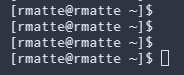
Here's an example of the lowest setting possible in Tabby with xterm.js canvas mode, it's even worse with webgl mode...
And here's how it looks in Termius with xterm.js...
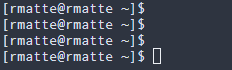
I spend long hours in terminals each day and even the slight blurring around the text in Tabby is just too hard on my eyes for me to be able to use it for extended sessions. There appears to be no visual difference whether I set contrast to 1 or 0 which makes me think that for whatever reason it's currently configured to use 1 as the lowest setting no matter what's defined.
Describe the solution you'd like I would like to see a way to completely eliminate the blurring around the edges of the text.
Describe alternatives you've considered Not applicable.
Additional context No additonal context to provide at this time.
