

 Eugeny
First terminal not show powerlevel10k os icon
Version: 1.0.196 Platform: macOS arm64 22.4.0 Plugins: none Frontend: xterm-webgl
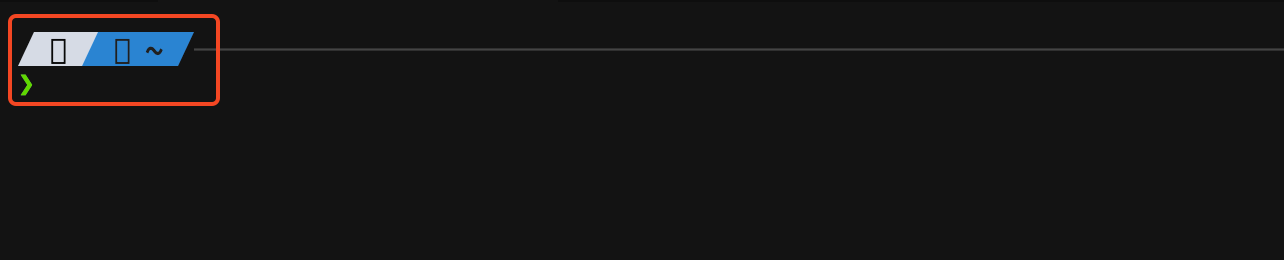
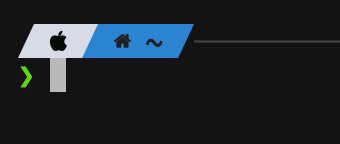
When I first open the terminal, the powerlevel10k icons appear distorted, but everything returns to normal when I close and reopen the terminal. This issue occurs only in the first terminal instance.
First Terminal
later

This issue might be related to the initial rendering of the powerlevel10k icons when the terminal first opens. It's possible that the terminal emulator is not fully initialized yet and some components of the powerlevel10k theme, such as the icons, are not being rendered correctly.
One possible solution is to add a delay before the powerlevel10k theme is loaded. This will give the terminal emulator enough time to fully initialize before the theme is applied. You can do this by adding the following line to your shell configuration file.
Replace /path/to/powerlevel10k with the actual path to the powerlevel10k theme on your system.
This will add a one-second delay before the powerlevel10k theme is loaded. You can adjust the sleep time to suit your needs if necessary.
Alternatively, you could try using a different terminal emulator to see if the issue persists. It's possible that the issue is specific to Xterm-webgl.

Faced the same issue, do note that the icons are also restored when zooming in or out.

I have the same issue, and I have to zoom in and out every time I turn on tabby. I am looking for another terminal because of this.

Screencast from 2024年04月03日 09时56分06秒.webm
The icon cannot be displayed, it can be displayed by zooming in or out.

I have the same issue, and I have to zoom in and out every time I turn on tabby. I am looking for another terminal because of this.
I guess tabby doesn't plan to fix this problem anytime soon so I changed my terminal app
