

 Eugeny
Help wanted: Font Rendering issue, seems not support Nerd Fonts?
I am a new user of Tabby alpha 169. when I use neovim to open C++ source code, I found the font rendering is strange if making comparison with Windows Terminal.
Configuration of Tabby(As same as windows terminal):
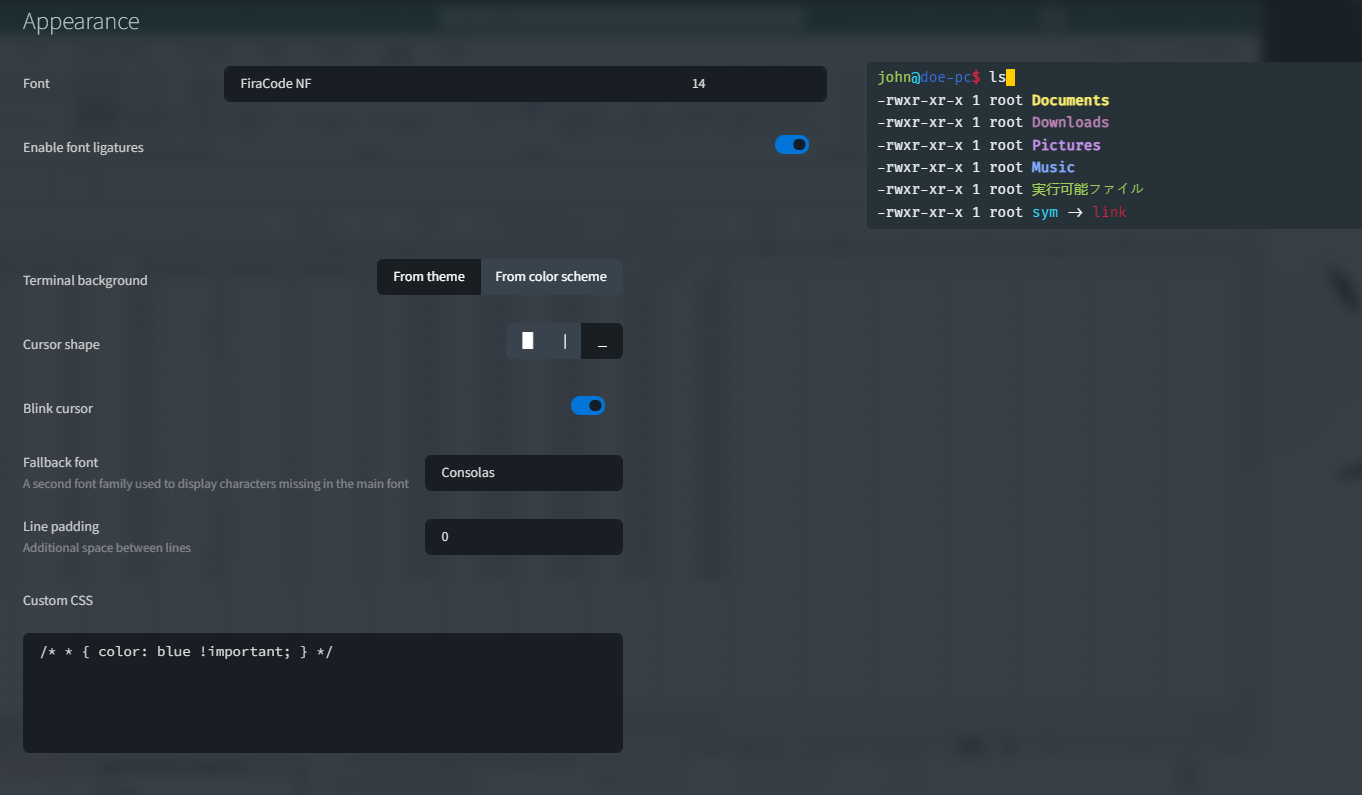
Test Environment:
- Host Operating System: Windows 10 2004 enterprise
- Remote Operating System: Cent OS 7.9
- Neovim:
v0.6.0 - Plugins: coc.nvim + ccls + vim-lsp-cxx-highlighting(all latest version)
- Windows Terminal:
1.12.3472.0
screenshot from Windows Terminal:

screenshot with Tabby alpha 169:

I think you could find that, the blur of C++ keyword, the highlight of member variable is indistinguishable, the floating window is
pierced by the letter r, and the flag column diverts the position of line number column, and so on.
And the many of my issues disappeared when I used Consolas as the default font, except the keyword blur and indistinguishable highlight of member variable. so are these issues caused by nerd fonts(FiraCode NF is one of nerd fonts)?
screenshot with Tabby alpha 169, used font Consolas. you can find the behaviours of floating window and flag column are expected.

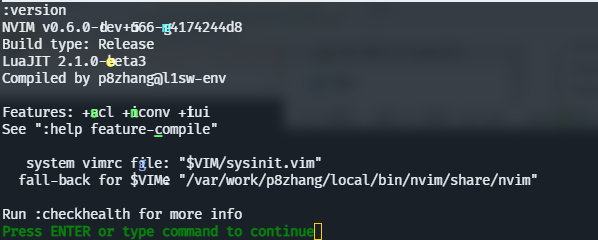
P.S.: new bug when run command :version in neovim with FiraCode NF:

I'm a newbie of this app. I also want to use Fira code font in this app, could you please tell me how to set it? Similar test environments.

I have a similar issue with Fira Code and other Cascadia Mono offshoots, where italic characters get cut off where their character cells end.

I'm a newbie of this app. I also want to use
Fira codefont in this app, could you please tell me how to set it? Similar test environments.
I have given it up and been back to Windows Terminal.
Thanks for your quick reply! I also think Windows Terminal is good because of it's less memory usage and good GPU rendering.
could you please tell me how to set it?
Go into Appearance and set Font to Fira Code after installing it on your device.
could you please tell me how to set it?
Go into
Appearanceand setFonttoFira Codeafter installing it on your device.
Thanks a lot. I forgot to restart Tabby
I don't believe I had to restart Tabby; all I have to do is go back to the tab I was on before.
I also have some strange issues with Jetbrains Mono NF. Sometimes, the ligatures have some random character in the middle of them.

I have no similar errors in Tabby using Mono-series Fonts, Would you update to latest version and download full-version Font (thin bold or italic) ?
在2023-02-09 15:46:10,Alex @.***写道:
I also have some strange issues with Jetbrains Mono NF. Sometimes, the ligatures have some random character in the middle of them.
— Reply to this email directly, view it on GitHub, or unsubscribe. You are receiving this because you commented.Message ID: @.***>

The translator bot has detected that this issue body's language is not English, and has translated it automatically.





I am experiencing similar issuer on Windows.
Also, it strangely highlights the letter i when i type "fish" (to run the shell)
This is running
- tmux
- Tabby 1.0.207 on Windows 11 with WSL 2.0 Ubuntu 22.04
- Fira Code Mono Nerdfont
I'll try playing around with the terminal render settings in tmux, nvim and the like, they were working with this config on my Mac and my Windows 10 / WSL 2.0.
EDIT: after quickly trying a few fonts, this seems to be isolated to Fira. I am now testing Monaspace, which currently doesn't work with ligatures. BUt at least the super annoying text rendering is gone.
EDIT2: Disregard. Now it just happens with other letters.

Hello, same problem here with FiraCode NF and Maple Font NF (less worse with Maple Font NF). No problem with Liberation Mono. (See the "i" letter overlapping the blue header)
Edit : If you change WebGL render to Canvas in Settings -> Terminal -> Frontend -> xterm (canvas), this fixes the problem for me. Exactly like Hyper.js term (see https://github.com/vercel/hyper/issues/3607j). But Tabby is more laggy with Canvas instead of WebGL.
Re-edit : I have still some graphic issue with Canvas render, but it is far more less than with WebGL (see screenshot below)
OS : Arch Linux GPU: NVIDIA GeForce GTX 1060 3GB
