

 EsotericSoftware
Allow aligning attachments with bones outside of Setup Pose.
It's impractical to align certain poses/attachments in Setup Mode. This is especially true with poses that significantly deviate from Setup Pose— e.g. when body parts are at a different visual angle, perspective, configuration or gestural shape, or need different "2D cheats" to get it to look correct.
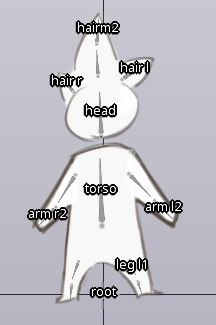
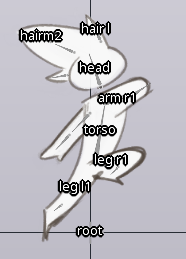
One way to accommodate this is to allow adding and moving attachments in Animate Mode. However, not allowing moving or adding attachments in Animate Mode is still good to prevent accidentally moving attachments.

Relevant: http://esotericsoftware.com/forum/Changing-poses-within-a-single-animation-9202
Relevant: http://esotericsoftware.com/forum/Multiple-Bind-poses-in-Setup-9570
But also applicable to PoseConstraint idea, or another solution that addresses the problem.
I'll chalk this up as related.
http://esotericsoftware.com/forum/AI-Spine-Multi-Pose-Character-File-Management-9626
Keeping both of these here as related. (different poses requiring a change in multiple attachments)
http://esotericsoftware.com/forum/Toggle-visibility-of-multiple-attachments-7683 http://esotericsoftware.com/forum/Control-visibility-of-a-set-of-image-10173
Current workaround steps for weighted meshes: (c/o @erikari)
- Do your setup pose
- Make a mesh for the alt pose in Setup Mode
- Go to Animate Mode. Pose the skeleton to match that mesh
- Bind the mesh to the bones that move, plus a dummy bone that doesn't move. Set all the vertex weights to the dummy bone.
- In Animate Mode, go to the keyframe where your pose matches exactly the bones
- In the Weights panel, press
Update Bindings- Change weights from the dummy bone to the actual bones. They will now follow that new pose.
- Profit
Note this is only for meshes.
We now have good workflows to do this for meshes: http://esotericsoftware.com/blog/Rigging-new-poses-tutorial
I'm guessing it is still a problem for regions? What do you think, @erikari?

Not really a problem for regions: one can convert them to meshes and bind them in batch, then uncheck the mesh setting once they are aligned to the new pose.
