

 Ericsson
How to cache or pre-store the large info tree result
Hello,
I found a user experience issue that the Info Tree could be very slow some time. The Info Tree looks always do the language element query on the fly and does not cache previous query result. It will take very long time to finish the element query every time if user click some basic type in the code tree. Below is an example. The "EFI_STATUS" is fundamental type in edk2 project, and there are 12352 usages in below project. Every time I happen to click the "EFI_STATUS" in the code, my browser will hang for ~7 seconds to wait for the Info Tree finishing the query. And if I try to extend the usage details, it will take ~40second to show the usage details.
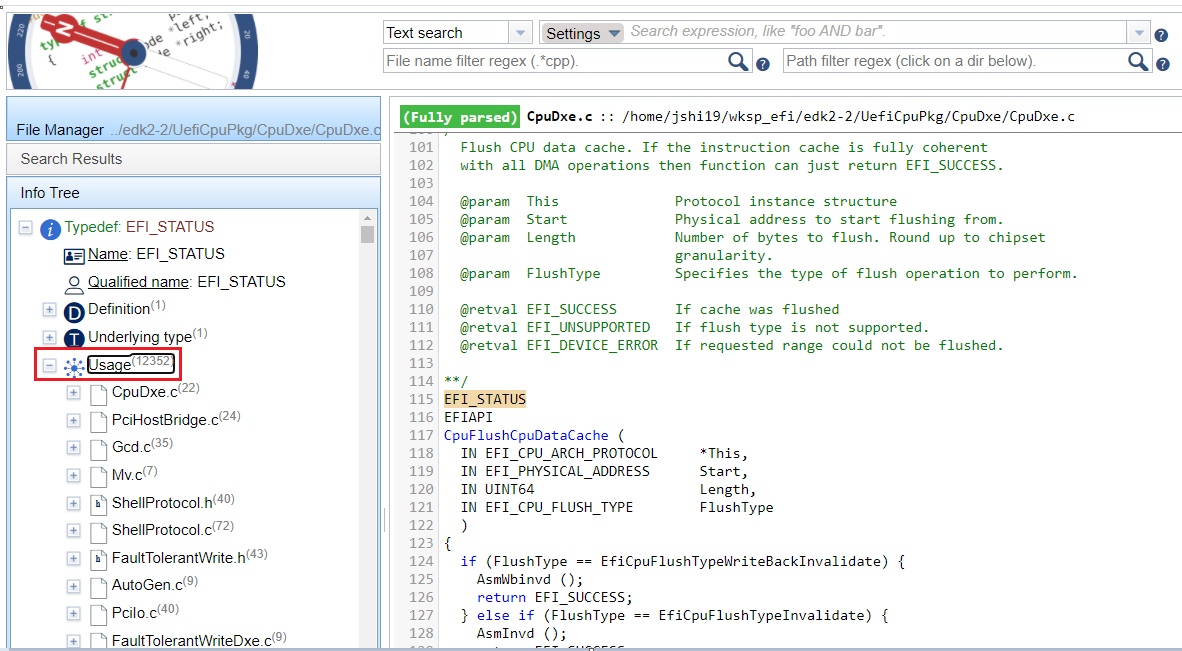
Is it possible that CodeCampass preprocess and cache the Info Tree result for any element which has +1000 usages? User can do this Info Tree preprocess in free time.
Thanks Steven

Hello Steven,
That seems like a lot of usages :smile: . I have managed to reproduce the issue and it indeed takes altogether nearly a minute to get the extended results for me, too. We will think about possible solutions for this.
Maybe it is also a valid question whether displaying so many usages are helpful at all or not?
Regards, Máté

I think it is useful to show the basic usage counts. It will be nice if CC could show the usage count quickly. I'm ok for the slow response if click the 12352 usages to extend the details. So, maybe to pre-cache the usage count info in database is enough.