
pyleecan
 pyleecan copied to clipboard
 Eomys
Eomys
Skew object for Lamination + FEMM
It would be interesting to add the possibility to skew the laminations. To achieve that it would require:
- To add an instance of a Skew abstract object in the Lamination class. The Skew class define Nslice the number of skew slices.
- Provide several daughters of Skew (for instance SkewLinear, SkewStep...) with the method comp_angle_skew that returns an array of length Nslice of the angular position of the lamination slices [rad].
- The comp_angle_skew would also have an optional argument (alpha_ref) to normalize its output according to an angle [rad]. The idea is to be able to provide the skew as a multiple of the stator slot pitch for instance
- The "angle_skew" of both laminations are computed in the comp_output_geo method of the Lamination object and stored in the corresponding OutGeoLam
- In MagFEMM solve_FEMM method there is another loop on the skew slice. The skew is set in the update_FEMM_simulation to set the correct rotor relative position (angle_skew_rotor[ii] - angle_skew_stator[ii])
- The resulting flux is stored in the OutMag object as Br_skew and Bt_skew with dimensions [Nt_tot, Na_tot, Nslices]. Br and Bt are then computed as the average of Br_skew and Bt_skew on the slices.
- OutMag will define a get_flux_skew_rotor(Nslice) and get_flux_skew_stator(Nslice) that returns the flux at on a Z linspace. If Br_skew and Bt_skew are not available, the method returns just an extended [Nt_tot, Na_tot, Nslices] matrix of Br or Bt.
- A validation case on each Skew daughter and one comparing Br and Bt of a no skew simulation with a simulation with a 0 linear skew would be interesting.

Hi everyone,
I dig up this issue to talk again about rotor skew implementation in machine and Magnetics objects. The implementation has changed consequently regarding the original issues. The implementation is now divided in three parts:
1st part: implement skew class as an attribute of lamination class:
- The skew class takes as argument the skew type and the number of layers. The skew types can be linear continuous (e.g. for skewed squirrel cage) or stepwise (e.g. for PM rotor, with default stepwise patterns such as linear, V-Shape and zig-zag)
- The skew class contains methods to calculate rotor skew angle function of axial dimension (z axis for radial flux machine) and plot it
- For continuous linear skew, rotor skew angle can be given at the both axial extremities of the machine so the input number of layers is irrelevant as it is two.
- For stepwise skew, rotor skew angle is given at the axial extremities of each magnet layer to describe the skew angle stepwise function.
2nd part: implement slice class in Magnetics class:
- The new class SliceModel enables to calculate the slices that are relevant for magnetic calculation (2.5D assumption) by looking at the rotor skew type. A new axis "z" is then added to the existing axes "time" and "angle". "z" is SciDataTool axis of type DataPattern which enables to only store unique slices and rebuild the matrix with all the slices if requested. For non-skewed rotor the "z" axis will only have one slice but I think it is better not to squeeze it to identically deal with skewed and non-skewed machines.
- The method run() of Magnetics enables to loop on comp_airgap_flux() on each slice and update the rotor initial angle depending on rotor skew angle at the specific slice.
- The method store() is quite the same for the airgap flux density, which is now always 3D even for non-skewed rotor. The main difference is how torque and winding flux are calculated. It can be done by using SciDataTool command to integrate torque/flux per slice that are embedded in DataPattern object.
3rd part: implement skew type setup in machine GUI:
- A rotor skew setup widget is added at the end of rotor definition
- The widget enables to choose among the different skew types and patterns, and even define an arbitrary pattern.
- For SCIM the only available rotor skew should be continuous linear skew, the number of layers is implicitely 2. For rotor PM it is possible to define the number of layers and choose among the most common patterns: "linear","v-shape" and "zig-zag".
Please let me know if you have any questions/remarks,
Best regards Emile

Hello everyone,
We had to clarify how torque/phi_wind are calculated in case of skew because the current method is not generic to all skew patterns. Right now the actual torque/phi_wind is obtained in MagFEMM by setting the machine length in the FEMM model. With multislice approach, the length would rather be:
- in case of stepped skew (e.g. for PMSM with magnet segments): the length of each slice since the magnetic quantities are assumed to be constant all along each segment (scheme 1)
- in case of continuous skew (e.g. for skewed squirrel cage): an infinitely small length, because the magnetic quantities are given at the exact slice position, and the values at other positions are obtained by interpolating between the slice before and the slice after. (scheme 2)
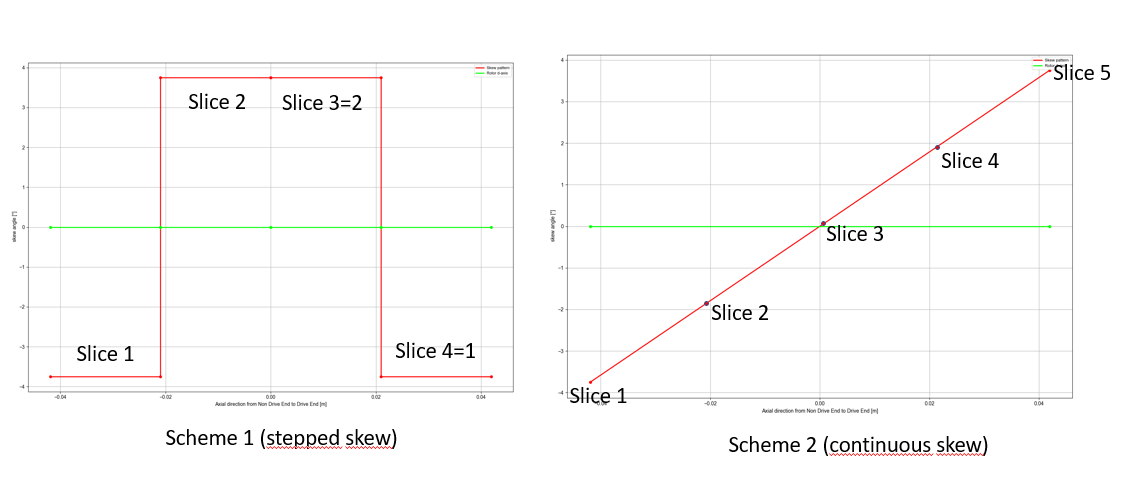
Both solutions require to treat separately stepped skew and continuous skew in the method run() of Magnetics, which is not really satisfying in terms of genericity.
There is a third solution which is described as below and that we think is the best to implement in pyleecan:
- Remove length from FEMM to get Tem / Phi_wind per meter for each slice so it is generic to both continuous and step skew types
- Store Tem_slice/Phi_wind_slice as DataTime objects with "time" and "z" axes (+ "phase" axis for Phi_wind_slice) in OutMag (while keeping already existing fields Tem and Phi_wind in OutMag for compatibility)
- Add getter to calculate Tem from Tem_slice (resp. Phi_wind from Phi_wind_slice) using integration method of SciDataTool for DataPattern axes
- User can either call out.mag.get_Tem() to get overall instantaneous torque or look at out.mag.Tem_slice to see slice contribution
Please let me know if you have any questions / remarks,
Best regards, Emile