

 ElemeFE
[bug report] cascader style still shows the last bound value status

Element UI version
2.13.0
OS/Browsers version
windows/Google Chrome79.0.3945.88
Vue version
2.6.10
Reproduction Link
https://codepen.io/xlong1029/pen/jOExNMv
Steps to reproduce
Cascader第二次绑定值时,下拉框里选项高亮样式仍显示上一次绑定值时的状态
What is Expected?
应根据当前传入的值来显示对应高亮样式
What is actually happening?
Cascader第二次传入值时,下拉框里选项高亮样式仍显示上一次传入值时的状态

Translation of this issue:
Element UI version
2.13.0
OS/Browsers version
windows/Google Chrome79.0.3945.88
Vue version
2.6.10
Reproduction Link
https://codepen.io/xlong1029/pen/jOExNMv
Steps to reproduce
When the cascader binds the value for the second time, the highlighted style still displays the status of the last bound value
What is Expected?
The corresponding highlight style should be displayed based on the current incoming value
What is actually happening?
When cascader passes in the value for the second time, the highlighted style still shows the status of the last time it passed in the value

i found a same question, i view the source code, find that these code can fix this problem open the file packages/cascader-panel/src/cascader-panel.vue, view the line at 377
clearCheckedNodes() {
      const { config, leafOnly } = this;
      const { multiple, emitPath } = config;
      if (multiple) {
        this.getCheckedNodes(leafOnly)
          .filter(node => !node.isDisabled)
          .forEach(node => node.doCheck(false));
        this.calculateMultiCheckedValue();
      } else {
        this.checkedValue = emitPath ? [] : null;
        this.activePath = []; // add this line
        this.calculateCheckedNodePaths(); // add this line
        this.syncActivePath(); // add this line
      }
    }
open the file packages/cascader-panel/src/cascader-panel.vue, view the line at 147
value() {
      this.clearCheckedNodes(); // add this line
      this.syncCheckedValue();
      this.checkStrictly && this.calculateCheckedNodePaths();
},
this problem spend my one day to fix the online project, i hope that can help you.

i found a same question, i view the source code, find that these code can fix this problem open the file packages/cascader-panel/src/cascader-panel.vue, view the line at 377
clearCheckedNodes() {
      const { config, leafOnly } = this;
      const { multiple, emitPath } = config;
      if (multiple) {
        this.getCheckedNodes(leafOnly)
          .filter(node => !node.isDisabled)
          .forEach(node => node.doCheck(false));
        this.calculateMultiCheckedValue();
      } else {
        this.checkedValue = emitPath ? [] : null;
        this.activePath = []; // add this line
        this.calculateCheckedNodePaths(); // add this line
        this.syncActivePath(); // add this line
      }
    }
open the file packages/cascader-panel/src/cascader-panel.vue, view the line at 147
value() {
      this.clearCheckedNodes(); // add this line
      this.syncCheckedValue();
      this.checkStrictly && this.calculateCheckedNodePaths();
},
this problem spend my one day to fix the online project, i hope that can help you.
thanks a lot

Give it a try:
<el-cascader ref="select" />
this.$refs['select'].focusFirstNode()

Try this at home!
<el-cascader ref="cascaderSelector" v-model="classId" :options="classesOptions" :props="classIdListProps"
  :style="{width: '100%'}" placeholder="select class" filterable clearable @change="handClassIdChange"></el-cascader>
resetCasadeSelector() {
    if (this.$refs.cascaderSelector) {
        this.$refs.cascaderSelector.$refs.panel.activePath = []
        this.$refs.cascaderSelector.$refs.panel.calculateCheckedNodePaths()
    }
}

Try this:
<el-cascader v-if="isShowCascader"/>
this.isShowCascader = false
this.$nextTick(() => { this.isShowCascader = true })

Try this:
<el-cascader v-if="isShowCascader"/>this.isShowCascader = falsethis.$nextTick(() => { this.isShowCascader = true })
this works~

Try this:
<el-cascader ref="cascader"/>
this.$refs.cascader.$refs.panel.checkedValue = [];//也可以是指定的值
this.$refs.cascader.$refs.panel.activePath = [];
this.$refs.cascader.$refs.panel.syncActivePath();

试试这个:
<el-cascader v-if="isShowCascader"/>this.isShowCascader = falsethis.$nextTick(() => { this.isShowCascader = true })这个可行〜
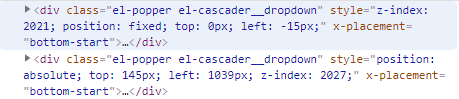
但是在选择完一个以后,再次展开,页面会出现两个下拉框,请问您有出现这个问题吗?有什么解决方案吗?

Looks like it's still a bug. I got around this by doing the following:
this.$refs.cascader.$refs.panel.clearCheckedNodes();
this.$refs.cascader.$refs.panel.activePath = [];
this.$refs.cascader.$refs.panel.menus.forEach(menuItem => {
    menuItem.forEach(node => node.doCheck(false));
});

Try this:
<el-cascader ref="cascader"/>this.$refs.cascader.$refs.panel.checkedValue = [];//也可以是指定的值 this.$refs.cascader.$refs.panel.activePath = []; this.$refs.cascader.$refs.panel.syncActivePath();
这个有用,不过要找到对应的ref下的panel的syncActivePath方法(因为有些panel下面的syncActivePath是个数组)
我的结构是这样的
<el-cascader ref="nationRelationCascader"/>
this.$refs.nationRelationCascader[0].$refs.panel.clearCheckedNodes()
this.$refs.nationRelationCascader[0].$refs.panel.activePath = []
this.$refs.nationRelationCascader[0].$refs.panel.syncActivePath()
