

 Egyras
Rules stops after calling a url command
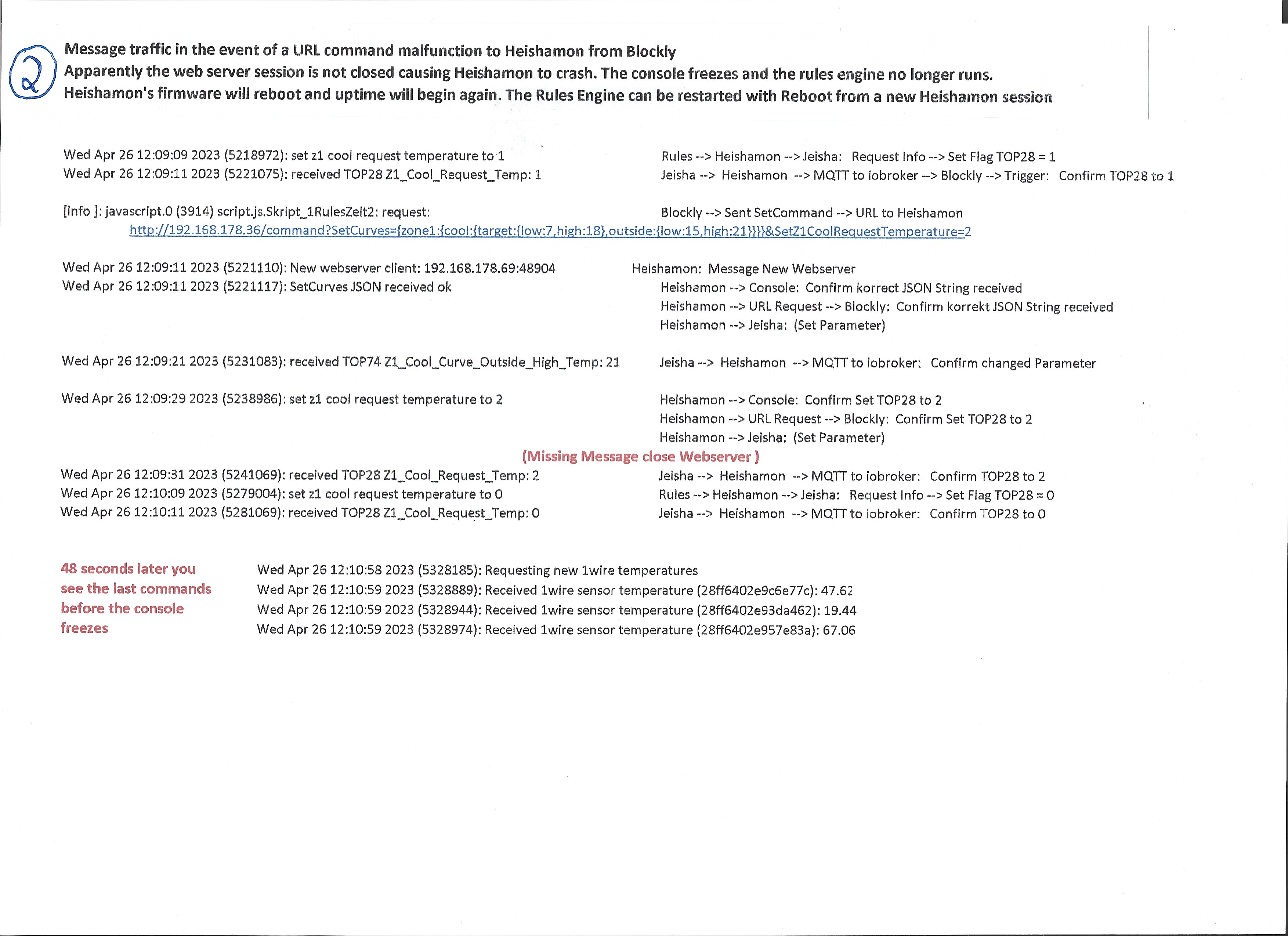
I'm trying to implement a message path via url in rules. It often happens that rules does not continue to run. In my case, blockly sends a command from iobroker, e.g. every 3 minutes. After a few good runs, Heishamon hangs himself. The error is reproducible. I looked at and analyzed the message traffic. Here is the analysis of a good event (1) followed by a failed one (2). Even if the commando is syntactically incorrect, rules should not stop.


Hi, is it possible to send url commands by using rules? I didn't found such a command in the rules set. Was the requested URL reachable/online?

No. This is about writing external data to the HP and then accessing it from rules because there is no direct way to the rules. There are REST commands for that, which also work. Unfortunately they are not reliable.
It would be ideal if there were a few TOPs as fixed variables that were directly accessible in rules. In my example, it is about writing the current time in encrypted form to the Jeisha so that the time becomes available in rules in this way. URL commands could be triggered indirectly from rules via a signal to an unused port of HP which is then executed by iobroker and blockly.
@McMagellan could you explain bit more what you're trying to accomplish? What fro you need static data from heishamon? How you're controling your heatpump? It's seam's a little bit overcomplicated

The reason for this contribution is that the REST command SetCurves and other SetCommands do not always work as described in the documentation. In the event of an error, rules is terminated and no longer runs. I analyzed and documented this process as far as I could.
In concrete terms, this is about making the correct time available in rules in order to have more switching entries with more parameters than is possible in the weekly timer. This project is implemented by blockly iobroker writing the time in coded form into the unused parameters of the cooling curve of heating circuit Z1 . Rules accesses it, decodes it and then updates the hour and minute variables.
The TOP28, which is also not used, is used for flow control. 1 = Rules is requesting, 2 = Blockly has updated, 0 = rules has taken over.
The malfunction has nothing to do with the implemented task. Other values should also be exchanged via this reporting channel.
It could well be that the fixes i have pending in the PR's will fix the issue described here. https://github.com/IgorYbema/HeishaMon/pulls

I use version 3.0-frac. When will a new version be available?
On the topic of time in rules, I saw that internal variables will be available in the future. I would like to point out a problem with the synchronization. Last week we had a power outage. After that, the Heishamon time started running at 00:00:00 on 1/1/1970 and did not synchronize even after more than a day.
Extract from the console: Thu Jan 1 07:42:41 1970 (27761264): received TOP1 Pump_Flow: 9.80 Thu Jan 1 07:42:41 1970 (27761272): received TOP5 Main_Inlet_Temp: 28.25 Thu Jan 1 07:42:41 1970 (27761276): received TOP6 Main_Outlet_Temp: 32.25 Thu Jan 1 07:42:41 1970 (27761289): received TOP62 Fan1_Motor_Speed: 420 ...... Thu Jan 1 23:59:55 1970 (86395974): received TOP1 Pump_Flow: 9.44 Thu Jan 1 23:59:55 1970 (86395988): received TOP64 High_Pressure: 12.0 Thu Jan 1 23:59:59 1970 (86399526): Requesting new 1wire temperatures Fri Jan 2 00:00:00 1970 (86400255): Received 1wire sensor temperature (28ff6402e93ec9af): 25.88 Fri Jan 2 00:00:00 1970 (86400324): Received 1wire sensor temperature (28ff6402e95796dd): 54.69 Fri Jan 2 00:00:04 1970 (86404529): Requesting new 1wire temperatures
I suspect that my internet connection took longer to restart. It might be helpful to start several staggered synchronization attempts.
Note on documentation: The operation not equal to (!=) is not described.
Last week we had a power outage. After that, the Heishamon time started running at 00:00:00 on 1/1/1970 and did not synchronize even after more than a day.
It's good practice to not mix up different issues in a single thread. So best open a new one for the NTP functionality.
The operation not equal to (!=) is not described.
Do you mind opening a PR for yourself to add it?