

 EdgeTX
Gamepad mode missing throttle axis on Android Chrome
Is there an existing issue for this problem?
- [X] I have searched the existing issues
What part of EdgeTX is the focus of this bug?
Transmitter firmware
Current Behavior
When using the radio as a gamepad connecting to a Chrome browser on an Android phone, the throttle axis can't be detected. To test, go to https://fpvsim.com/radio-tester or https://gamepad-tester.com/, you can see all axis can be read except for throttle.
Expected Behavior
Throttle axis can be read through browser's gamepad API.
Steps To Reproduce
- Go to https://fpvsim.com/radio-tester or https://gamepad-tester.com/
- Connecting the radio to the PC, and move the gimbals
- Notice that all other three axes readings change except for throttle.
Version
2.7.1
Transmitter
FrSky X9 Lite / Lite S
Anything else?
No response

Note that an XBox 360 gamepads can have the joystick axes detected fine, so must be some compability related things.
https://github.com/EdgeTX/edgetx/pull/2277 is likely to fix this - most likely it is simply that the axis are not presented in the order your Android Chrome is expecting - and this PR will allow the order of the channels for the joystick to be defined. If you're interested in giving it a try, now would be a good time to give it a try and see how it goes - since the author just added support for your radios screen size :grin: Keep in mind it's still a WiP, so not necessarily a flight-ready firmware - but the good thing is you can have release build and test firmware on the SD card and use the bootloader to switch between them pretty quickly.

I flashed @banyaszg's dev branch: https://github.com/banyaszg/edgetx/tree/usb-joystick. Unfortunately still the same, all axes works fine other than throttle.
Did you reconfigure that axis?
If you just flashed the firmware, then it will set the old settings as default, so the throttle will be the same Z axis. I suggest to change the axis for that channel.
So you have to select the advanced settings
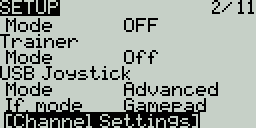 Then you have to set the configuration for each channel.
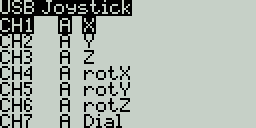 I suggest to set a different axis than Z for the throttle.
You can also check the control during the configuration. The value in the top right corner should change if the stick axis is right.
I suggest to set a different axis than Z for the throttle.
You can also check the control during the configuration. The value in the top right corner should change if the stick axis is right.
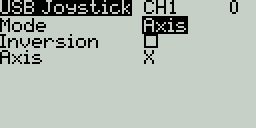
Actually the HID driver in the OS will detect the radio. So this thing depends on the OS. I also used the https://gamepad-tester.com/ while I tested the Zorro with Linux, and that part worked fine. (Under Linux the slider channels have problem .. channel 7 and 8.) I never tested the stuff with my phone, but I will at the evening. I don't know whether the Android uses the default Linux driver in the Kernel, or have a different one.

I finally found a USB-OTG cable, so decided to give this a try since I wanted to play with the PR anyway ;) Using https://gamepad-tester.com and the Zorro with my phone, I was able to use the Advanced mode, Joystick, and get all four sticks responding with CH1-4 set to Axis... set to X, Y, Z, rotZ if that matters
Then I have an idea. Perhaps in @dronesitter 's configuration the throttle is on channel 7. The default configuration for the channels is "X, Y, Z, rotX, rotY, rotZ, slider, slider". But the Linux driver doesn't allow more axes with the same id, so it hides one "slider". I assume the Android uses the default hid driver from the Linux kernel and this is the reason of the missing axis.
@pfeerick My dev branch has some improvements since the PR: rebase to a later nighly, support for both BW lcds, conflict detection in the configuration.
Yup, that's in the PR... it's just a pointer to the most recent state of your branch ;) So it will continue to update as you make changes in your branch. The collision detection was certainly handy while setting the channels up was very useful! :grin:
I tested my Zorro with my phone (Samsung Galaxy S10) and the gamepad-tester.com. I can confirm it's very hectic and picky. First of all it doesn't like the Joystick mode, just the GamePad. Also in the X,Y,Z,rotX order I can not see the Z axis. But if I change that to anything else, or I cange the order of the axes then it will work. So with this configurable interface I can create a working configuration. It's pretty sure the problem is on the phone side, because connecting to my Linux PC everything works fine, and from the view of the Zorro they are the same.
I changed the output order to Z, Y, X, rotZ/rotX. And it works now! Yeah, definitely some quirks on Android side, Ubuntu works fine without any of the special configurations.

Ok, so one thing very weird happened. When I try to play with it again after like 15 mins, no matter what I do, only two axes can be recognized now, tried reflashing the firmware, no luck, is it possible some bad settings got stored on EEPROM? anyway to erase it?
OK, tried more axis combinations, this set works now: rotX, X, rotZ, Y. Still no idea what happened. Hope this'll continue to work.
Here is how the radio side works (in my version):
- When the USB is connected the radio creates and sends a report description, a list about the type and representation of the values what you configured in the model.
- Then perodically the radio sends a report with the values.
- Nothing stored about the host side in the radio. Currently this is a one way communication.
- If you don't change the type of the channels, just the axis id, then the report will be exactly the same, just the report descriptor will differ in a byte.
So there is no remaining info about the last connection on the radio side. But I saw the same inconsistency on my phone. I think the error is in the report descriptor communication phase. I don't know whether it's a random data loss, or some buffer overflow in the driver or what. I'm going to inverstigate more at the phone side when I finished the feature implementation.
I made an other test. I could reproduce the problems with my Tablet + chrome + gamepad-tester.com. Then I downloaded an app to test. I found one with the name of "Gamepad tester". It gives me relatively low level info. Testing with that I have stable results. Everything works (except the double "slider" problem, and the "dial", and "wheel" type of axes doesn't show up). Based on this it seems to me the problem is at a higher level. Maybe some android or chrome magic.
I made an other test. I could reproduce the problems with my Tablet + chrome + gamepad-tester.com. Then I downloaded an app to test. I found one with the name of "Gamepad tester". It gives me relatively low level info. Testing with that I have stable results. Everything works (except the double "slider" problem, and the "dial", and "wheel" type of axes doesn't show up). Based on this it seems to me the problem is at a higher level. Maybe some android or chrome magic.
Thanks for looking into this @banyaszg! Yeah, I agree it's probably something with Android or Chrome gamepad API.
One more thing about the XBox gamepads. They are not USB-HID devices. It has an own, non flexible report format, and handled by an own driver. (However a lot of controllers copy that protocol, so the driver support those too. You can check the list of devices in the kernel source: xpad.c ) So I think there could be some difference between the USB-HID and the xpad devices.
Maybe at a point the EdgeTX could emulate an XBox pad too, if it will be needed. But it requires a new interface impelementation, some USB ID forging, and the result will be more static.
