

 EdgeTX
Horus X10S cable trainer not working
Is there an existing issue for this problem?
- [X] I have searched the existing issues
What part of EdgeTX is the focus of this bug?
Transmitter firmware
Current Behavior
I have 2 Horus X10S that I have been trying to use as master and slave transmitters. Today I tried this using a mono and also an stereo 3.5 mm cables, but this didn't work at all. Bluetooth seems to be working.
Expected Behavior
It should be possible to use a cable to connect two Horus X10S as master and a slave transmitters.
Steps To Reproduce
- Configure one transmitter as Master/Jack
- Configure the second transmitter as Slave/Jack
- Enable the trainer function via a programmed switch (in Bluetooth mode this is working).
- The master transmitter remains in control. The command of the slave do not get to the master.
Version
2.7.1
Transmitter
FrSky X10 / X10S (ACCST)
Anything else?
The same was happening in OpenTX 2.3.15 (no connection at all by cable) and this is the reason I am trying EdgeTX. In OpenTX Bluetooth was very unreliable. In Edge it seems to be much better, but I need to make further tests because I don't know if there is any difference in the Bluetooth code between Open and Edge.
By the way, thanks for such a wonderful project.

With the master transmitter, is there any indication that it is detecting the signal? i.e. on the Radio Settings -> Trainer do the values change when you move sticks on the slave, or even as you plug the cable in? And unfortunately with OTX, I can't ask you to try an older version like say 2.3.12 as there was a change to the trainer code back in January it would be good to eliminate. With OTX, it would be worth double checking that the modes are explicitly set - as I think we default to OFF rather than I guess it was slave before? I can't remember now.

~~Oh, interesting... looking back that the offending code I was thinking of... #1685 ... it was specific to ACCESS radios... i.e. was fine for the for the X9D+2019, and fixed for the X7 and X9Lite... but no mention of the X10 Express/Access radios... would you be game to flash a test firmware on the master radio (assuming it is a X10S Express (ACCESS) radio, rather than a X10S (ACCST))? Judging by the fix of the other radios, it just needs to be added to the list and will just work ... but I don't have two (let alone one) of that radio family to test with. I can add it onto the 2.7.1 firmware so you can keep leave it on if it works... and then fix it for 2.8.~~
edit: and having said that, I finally noticed you did mention ACCST for your transmitter, so that isn't the problem... oh well...
@pfeerick Thanks for your answer. My radios are old, and have no hardware upgrade so I guess (please correct me if I'm wrong), they are indeed ACCST. About your first question, I can see no sign of connection when the slave is connected to the transmitter, the values do not change when moving the slave sticks (when in Bluetooth training mode they do change, so I guess there is nothing else miss configured). About the modes, I did double check. I also did change the modes and turned off and on the transmitters, to see if this helped, but no. There is a test I can do, and is to see using an oscilloscope if there is any signal coming out from the slave transmitter. Would this test help?
AFAIK, as long as they don't have "Express" on the front, and as you say, no (ISRM) hardware upgrade, they should be ACCST radios. And even with that upgrade, you treat them like a ACCST radio, but with ISRM RF module.
Yes, checking for a PPM signal from the slave would at least rule that side of the problem out if it is present. It may even be worth doing that with both transmitters (checking for signal when configured as a slave), as that would also indicate the trainer jacks on both radios are ok.
@pfeerick , I just did the test connecting the cable output to an oscilloscope in both controllers, and I can't see any PPM signal. Basically in the model menu, I configured the controller to slave/jack . Is there anything else I should change in the configuration?
Ok, if you're not seeing something like the following on your scope
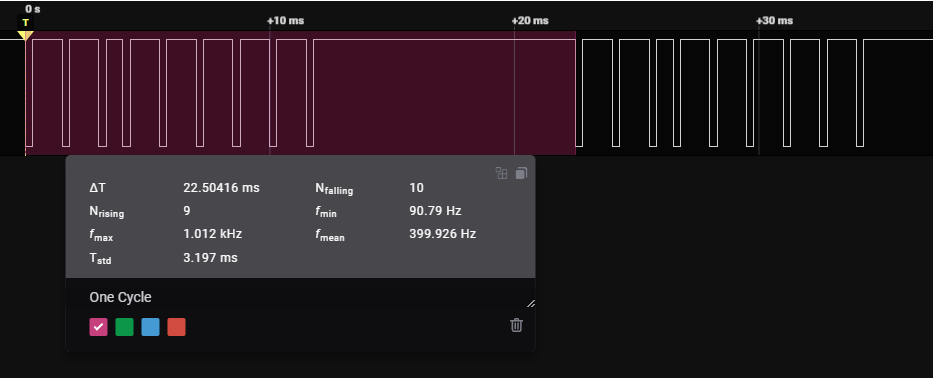
with the following settings
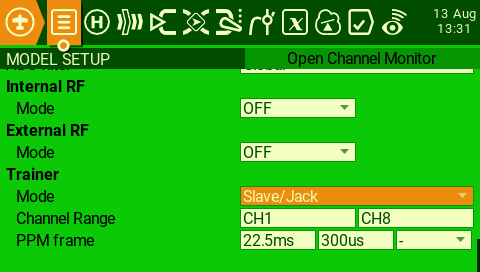
(double check the channel range!! Mine was set CH1 - CH0 for some reason, and had no output, but I can't repo that, so I proably forced it at some point)
Then we have a problem - either the jack isn't working, or something isn't configured right. It should be night and day - OFF will have no output, and Slave/Jack should put out a signal. There's nothing else that needs to be set as a user. At this point, it is probably a matter of looking at the radio hal, and checking what is going on. However, my concern here is that if you have an X10, and it wasn't working on OpenTX, then there is probably a fault with your handset, as I don't remember seeing any reports recently, here or over there.
radio/src/targets/horus/CMakeLists.txt radio/src/targets/horus/hal.h radio/src/targets/horus/board.cpp
Hey @rburrow87, have you got any way to check X10 hard-wired trainer... just need to be able to set an x10 (non-ACCESS if you have one?) as slave, and second radio as master, and see if you get stick movements on the radio -> settings page on the master radio...

Dammit... I thought you might have had the X10 still, as well as X12. Well, if you get a chance, can you see if X12 slave output is working, just for peace of mind? No hurry though, as it's not the focus here :grin:
@pfeerick , no I don't see this signal in either radio (I have 2 of them). About the setting I'm pretty sure they are the same as yours (still I will double check tomorrow). I was thinking installing ETHOS to test my hardware, but as I understand it requires an ISRM module installed, which I don't have. Do you think the trainer port should work with ETHOS even if I have no ISRM? If not I can try to go back to FROS, and check. Another question. Is there anything special about the cable? I'm using a 3.5 mm mono cable.
I'm afraid I have no idea about ETHOS... I only know it exists and I don't have any radios that can run it ... the entirety of my Frsky radios is X9D+ & X9D+2019 😆
No, nothing special about the cable... mono is best, stereo it's sometimes good to make sure the sleeve and first ring are joined (like mono) - ie. I made my own cables and just join the two connections in the plug when wiring them up.
Have you tried asking on the OpenTX discord to see if there are any other X10S users... JC (3djc) should have an X10 or X10S to compare with also... and knows the OTX codebase inside and out ;)
@pfeerick and @rburrow87. I installed again FROS, and during the procedure I found out I had an issue with the connection. Now I can confirm indeed everything works as expected with EdgeTX and Horus X10S cable training, so I'm closing the issue. I apologize for the noise. I'm open to collaborate on developing or testing EdgeTX. Is you consider I can help, please let me know.
No apology is needed... as long as you got to the bottom of the issue. :) And thanks, I'll keep you in mind for anything X10S specific that needs testing ;)