

 EdgeTX
[LUA] lcd.drawGauge faulty
Is there an existing issue for this problem?
- [X] I have searched the existing issues
What part of EdgeTX is the focus of this bug?
Transmitter firmware
Current Behavior
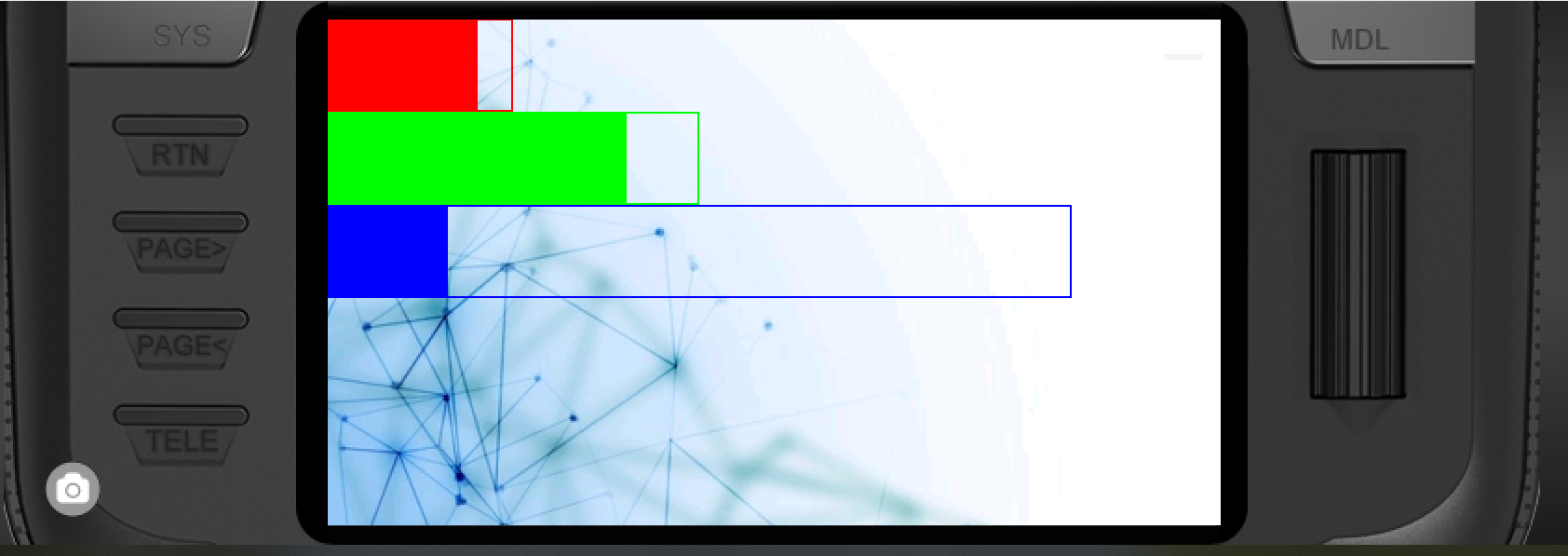
lcd.drawGauge seems to render the fill amount wrong if the gauge is relatively wide, i.e. in the full screen appereance of an widget.
Example: all gauges should render a fill state of 80% (value = 80, max = 100). The first gauge is 100px wide, the second one 200px and the last one is 400px wide. The first two render correctly but the last one suddenly displays something like ~10 percent
  lcd.drawGauge(0, 0, 100, 50, 80, 100, RED)
  lcd.drawGauge(0, 50, 200, 50, 80, 100, GREEN)
  lcd.drawGauge(0, 100, 400, 50, 80, 100, BLUE)
Expected Behavior
lcd.drawGauge should render the correct fill amount for any width, height
Steps To Reproduce
Either use the code above in a large or fullscreen widget. Alternatively you can unzip the provided widget (beta) into the WIDGETS folder and create the "gaugePRO" widget. A large widget or a fullscreen widget are rendered wrongly while smaller ones work just fine
Version
2.7.1
Transmitter
Radiomaster TX16S
Anything else?
No response
