

 EdgeTX
Companion error reading models and settings from new TX16S
Is there an existing issue for this problem?
- [X] I have searched the existing issues
What part of EdgeTX is the focus of this bug?
Companion
Current Behavior
unable to backup or read models and settings of New radio (TX16S) to a file useing EDGETX companion 2.7.1. The radiomaster tx16s came with edgetx 2.6 firmware already installed . connected to campanion useing mass staorage of TX and sd card seperately both unable .
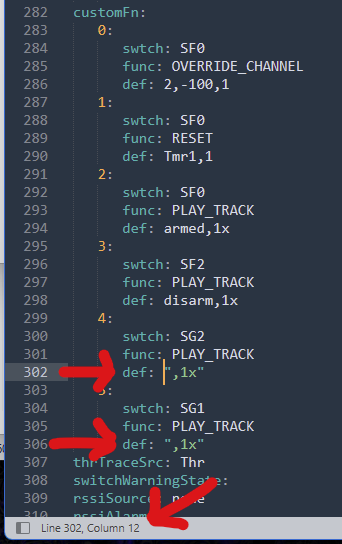
error : Can't load MODELS?model8.yml: yaml-cpp: errorat line 302, column 12 end of map not found
Expected Behavior
back up radio to file useing edge tx companion before doing firmware update
Steps To Reproduce
plug in usb c to TX connect to computer access mass storage of TX and read models settings / back up radio to file .
Version
2.7.0
Transmitter
Radiomaster TX16S
Anything else?
No response

@hazeguage looks like there is a corruption in model8.yml file. Can you please manually copy from the sd card and upload as a zip file so I can have a look.

Strange but there appears to be a known issue for some computers https://github.community/t/cannot-upload-zip-file-to-issues-on-windows-due-to-unusual-content-type-header/132447
Having exact same issue. Installed Compainon 64 and tried 32 bits as well. Please let me know what info you need? RadioMaster TX16S Edgetx 2.7.1 EdgeCP 2.7.1 Windows 10

Just purchased my new radio and have the same issue as well. RadioMaster TX16s - Edgetx 2.71 - Edgetx Comp 2.71 - Win 10


The file is on my radio, but not in the zip file.
Sent from Mailhttps://go.microsoft.com/fwlink/?LinkId=550986 for Windows
From: Malte @.> Sent: Tuesday, July 26, 2022 9:56 AM To: @.> Cc: @.>; @.> Subject: Re: [EdgeTX/edgetx] Companion error reading models and settings from new TX16S (Issue #1969)
Yes, this is a problem. The models are stored there.
— Reply to this email directly, view it on GitHubhttps://github.com/EdgeTX/edgetx/issues/1969#issuecomment-1195518428, or unsubscribehttps://github.com/notifications/unsubscribe-auth/AOOF63APADDF2S6XWTSUD6TVV7U7PANCNFSM5V7OMSWA. You are receiving this because you commented.Message ID: @.***>
The stock SD card that RM shipped had a corrupt model file on it on some of the early SD images. The simplest fix is to open the model on the radio, make a simple change - tick an option on - exit the model settings page, go back in again and turn that option off again. The radio firmware will correct the file, and then you will be able to sync with companion without that errror.
The model in question is the "Eachine P-51D" one, model8.yml.
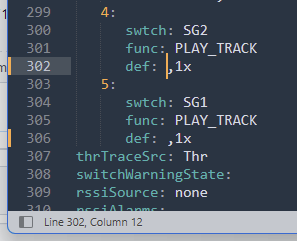
Alternately, you can open up the specified file - model8.yml, scroll down to line 302, and have a look at what is going on... for some reason, that model had two Play Track special functions, but no filename specified... and needs double quotes to handle that missing filename. So if you add them to both entries (as if you only do 302, you'll promptly get an error for 306 next!), like in the screenshot, that will also fix it, and the rest of the entries will be corrected by Companion anyway. The same is is true for anytime Companion might spit out that sort of error - either open the model on the radio and get the firmware to fix it itself, or open it manually and see if you can figure out what is wrong/different at the line:column reference.
btw, this is how it looked originally:

Yesssssssss that worked for me!!
Many thanks for the help. Now I can click my way around in the Companion.
Attached the file for others for a quick solve.
Thanks I have just gotten this radio and know nothing about any of this cant open file tells me to select app to open but nothing working. went in to model on radio changed picture and that worked. so if know how or what to open with lrt me know pls

Thanks I have just gotten this radio and know nothing about any of this cant open file tells me to select app to open but nothing working. went in to model on radio changed picture and that worked. so if know how or what to open with lrt me know pls
are you aware there are 2 usb-c connectors ?
Yaml files are text files. You can use notepad to open them.
The other way to correct this is to go into model 8 (Eachine P-51D), model settings -> special functions, and delete the last two since they don't do anything anyway.
Thanks I have just gotten this radio and know nothing about any of this cant open file tells me to select app to open but nothing working. went in to model on radio changed picture and that worked. so if know how or what to open with lrt me know pls
are you aware there are 2 usb-c connectors ?
Yes charge bottom radio update and SD card top. Getting most of everything but still working to figure everything out. Gear and flaps were fun had to watch video
Yaml files are text files. You can use notepad to open them.
The other way to correct this is to go into model 8 (Eachine P-51D), model settings -> special functions, and delete the last two since they don't do anything anyway.
Thanks