

 EUA
EUA
Advanced FIND mechanism
After a find operation, program could replay search for next wıth F3 (or previous one if you switched backward flag) or previous with F3+SHIFT
Fınd dialog needed to be hidden..
Also a quick search dialog could be used with up and down buttons... Like gedit.

Since we're brainstorming:
I'm migrating from AXE3 hex editor which is no longer developed/available, and here's how it was done there:
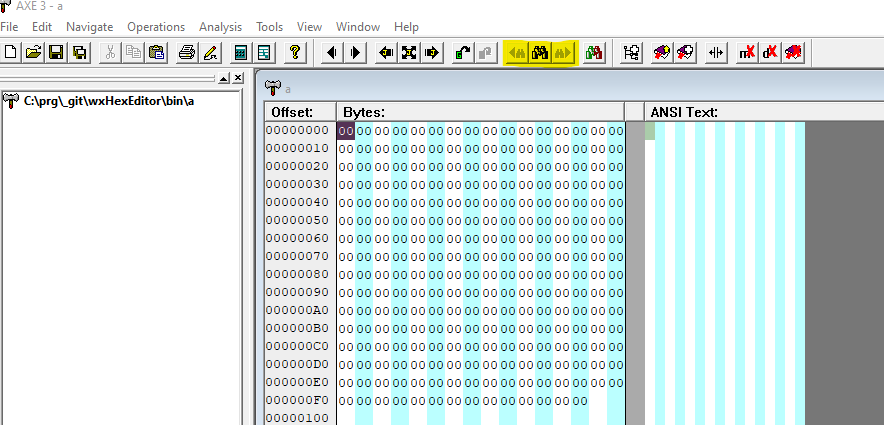
I've highlighted 3 buttons. There is a "search" button and "search previous" / "search next" buttons which are quite handy to use without memorizing too many shortcuts. How do you feel about adding them?
Regarding shortcuts, I dunno if there's a golden standard for that but:
- Find forward as F3 is a must since it's consistent with e.g. regedit
- Find backward as alt+F3 or shift+F3 - I think shift is semantically better since alt implies alternative meaning of shortcut
Also, I'll leave a screenshots of search dialog from AXE, perhaps you'd like to borrow some ideas from it:
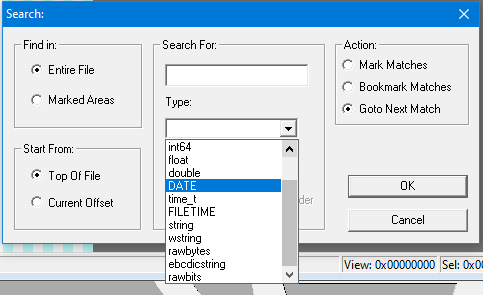
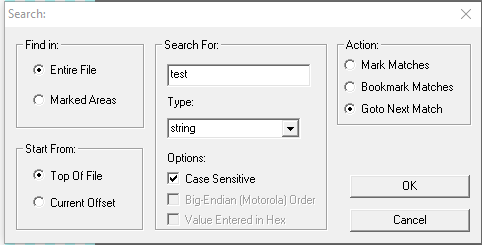
Note the ability to:
- select data type of given size / endianness
- ability to search for binary values entered either in decimal or hex format
- start from beginning / current position
- find in selection / marked area
- find all matches and mark/bookmark them
Also, if you find those features interesting, I'm willing to help implementing any of them. ;)

Is there a possibility to implement regex search? It can also be a simplified regex, for example - search: 55 AA * 30.
