

 EFForg
Privacy Badger blocks website while performing Mailchimp signup
Privacy Badger breaks my website structurefy.com after clicking the activation-link of the Mailchimp-Signup. My CSS & JS-files get blocked.
When I click the activate-Link, I get the following message for dozens of my files:
Failed to load resource: net::ERR_BLOCKED_BY_CLIENT
As soon as I disable Privacy Badger, everything works fine.
How to fix it?

Hello and thanks for the report.
Could you explain a bit more how to reproduce this? Where can I click this activation link?
When the breakage happens, what does Privacy Badger report as blocked?

Thanks for the quick reply.
The problem seems to happen only in combination with Google Chrome and the Mail Client of Mac. To get the issue, you need to subscribe to my newsletter and click on the activation in the mail. Alternatively, try to click this link (as long as if doesn't expire): https://us17.mailchimp.com/mctx/clicks?url=https%3A%2F%2Fstructurefy.us17.list-manage.com%2Fsubscribe%2Fconfirm%3Fu%3Dfad25ccedbae48ade137ffbe4%26id%3Dadcab80bc9%26e%3D39132112f7&h=b0810d0facbc4aeb5f7b79579567b0829352b0f7e03e83427b19d49a6e411028&v=1&xid=cbf16bbf7c&uid=84667521&pool=&subject=
Privacy badger says reports "structurefy.com" as blocked.
OK, thank you. That link does a couple of 302 redirects that end with structurefy.com. This might be the same issue as #1997.
Thanks for the info.
How do I remove the 302 redirects?
So there's nothing I can do to fix the problem? Do I have to wait for the Google Chrome fix?
We're going to resolve #1997 eventually, likely sooner than later. (Chrome won't help here.)
Most users will probably never run into this because Privacy Badger needs to see tracking by a domain happen on three separate sites before blocking the domain. When you click the Mailchimp link, Privacy Badger thinks structurefy.com is tracking you on some Mailchimp domain. This is a Privacy Badger bug. However, unless your Badger sees tracking by structurefy.com on two other site domains, it won't learn to block structurefy.com.
If you want, you can see which sites your Badger thinks it saw tracking by structurefy.com on by following the debugging instructions (steps 2 and 3) for "structurefy.com".
Ok, but could you please explain to me again why most users won't run into this problem?
thank you!
Because they don't do any of the website admin things that you do that can end up making Privacy Badger think it saw tracking multiple times. Perhaps you tested the signup flow three times, getting a different Mailchimp domain each time. We should be able to say what happened looking at the debug output.
Also, I'm no longer clear on what's going on here, as rapid-navigation-related problems to Privacy Badger mean seeing domains belonging to the previous site as trackers on the new, just-navigated-to site. Whereas here we seem to have the navigated-to site blocked ... on the navigated-to site.
Which version of Privacy Badger do you have? Do you mind attaching a screenshot of Privacy Badger's popup when the problem occurs? Could you also share the debug output for "structurefy.com"?
I extracted the information you need. Please let me know if you need anything else.
My Privacy Badger version: 2019.11.18
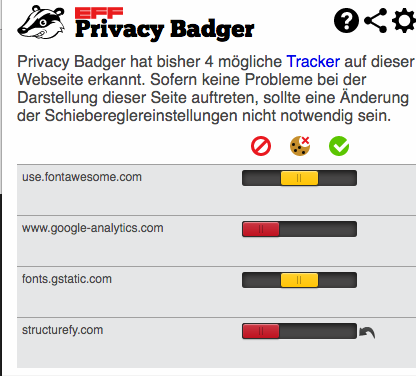

Thank you!
When the problem occurs, if you click on the Share button in the upper-right corner of the popup, what does it say where it says something like, "Privacy Badger found 4 potential trackers on example.com"?
Regarding debug output, it looks like you got the console open (step 2 of debugging instructions), but you haven't yet run the debugging code (reproduced below for convenience):
(function () {
  const STR = getBaseDomain("structurefy.com");
  let out = [],
    actionMap = badger.storage.getBadgerStorageObject('action_map'),
    snitchMap = badger.storage.getBadgerStorageObject('snitch_map');
  out.push("**** ACTION_MAP for " + STR);
  _.each(actionMap.getItemClones(), (obj, domain) => {
    if (domain.indexOf(STR) != -1) {
      out.push(domain + " " + JSON.stringify(obj, null, 2));
    }
  });
  out.push("**** SNITCH_MAP for " + STR);
  _.each(snitchMap.getItemClones(), (sites, domain) => {
    if (domain.indexOf(STR) != -1) {
      out.push(domain + " " + JSON.stringify(sites, null, 2));
    }
  });
  if (out.length == 2) {
    console.log(
      "\n\nNo debug information found ...\n\n" +
      "Please double-check that you put in the correct \"culprit\" domain. " +
      "You want the domain that Badger blocks on the page. " +
      "You don't want the page's own domain.\n\n"
    );
  } else {
    console.log("\n\n" + out.join("\n") + "\n\n");
  }
}());
sorry, my fault ...
When I click share, I get: Privacy Badger has found 3 possible trackers on structurefy.com: use.fontawesome.com fonts.gstatic.com structurefy.com


Thanks again, this is very helpful.
When the problem occurs, could you open the popup (that says structurify was blocked on structurify ...), right-click on it, click "Inspect", select the Console tab, run the following code and share the output?
chrome.extension.getBackgroundPage().badger.tabData[POPUP_DATA.tabId].frames[0]

Can you reproduce this problem in any other way, or only when you click the Mailchimp link from the Mail app? Can you reproduce if you click the link from a webmail client?
The problem still exists. The only combination where the problem occurs/occurred is Google-Chrome in combination with Mac Os Mail-Client. Even if I use Google Web-Mail, everything works fine.
Just trying to figure out how to reproduce. I see that other people run into this occasionally, and it seems related to following links from email newsletters and such.